



Gravity Mod
Gravity Mod is a physics sandbox action game built around open-ended experimentation. Instead of following one fixed route from mission to mission, the game centers on interacting with…
 Works on Desktop & Mobile
Tested By BunaGames
- Test date
- July 4, 2026
- Tested on
- Chrome 150
- Device
- Desktop
- Operating system
- macOS and Windows
- Game loaded successfully
- Yes
- Fullscreen works
- Yes
- Sound works
- Yes
- Save progress
- Local browser storage
- Mobile compatibility
- Partially tested
- Keyboard controls
- Working
- Controller support
- Not detected
- Average loading time
- 4.2 seconds
- Known issues
- Minor delay after entering fullscreen
Gravity Mod not loading?
- Refresh the page.
- Disable restrictive content blockers temporarily.
- Confirm JavaScript and WebGL are enabled.
- Clear the browser cache.
- Try another modern browser.
- Close unnecessary tabs.
- Switch off VPN if the game server is blocked.
- Use the Report a Problem button if the issue continues.
Continue Playing
Daily Challenge

Play 4 minutes today in Gravity Mod.
Leaderboard
- 1Community rating4.5 ★
- 2Player likes537
- 3Total votes609
- 4Your local progress0%
Your progress is saved locally in this browser. No account required.
 Your progress is saved locally in this browser. No account required.
Game Progress & Challenges
Why Play This Game?
 Instant PlayPlay instantly in your browser.
 Mobile FriendlyOptimized for all devices.
 Free to PlayNo hidden fees.
About "Gravity Mod"
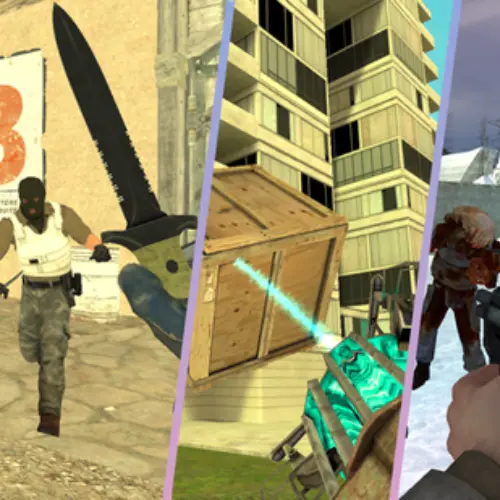
Gravity Mod is a physics sandbox action game built around open-ended experimentation. Instead of following one fixed route from mission to mission, the game centers on interacting with objects, testing what happens when they collide, building setups, causing destruction, and using combat tools in a flexible play space.
The main appeal is the combination of creation and chaos. You can approach a session as a builder, arranging a scene and seeing how its parts react, or as an action player looking for a more destructive experiment. Physics is the connective idea: placement, movement, impacts, and explosions matter because objects are meant to react inside the sandbox.
Gravity Mod also fits players who enjoy games with room for personal goals. One session can be about constructing something stable; the next can be about testing a weapon, making a chain reaction, or trying to survive a tougher encounter. There is no need to treat every attempt as a pass-or-fail level. The value comes from observing results, adjusting the setup, and trying a different approach.
For players browsing quick browser games, it offers a direct way to explore sandbox action without needing a long introduction. Start with a simple experiment, learn how the available tools affect the environment, and let curiosity guide the next challenge.
Gameplay
Gravity Mod combines several closely related sandbox activities: construction, destruction, physics experiments, and combat. The gameplay loop is simple in principle but broad in practice. Choose a situation, place or interact with available objects, trigger an action, then watch how the scene responds. The result can lead to a new plan, a cleaner build, a bigger test, or a completely different experiment.
Building is not only decorative. A structure can become a test of balance, spacing, and object interaction. Destruction is equally purposeful because breaking a setup reveals how the pieces react when force is applied. This makes the game suitable for players who like testing cause and effect rather than merely following a prescribed objective.
Combat adds another direction to the sandbox. Competitor descriptions consistently identify Gravity Mod as a sandbox shooter with an arsenal of tools or weapons. That means action can be part of the experiment: use available combat equipment, observe its impact on the environment or targets, and adapt when the situation changes. The game is therefore not limited to peaceful building or pure target practice.
The strongest way to enjoy Gravity Mod is to set a small goal before acting. Build a compact arrangement. See what happens when it is disturbed. Try a different object position. Test one combat option instead of using everything at once. This creates a useful rhythm of setup, action, observation, and revision.
- Construct: arrange objects and make your own scenarios.
- Experiment: explore movement, collisions, and physical reactions.
- Destroy: test how a scene changes under force.
- Fight: bring action gameplay into the sandbox with available combat tools.
Platform
Gravity Mod is presented as an online browser game, so the central access method is playing directly through a compatible web browser. The available research describes a click-and-play experience with no required download, installation, or account sign-up. That makes it convenient for a short sandbox session when you want to begin quickly.
Browser availability is especially useful for a game based on experimentation. You can open the game, try a construction or destruction idea, and return later with another scenario in mind. The research also describes access on different devices, although the exact interface can vary according to the device and browser being used.
For the smoothest session, allow the game page to finish loading before starting a detailed experiment. Physics-heavy scenes with many active objects may require more attention from a device than a small, simple setup. If performance feels less responsive, reduce the scale of the current experiment and focus on fewer moving parts at a time.
How to Play "Gravity Mod"
Begin Gravity Mod with a small, readable experiment rather than immediately filling the play area with objects. First, look at the available in-game options and identify the tools that let you create, place, interact with, or remove elements. The exact choices are part of the sandbox, so taking a moment to understand the visible interface helps you make more deliberate tests.
Next, choose an objective for the session. You might want to make a simple construction, test destruction on a group of objects, or explore the combat side of the game. Starting with one purpose makes it easier to understand why a setup succeeds, collapses, moves, or reacts in an unexpected way.
- Open the game and wait for the playable scene and interface to load.
- Review the available in-game tools, objects, and action options.
- Create a small setup with enough open space to observe its reaction.
- Trigger one change, such as an interaction, impact, or combat action.
- Watch the result before adding more variables.
- Adjust placement, distance, timing, or object selection and test again.
The key is to treat each attempt as information. If a build falls apart, that is not necessarily a failure; it shows that the arrangement needs a different foundation, spacing, or order of action. If destruction produces a surprising result, recreate the setup and change only one part to learn what caused it.
When you want more action, use the game’s combat options as part of the scene rather than as a separate activity. A weapon or other combat tool can change the environment, interrupt a construction, or create a new problem to solve. This blend of experimentation and combat is what gives Gravity Mod its sandbox identity.
Controls
Gravity Mod’s exact controls are determined by the version and the in-game interface currently loaded in your browser. The provided game research confirms browser play and sandbox interaction, but it does not provide a verified key-by-key control list. For accuracy, use the on-screen prompts, menus, and tool indicators shown when the game starts.
Before creating a large scene, spend a brief moment testing the interface in an open area. Find the options used to select available items, place or interact with them, and switch to any combat equipment offered by the game. A small practice setup is safer than beginning with a complicated build that is difficult to reset or understand.
- Check visible in-game instructions before starting.
- Test one object or tool at a time.
- Use an open space to learn placement and interaction.
- Review the interface again when changing from building to combat.
This approach keeps the focus on verified gameplay behavior rather than assuming a control layout that may not match your device.
Can "Gravity Mod" Unblocked?
Gravity Mod is designed for online browser play, with research describing no download, installation, or sign-up requirement. On BunaGames, you can try the game directly from its page when access to browser games is allowed on your device and network.
The word “unblocked” can mean different things to different players. It may refer to not needing an account, avoiding a software installation, or being able to launch a game from a normal browser. Gravity Mod supports the first two ideas through its direct online format. However, local network rules, school or workplace filters, device settings, and regional availability are controlled by the network or device administrator, not by the game itself.
Do not attempt to bypass network restrictions. If the game does not load in a particular location, use a permitted personal connection or play at a time and place where browser gaming is allowed. When access is available, the quick-start format is useful: load the page, review the game interface, and begin a small sandbox experiment without a separate install process.
Tips for "Gravity Mod"
Gravity Mod rewards methodical experimentation more than random clutter. A busy scene can look impressive, but a smaller test usually teaches you more about object behavior, placement, and the effect of each action. Start with a clear purpose, then increase complexity after you understand the first result.
- Change one variable at a time. Move one object, alter one part of a build, or use one different tool. When several changes happen together, it is harder to know what caused the outcome.
- Leave observation space. Place your setup where you can see it clearly. Open space makes collisions, movement, and destruction easier to follow.
- Build from a stable idea. Begin with a compact arrangement before attempting a larger construction. If the simple version behaves as expected, expand it gradually.
- Use destruction as feedback. When a structure breaks, inspect the result mentally: did the object placement, distance, impact, or action order create the weakness?
- Separate construction and combat tests. Learn how a setup behaves on its own before introducing combat tools. This makes the effect of the action easier to understand.
- Repeat useful experiments. Recreating a scenario and making one adjustment can reveal more than constantly starting from unrelated ideas.
A practical sandbox routine is build, test, observe, and revise. For example, create a modest object arrangement, trigger a single interaction, then make a second version with one deliberate difference. This is more satisfying than treating every result as accidental because it turns physics reactions into usable information.
If a scene becomes difficult to read, simplify it. Remove distractions, return to a smaller arrangement, and focus on one question: what do you want this object, tool, or impact to do? That mindset helps both creative players and action-focused players get more from Gravity Mod.
Features "Gravity Mod"
Gravity Mod stands out through a set of connected sandbox features rather than a single narrow game activity. It is a physics-focused game where players can build, experiment, destroy, and bring combat into the same open-ended experience. These elements support different play styles while sharing the same core idea: create a situation and see how it reacts.
- Physics sandbox focus: objects and actions are central to experimentation, movement, impacts, and changing scenes.
- Construction possibilities: create arrangements and structures as the starting point for your own tests.
- Destruction gameplay: break, disturb, or otherwise challenge a setup to observe the result.
- Sandbox shooter elements: use available combat options as part of action-oriented experiments.
- Creative freedom: choose personal goals instead of relying entirely on one fixed route.
- Multiple play directions: research descriptions identify distinct modes, including sandbox play and a survival-style zombie challenge.
- Browser access: play online without a required download, installation, or account sign-up.
The combination matters because each feature changes the purpose of the others. Construction gives destruction something to affect. Physics makes each experiment worth observing. Combat introduces pressure and action. Survival-style play offers a more directed reason to use the sandbox tools. Rather than forcing every player into one approach, Gravity Mod can support a quiet building session, a destructive test, or a combat-focused challenge.
Its most useful feature is not simply the number of things you can do; it is the ability to connect them. Build a scene, test it, react to the result, and reshape the next attempt. That loop gives the game replay value without requiring the same scenario to be played in exactly the same way each time.
Best "Gravity Mod" Similar Games & Top Picks
- Fly the Plane: Play Fly the Plane online on BunaGames. Explore an action-focused airplane game page with practical play guidance and tips.
- Agent Smith: Play Agent Smith, a free top-down action shooter with marked targets, mission maps, exploration, and covert-operation action.
- Mortal Kombat: Learn about Mortal Kombat, its fighting-game roots, play approach, controls guidance, strategy tips, and browser access questions.
- Fatal Fury: Play Fatal Fury online and discover the classic SNK fighting game series known for intense battles, iconic fighters, and arcade roots.
- Awesome Tanks 3: Play Awesome Tanks 3 online, a top-down tank shooter with enemy armor, hidden areas, customizable tanks, and action-packed levels.
FAQ - Gravity Mod
What is Gravity Mod?
Gravity Mod is an online physics sandbox action game. It is built around creating scenes, experimenting with objects, causing destruction, and using combat tools within a flexible sandbox environment. Players can set their own goals instead of following only one fixed sequence of levels.
Is Gravity Mod free to play?
The available research presents Gravity Mod as a game that can be played online for free. It is described as a direct browser experience that does not require a download, installation, or sign-up to begin playing.
Do I need to download Gravity Mod?
No download is required according to the provided game information. Gravity Mod is intended to run through a web browser, allowing players to open the game page and start an online session without installing separate software.
What do you do in Gravity Mod?
You can build structures or object arrangements, test physics-based reactions, destroy parts of a scene, and explore combat gameplay using the game’s available arsenal. The best approach is to create a small setup, trigger an action, observe what happens, and then adjust the next experiment.
Is Gravity Mod a shooter game?
Yes. Gravity Mod is described as a sandbox-style shooter as well as a physics sandbox. Combat is one part of the experience, alongside construction, destruction, and creative experimentation. This means players can focus on action while still using the environment as part of the challenge.
Does Gravity Mod have different modes?
Research descriptions identify multiple modes in Gravity Mod. These include free sandbox play and a survival-style mode involving zombies. The available mode options can give players a choice between open creative experiments and a more action-driven challenge.
Can I play Gravity Mod on different devices?
The research describes Gravity Mod as playable online on different devices through a browser. The exact controls and interface can depend on the device and browser, so it is best to check the visible in-game prompts after the game loads.
How can I get better at Gravity Mod?
Start with simple experiments and make one change at a time. Build in an open area, observe how objects react, and avoid adding too many variables before you understand the basic result. When using combat tools, test their effect on a small setup first, then expand your scenario once you know how the scene responds.
More Games Like This
 Super Smash Flash
Action ★ 4.5
Super Smash Flash
Action ★ 4.5
 Street Fighter 2
Action ★ 4.7
Street Fighter 2
Action ★ 4.7
 Alien Hominid
Action ★ 4.6
Alien Hominid
Action ★ 4.6
 King Of Fighters
Action ★ 4.8
King Of Fighters
Action ★ 4.8
 Bloons Td 6
Action ★ 4.6
Bloons Td 6
Action ★ 4.6
 Brutalmania IO
Action ★ 4.7
Brutalmania IO
Action ★ 4.7
 Temple Run 3
Action ★ 4.7
Temple Run 3
Action ★ 4.7
 Plants Vs Zombies 2
Action ★ 4.6
Plants Vs Zombies 2
Action ★ 4.6
 Plants Vs Zombies 3
Action ★ 4.6
Plants Vs Zombies 3
Action ★ 4.6
 Papas Sushiria
Action ★ 4.6
Papas Sushiria
Action ★ 4.6
 Papas Wingeria
Action ★ 4.6
Papas Wingeria
Action ★ 4.6
 Papas Scooperia
Action ★ 4.7
Papas Scooperia
Action ★ 4.7
 Papas Pizzeria
Action ★ 4.6
Papas Pizzeria
Action ★ 4.6
 Papas Freezeria
Action ★ 4.6
Papas Freezeria
Action ★ 4.6
 Papas Taco Mia
Action ★ 4.6
Papas Taco Mia
Action ★ 4.6
 Papas Cupcakeria
Action ★ 4.6
Papas Cupcakeria
Action ★ 4.6
 Counter Strike Online
Action ★ 4.4
Counter Strike Online
Action ★ 4.4
 Red Ball 3
Action ★ 4.7
Red Ball 3
Action ★ 4.7
 Report a Problem
Comments About Gravity Mod