


Paper Minecraft
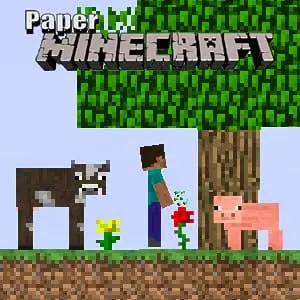
Paper Minecraft transforms the beloved 3D sandbox experience into an engaging 2D adventure that captures all the essential elements of the original game. This innovative adaptation brings the…
 Works on Desktop & Mobile
Tested By BunaGames
- Test date
- May 23, 2026
- Tested on
- Chrome 150
- Device
- Desktop
- Operating system
- macOS and Windows
- Game loaded successfully
- Yes
- Fullscreen works
- Yes
- Sound works
- Yes
- Save progress
- Local browser storage
- Mobile compatibility
- Partially tested
- Keyboard controls
- Working
- Controller support
- Not detected
- Average loading time
- 4.2 seconds
- Known issues
- Minor delay after entering fullscreen
Paper Minecraft not loading?
- Refresh the page.
- Disable restrictive content blockers temporarily.
- Confirm JavaScript and WebGL are enabled.
- Clear the browser cache.
- Try another modern browser.
- Close unnecessary tabs.
- Switch off VPN if the game server is blocked.
- Use the Report a Problem button if the issue continues.
Related Games
Continue Playing
Daily Challenge

Play 5 minutes today in Paper Minecraft.
Leaderboard
- 1Community rating4.7 ★
- 2Player likes1.0K
- 3Total votes1.1K
- 4Your local progress0%
Your progress is saved locally in this browser. No account required.
 Your progress is saved locally in this browser. No account required.
How to Play
Start by punching trees to collect wood, which serves as your primary building material and fuel source. Use collected wood to craft basic tools like wooden pickaxes and shovels, which allow you to mine stone and dig more efficiently. Progress through the tool tiers by mining stone to create stone tools, then iron for iron tools, and eventually diamond for the most durable equipment.
Establish a base before nightfall by constructing walls and a roof to protect against hostile mobs. Create a crafting table to access advanced recipes, and build a furnace to smelt ores and cook food. Explore caves and underground areas to find valuable resources, but always carry torches to light dark areas and prevent monster spawns.
On mobile: use on-screen buttons or gestures when the game supports them.
 On mobile: use on-screen buttons or gestures when the game supports them.
Controls
- ↑Jump
- ← →Move Left / Right
- ↓Crouch
- W / ↑Climb / Interact
- S / ↓Drop / Slide
Movement is controlled using the arrow keys or WASD keys, with the spacebar for jumping. Left-click to break blocks and attack enemies, while right-click places blocks or uses items. The mouse wheel or number keys switch between different items in your hotbar inventory.
Press E to open your full inventory and crafting interface. Hold Shift while clicking to quickly move items between inventory slots. Use Ctrl+click to drop items, and press Q to drop the currently selected item. These intuitive controls make the transition from 3D Minecraft seamless for experienced players while remaining accessible for newcomers.
Game Progress & Challenges
Why Play This Game?
 Instant PlayPlay instantly in your browser.
 Free to PlayNo hidden fees.
About "Paper Minecraft"
Paper Minecraft transforms the beloved 3D sandbox experience into an engaging 2D adventure that captures all the essential elements of the original game. This innovative adaptation brings the iconic block-building gameplay to a side-scrolling format, making it accessible as one of the most popular online games available today. Players can dive into the familiar world of mining, crafting, and building while enjoying a fresh perspective on the classic Minecraft formula.
The game maintains the core survival mechanics that made Minecraft famous, including resource gathering, tool crafting, and shelter construction. What sets this version apart is its streamlined 2D interface that makes complex building projects more manageable while preserving the creative freedom that defines the Minecraft experience.
Gameplay
The gameplay revolves around the fundamental Minecraft loop of exploration, resource collection, and construction. Players begin in a procedurally generated world where they must gather basic materials like wood, stone, and ores to craft essential tools and weapons. The 2D perspective simplifies navigation while maintaining the depth of the original game's crafting system.
Survival elements play a crucial role as players must manage hunger, health, and safety from hostile creatures that emerge during nighttime. Building secure shelters becomes essential for long-term survival, while advanced players can construct elaborate structures and automated systems. The game features multiple biomes to explore, each offering unique resources and challenges that encourage continued exploration and adaptation.
Platform
Paper Minecraft runs entirely in web browsers, eliminating the need for downloads or installations. This accessibility makes it perfect for players seeking play free gaming experiences on various devices. The game is optimized for both desktop and mobile browsers, ensuring smooth performance across different screen sizes and input methods.
The browser-based platform means players can access their favorite Minecraft-style gameplay from school, work, or any location with internet access. The lightweight design ensures quick loading times while maintaining the visual charm and functionality that players expect from quality browser games.
How to Play "Paper Minecraft"
Start by punching trees to collect wood, which serves as your primary building material and fuel source. Use collected wood to craft basic tools like wooden pickaxes and shovels, which allow you to mine stone and dig more efficiently. Progress through the tool tiers by mining stone to create stone tools, then iron for iron tools, and eventually diamond for the most durable equipment.
Establish a base before nightfall by constructing walls and a roof to protect against hostile mobs. Create a crafting table to access advanced recipes, and build a furnace to smelt ores and cook food. Explore caves and underground areas to find valuable resources, but always carry torches to light dark areas and prevent monster spawns.
Controls
Movement is controlled using the arrow keys or WASD keys, with the spacebar for jumping. Left-click to break blocks and attack enemies, while right-click places blocks or uses items. The mouse wheel or number keys switch between different items in your hotbar inventory.
Press E to open your full inventory and crafting interface. Hold Shift while clicking to quickly move items between inventory slots. Use Ctrl+click to drop items, and press Q to drop the currently selected item. These intuitive controls make the transition from 3D Minecraft seamless for experienced players while remaining accessible for newcomers.
Can "Paper Minecraft" Unblocked?
The browser-based nature of Paper Minecraft makes it naturally accessible in most environments where traditional gaming might be restricted. Since it runs through standard web browsers without requiring special software or plugins, players can typically access the game from school networks, workplace computers, and public internet connections.
The game's lightweight design and educational value in promoting creativity, problem-solving, and spatial reasoning make it suitable for educational environments. Teachers and parents often appreciate the constructive gameplay that encourages planning, resource management, and architectural thinking while providing entertainment.
Tips for "Paper Minecraft"
Always carry food and building materials when exploring to avoid getting stranded far from your base. Create multiple small shelters throughout your world rather than relying on a single large base, as this provides safe havens during long expeditions. Mark important locations like caves, villages, or resource deposits using distinctive block patterns or signs.
Prioritize creating a bed as soon as possible to set your spawn point and skip dangerous nighttime periods. Keep your tools repaired and always carry backup equipment, especially when mining in deep caves where losing items to lava or mobs can be costly. Use torches liberally to prevent monster spawns in your mining areas and around your base perimeter.
Features "Paper Minecraft"
- Complete 2D Minecraft Experience: Full crafting system with hundreds of recipes and items
- Multiple Game Modes: Choose between survival and creative modes for different play styles
- Procedural World Generation: Explore infinite worlds with varied biomes and structures
- Day/Night Cycle: Dynamic lighting and mob spawning based on time of day
- Comprehensive Building System: Construct everything from simple shelters to complex architectural marvels
- Resource Management: Mine, craft, and manage materials to survive and thrive
- Character Customization: Select from different character skins and appearances
- Browser Optimization: Smooth performance without downloads or installations
Best "Paper Minecraft" Similar Games & Top Picks
- Block Craft 3D: Play Block Craft 3D online and build houses, villages, castles, mines, and creative block-world projects at your own pace.
- Castle Craft: Play Castle Craft online, merge resources, clear fog, build your castle, unlock lands, and follow a magical family quest in your browser.
- Vectaria.io: Vectaria.io is a free browser-based voxel sandbox game. Mine resources, craft items, build structures, and explore multiplayer worlds in survival or PVP modes.
- Obby but You Re on a Bike: Master parkour obstacle courses on a bike in Obby but You Re on a Bike. Navigate jumps, tight turns, and precision challenges in your…
- Bloxd.io: Play Bloxd.io free online! Build, battle, and explore in this multiplayer sandbox IO game with Minecraft-style graphics. No downloads required.
FAQ - Paper Minecraft
Is Paper Minecraft free to play?
Yes, Paper Minecraft is completely free to play in your web browser. No downloads, purchases, or subscriptions are required to enjoy the full game experience.
Can I save my progress in Paper Minecraft?
The game includes save functionality that stores your world data locally in your browser. You can continue building and exploring from where you left off in previous sessions.
What's the difference between Paper Minecraft and regular Minecraft?
Paper Minecraft is a 2D side-scrolling version that captures the core gameplay of Minecraft in a simplified format. While it maintains the essential crafting, building, and survival elements, the 2D perspective offers a different gameplay experience.
Can I play Paper Minecraft on mobile devices?
Yes, Paper Minecraft is optimized for mobile browsers and can be played on smartphones and tablets. The touch controls are adapted for mobile gameplay while maintaining full functionality.
Are there multiplayer features in Paper Minecraft?
Paper Minecraft focuses on single-player gameplay, allowing you to build and explore at your own pace without the need for server connections or multiplayer coordination.
More Games Like This
 Survival Craft
Minecraft ★ 4.5
Survival Craft
Minecraft ★ 4.5
 Papas Sushiria
Minecraft ★ 4.6
Papas Sushiria
Minecraft ★ 4.6
 Papas Wingeria
Minecraft ★ 4.6
Papas Wingeria
Minecraft ★ 4.6
 Papas Scooperia
Minecraft ★ 4.7
Papas Scooperia
Minecraft ★ 4.7
 Papas Pizzeria
Minecraft ★ 4.6
Papas Pizzeria
Minecraft ★ 4.6
 Papas Freezeria
Minecraft ★ 4.6
Papas Freezeria
Minecraft ★ 4.6
 Papas Taco Mia
Minecraft ★ 4.6
Papas Taco Mia
Minecraft ★ 4.6
 Papas Cupcakeria
Minecraft ★ 4.6
Papas Cupcakeria
Minecraft ★ 4.6
 Minecraft Classic
Minecraft ★ 4.6
Minecraft Classic
Minecraft ★ 4.6
 Hello Neighbor
Minecraft ★ 4.7
Hello Neighbor
Minecraft ★ 4.7
 sprunki phase 8
Minecraft ★ 4.7
sprunki phase 8
Minecraft ★ 4.7
 Fly the Plane
Minecraft ★ 4.8
Fly the Plane
Minecraft ★ 4.8
 Melon Playground
Minecraft ★ 4.7
Melon Playground
Minecraft ★ 4.7
 Sprunkr
Minecraft ★ 4.4
Sprunkr
Minecraft ★ 4.4
 Dune Surfer Game
Minecraft ★ 4.6
Dune Surfer Game
Minecraft ★ 4.6
 Call of Duty
Minecraft ★ 4.4
Call of Duty
Minecraft ★ 4.4
 Cupcake Clicker
Minecraft ★ 4.6
Cupcake Clicker
Minecraft ★ 4.6
 Poop Clicker 2
Minecraft ★ 4.8
Poop Clicker 2
Minecraft ★ 4.8
 Report a Problem
Comments About Paper Minecraft