


Sprunki Playground Mod
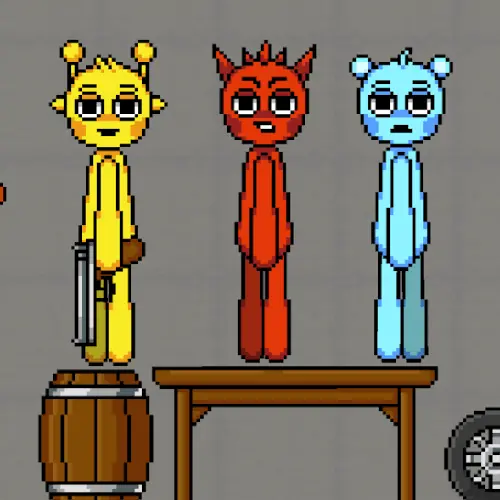
Sprunki Playground Mod is a browser-based sandbox game built around ragdoll physics, player-made setups, musical characters, and unpredictable battles. Instead of following a fixed campaign route, the game…
 Works on Desktop & Mobile
Tested By BunaGames
- Test date
- June 27, 2026
- Tested on
- Chrome 150
- Device
- Desktop
- Operating system
- macOS and Windows
- Game loaded successfully
- Yes
- Fullscreen works
- Yes
- Sound works
- Yes
- Save progress
- Local browser storage
- Mobile compatibility
- Partially tested
- Keyboard controls
- Working
- Controller support
- Not detected
- Average loading time
- 4.2 seconds
- Known issues
- Minor delay after entering fullscreen
Sprunki Playground Mod not loading?
- Refresh the page.
- Disable restrictive content blockers temporarily.
- Confirm JavaScript and WebGL are enabled.
- Clear the browser cache.
- Try another modern browser.
- Close unnecessary tabs.
- Switch off VPN if the game server is blocked.
- Use the Report a Problem button if the issue continues.
Continue Playing
Daily Challenge

Play 4 minutes today in Sprunki Playground Mod.
Leaderboard
- 1Community rating4.8 ★
- 2Player likes879
- 3Total votes937
- 4Your local progress0%
Your progress is saved locally in this browser. No account required.
 Your progress is saved locally in this browser. No account required.
Game Progress & Challenges
Why Play This Game?
 Instant PlayPlay instantly in your browser.
 Mobile FriendlyOptimized for all devices.
 Free to PlayNo hidden fees.
About "Sprunki Playground Mod"
Sprunki Playground Mod is a browser-based sandbox game built around ragdoll physics, player-made setups, musical characters, and unpredictable battles. Instead of following a fixed campaign route, the game invites you to create a situation, watch the physics react, then change the setup to see what happens next.
The central idea is simple: arrange cheerful Sprunki-style characters and turn an empty play space into your own experiment. Characters can sing, collide, fall, battle, and react to the environment, so even a small change in placement can alter the result. The appeal comes from testing combinations rather than memorizing one correct solution.
This is an action sandbox for players who enjoy creative destruction and unscripted outcomes. You can approach it like a miniature stage builder, a physics toy, or a battle creator. Make a quick scene for immediate chaos, or spend more time refining positions and interactions for a more deliberate result.
Because it runs in a web browser, it fits naturally among quick browser games while still offering room for repeat experimentation. Every new arrangement can become a fresh challenge, a funny accident, or a new musical confrontation.
Gameplay
Gameplay in Sprunki Playground Mod revolves around creating a scene and observing how its ragdoll physics unfold. The player is not limited to one prebuilt arena or one prescribed fight. Instead, stages can be assembled by the player, allowing each session to begin with a different layout, character arrangement, or battle idea.
Characters are the focus of each setup. They bring the game’s musical identity into the sandbox by singing while also taking part in energetic confrontations. Once a scene is active, physics becomes the deciding force: characters may topple, collide, pile up, or be pushed into unexpected positions. A planned battle can quickly become an improvised chain reaction.
The most useful way to think about a round is as a short experiment:
- Choose an idea for a stage or confrontation.
- Place characters and build the scene around that idea.
- Start the action and watch the physical reactions.
- Adjust the arrangement when the result is too calm, too chaotic, or simply not what you expected.
There is no need to treat every outcome as a win-or-lose result. The sandbox value is in discovery. A collapse, an awkward landing, or an accidental collision can be as entertaining as a carefully arranged battle. This also gives the game strong replay value: the same characters can behave differently when their positions, spacing, and surroundings change.
Players looking for a fast action game can build a simple clash and let it play out. Players who prefer creative play can use the stage-building side to shape more unusual situations. That balance between setup and surprise is the core loop.
Platform
Sprunki Playground Mod is presented as an online, browser-based game. That means the experience is designed to be played through a compatible web browser rather than requiring a separate traditional installation for the basic game session.
Browser access is especially useful for a sandbox game because the play pattern is flexible. You can open the game for a short physics experiment, make a quick battle scene, or return later with a new stage idea. The main requirement is a device and browser that can run the game smoothly.
For the best experience, use a current browser and allow the game page to finish loading before starting a complex setup. Physics-heavy scenes can involve several moving characters and reactions at once, so performance may feel more stable when you avoid keeping unnecessary browser tabs or apps active.
- Format: Online browser game
- Core play: Sandbox building and physics experiments
- Session style: Quick scenes or longer creative setups
- Best use: A stable browser session with enough screen space to view the play area
The game’s browser format keeps the focus on entering a scene quickly and experimenting with it directly.
How to Play "Sprunki Playground Mod"
Start by treating the play area as a blank stage. Your goal is not necessarily to complete a fixed sequence of levels; it is to construct an interesting situation using the available characters and the game’s physics-driven environment. Decide what you want to test before filling the scene at random.
A simple first setup works best. Add a small number of characters, give them enough space to react, and let the action begin. Watch how they move, collide, sing, and battle. Once you understand the result, rebuild the scene with one meaningful change. Move a character closer, alter the arrangement, or create a more crowded confrontation to compare the outcome.
- Open the game and wait for the sandbox area to load.
- Choose characters for the scene.
- Arrange them to create a stage, confrontation, or physics experiment.
- Begin the action and observe the ragdoll movement.
- Use what happened to guide your next setup.
- Repeat with different spacing, group sizes, or battle ideas.
Build with a purpose. A wide-open setup can help you see individual movement clearly, while a tighter arrangement can produce more collisions and comic disorder. If the scene becomes difficult to read, simplify it instead of adding more at once. This makes it easier to identify which placement or interaction caused the most interesting result.
The key skill is iteration. In a conventional action game, timing and precision may be the main challenge. Here, the important decision often happens before the action starts: how you construct the stage. Think of each round as a test, not a one-time attempt. The more deliberately you place characters, the more control you have over the kind of chaos that follows.
Controls
Sprunki Playground Mod is played through the controls shown in its browser game interface. The available research describes the sandbox gameplay and physics systems but does not establish one universal set of keyboard bindings. Use the on-screen prompts and interface indicators in the loaded game as the authority for the current version.
In general, your interaction is centered on selecting characters, placing them in the play area, and managing the setup before observing the battle or physics reaction. Take a moment to identify the game’s visible selection and placement options before creating a large scene.
| Action | What to check |
|---|---|
| Select | Character options |
| Place | Play area prompts |
| Manage scene | Visible interface tools |
| Restart or adjust | Current game controls |
If you are using a touch-enabled device, follow the touch guidance displayed by the game. If you are using a computer, follow the mouse or keyboard instructions provided in the active interface. Checking these prompts avoids relying on controls from a different version or hosting layout.
Can "Sprunki Playground Mod" Unblocked?
Players often search for an unblocked version when they want to play a browser game without a download or a long setup process. Sprunki Playground Mod is described as an online browser sandbox, so the normal way to access it is directly through its game page in a compatible browser.
Whether a game page is available on a particular network depends on that network’s own rules, device settings, and browser permissions. A school, workplace, library, or managed device may restrict entertainment websites, web games, audio, or other browser features. Those restrictions are not part of the game itself.
The appropriate option is to play where browser gaming is permitted and to follow the rules for the network and device you are using. If the page does not load correctly, try ordinary troubleshooting first: refresh the page, check your connection, update the browser, and make sure the browser is allowed to run the game.
For an easy session, open the game on a personal device or an approved network, let the page load fully, and begin with a small sandbox setup. No special workaround is needed for normal browser play where access is allowed.
Tips for "Sprunki Playground Mod"
The best Sprunki Playground Mod setups are not always the busiest ones. Ragdoll physics is easier to understand when you control the number of variables. Start small, learn how the scene responds, and then build toward bigger musical battles or more chaotic stage designs.
- Test one change at a time. After watching a scene, change one character position or one part of the arrangement. This helps you understand why the outcome changed.
- Use spacing deliberately. Wide spacing can make individual movement easier to see. Close spacing can create immediate contact, pileups, and fast reactions.
- Make a clear battle idea. Set up opposing groups or a central meeting point rather than placing every character without a plan.
- Watch the first collision. Early contact often determines the rest of a physics sequence. Notice which character falls, pushes, or changes direction first.
- Let accidents teach you. Unexpected collapses are useful information. Recreate an amusing result by keeping the successful parts of the layout and adjusting only what you want to improve.
- Avoid overcrowding too early. A packed scene may be funny, but it can be hard to tell what caused the action. Add complexity after you understand the basic setup.
Another useful approach is to alternate between controlled and chaotic rounds. In a controlled round, use a simple stage with a few characters and observe the physics carefully. In a chaotic round, turn that knowledge into a larger confrontation. This rhythm keeps the game entertaining while helping you become a better scene builder.
Finally, do not judge every creation by whether it looks perfect. The game is built for experimentation. A strange fall, an uneven battle, or a surprising singing scene can be the most memorable outcome because it came from the interaction between your design and the ragdoll system.
Features "Sprunki Playground Mod"
Sprunki Playground Mod combines several closely connected ideas into one open-ended browser experience. Its strongest feature is the freedom to create a stage rather than being limited to a single predefined battle layout. That player-built structure makes each session feel like a new physics experiment.
- Sandbox-style play: Create situations instead of following only a fixed route.
- Ragdoll physics: Character movement and collisions produce loose, reactive outcomes.
- Player-built stages: Shape the setting for fights, musical scenes, and experiments.
- Singing characters: The Sprunki-inspired cast adds a musical element to the action.
- Battle creation: Arrange characters for playful confrontations and watch the result unfold.
- Creative destruction: Enjoy the disorder that follows physical interactions and changing setups.
- Browser accessibility: Enter the game online and start experimenting without treating it like a lengthy campaign.
The game’s most important design advantage is that its systems support different player moods. You can make a compact scene when you want a quick burst of action, or use the sandbox tools more patiently when you want to test a particular arrangement. The same basic ingredients—characters, stage space, battles, music, and physics—can produce very different results.
It also offers a useful form of replayability that does not depend on repeating an identical level. Replaying means changing the experiment. A new position, a different group arrangement, or a redesigned stage can transform the flow of a battle. That makes the game a good fit for players who prefer emergent moments over strictly scripted action.
Best "Sprunki Playground Mod" Similar Games & Top Picks
- Fly the Plane: Play Fly the Plane online on BunaGames. Explore an action-focused airplane game page with practical play guidance and tips.
- Agent Smith: Play Agent Smith, a free top-down action shooter with marked targets, mission maps, exploration, and covert-operation action.
- Mortal Kombat: Learn about Mortal Kombat, its fighting-game roots, play approach, controls guidance, strategy tips, and browser access questions.
- Fatal Fury: Play Fatal Fury online and discover the classic SNK fighting game series known for intense battles, iconic fighters, and arcade roots.
- Awesome Tanks 3: Play Awesome Tanks 3 online, a top-down tank shooter with enemy armor, hidden areas, customizable tanks, and action-packed levels.
FAQ - Sprunki Playground Mod
What is Sprunki Playground Mod?
Sprunki Playground Mod is an online sandbox-style game that combines ragdoll physics, musical characters, player-created stages, and playful battles. The main activity is building a situation and seeing how the characters and physical environment react.
Rather than focusing only on a fixed sequence of objectives, it encourages experimentation. You can arrange characters, set up a confrontation, and revise the scene after watching the result.
Is Sprunki Playground Mod free to play?
The game is presented as an online game that can be played in a browser. Open the game page and follow the available play interface to begin a sandbox session.
Browser availability can still depend on your connection, device, and the rules of the network you are using. Always use the game on a device and network where browser gaming is allowed.
What kind of game is it?
It is a physics-driven action sandbox. Its main elements are ragdoll movement, stage creation, singing characters, and battles that can develop in unpredictable ways.
It is not best approached as a traditional level-by-level action game. The player’s creative setup is an important part of the gameplay, because the arrangement of a stage influences what happens when the physics action begins.
How do battles work in the game?
Players create battle situations by arranging characters within a stage they have built. Once the action starts, ragdoll physics affects movement, collisions, falls, and the overall flow of the encounter.
Because the game is physics-based, a battle may not play out exactly as planned. That unpredictability is part of the experience: a small placement change can lead to a very different reaction.
Can I build my own stages?
Yes. Player-built stages are a core part of the game’s sandbox format. You can use the play space to create your own battle setups and physics experiments rather than relying on only one ready-made scene.
For clearer results, begin with a simple layout and add complexity gradually. This makes it easier to see how character spacing and placement affect the action.
What are the controls?
Use the instructions and prompts displayed in the active game interface. The available game descriptions establish the sandbox and physics gameplay but do not confirm a single fixed set of universal keyboard controls.
Look for the current interface options for selecting characters, placing them, adjusting the scene, and restarting or changing a setup. On a touch device, follow the touch prompts shown by the game.
Does the game have ragdoll physics?
Yes. Ragdoll physics is one of the defining gameplay elements. Characters can react to impacts and movement with loose, physical motion, making collisions, falls, and battle outcomes part of the entertainment.
This system also supports replayability. When you alter a character’s position or change a stage arrangement, the physics can create a new sequence of events.
What is the best way to start playing?
Start with a small scene. Place a limited number of characters, give them room to move, and watch the first interaction carefully. Then make one adjustment and try again.
This method helps you learn the sandbox more quickly than filling the stage immediately. Once you understand how a basic battle reacts, you can create larger, wilder, and more creative Sprunki Playground Mod setups.
More Games Like This
 Super Smash Flash
Action ★ 4.5
Super Smash Flash
Action ★ 4.5
 Street Fighter 2
Action ★ 4.7
Street Fighter 2
Action ★ 4.7
 Alien Hominid
Action ★ 4.6
Alien Hominid
Action ★ 4.6
 King Of Fighters
Action ★ 4.8
King Of Fighters
Action ★ 4.8
 Bloons Td 6
Action ★ 4.6
Bloons Td 6
Action ★ 4.6
 Brutalmania IO
Action ★ 4.7
Brutalmania IO
Action ★ 4.7
 Temple Run 3
Action ★ 4.7
Temple Run 3
Action ★ 4.7
 Plants Vs Zombies 2
Action ★ 4.6
Plants Vs Zombies 2
Action ★ 4.6
 Plants Vs Zombies 3
Action ★ 4.6
Plants Vs Zombies 3
Action ★ 4.6
 Papas Sushiria
Action ★ 4.6
Papas Sushiria
Action ★ 4.6
 Papas Wingeria
Action ★ 4.6
Papas Wingeria
Action ★ 4.6
 Papas Scooperia
Action ★ 4.7
Papas Scooperia
Action ★ 4.7
 Papas Pizzeria
Action ★ 4.6
Papas Pizzeria
Action ★ 4.6
 Papas Freezeria
Action ★ 4.6
Papas Freezeria
Action ★ 4.6
 Papas Taco Mia
Action ★ 4.6
Papas Taco Mia
Action ★ 4.6
 Papas Cupcakeria
Action ★ 4.6
Papas Cupcakeria
Action ★ 4.6
 Counter Strike Online
Action ★ 4.4
Counter Strike Online
Action ★ 4.4
 Red Ball 3
Action ★ 4.7
Red Ball 3
Action ★ 4.7
 Report a Problem
Comments About Sprunki Playground Mod