



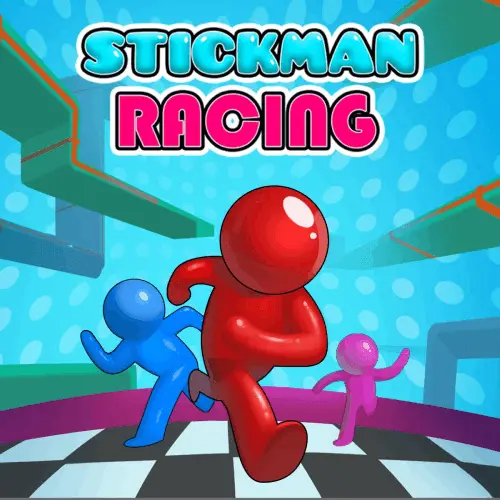
Stickman Racing
Stickman Racing is a fast online stickman race built around parkour movement, obstacle timing, and survival under pressure. Instead of a standard lap-based driving race, the action focuses…
 Works on Desktop & Mobile
Tested By BunaGames
- Test date
- May 29, 2026
- Tested on
- Chrome 150
- Device
- Desktop
- Operating system
- macOS and Windows
- Game loaded successfully
- Yes
- Fullscreen works
- Yes
- Sound works
- Yes
- Save progress
- Local browser storage
- Mobile compatibility
- Partially tested
- Keyboard controls
- Working
- Controller support
- Not detected
- Average loading time
- 4.2 seconds
- Known issues
- Minor delay after entering fullscreen
Stickman Racing not loading?
- Refresh the page.
- Disable restrictive content blockers temporarily.
- Confirm JavaScript and WebGL are enabled.
- Clear the browser cache.
- Try another modern browser.
- Close unnecessary tabs.
- Switch off VPN if the game server is blocked.
- Use the Report a Problem button if the issue continues.
Continue Playing
Daily Challenge

Play 5 minutes today in Stickman Racing.
Leaderboard
- 1Community rating4.6 ★
- 2Player likes818
- 3Total votes902
- 4Your local progress0%
Your progress is saved locally in this browser. No account required.
 Your progress is saved locally in this browser. No account required.
Game Progress & Challenges
Why Play This Game?
 Instant PlayPlay instantly in your browser.
 Mobile FriendlyOptimized for all devices.
 Free to PlayNo hidden fees.
About "Stickman Racing"
Stickman Racing is a fast online stickman race built around parkour movement, obstacle timing, and survival under pressure. Instead of a standard lap-based driving race, the action focuses on a running stickman who must jump across gaps, stop at the right moment, handle moving platforms, avoid traps, and stay ahead of rival stickmen on unpredictable courses.
The game fits naturally into the racing and arcade space because every run is about momentum, positioning, and reaching the finish area before the competition. The strongest challenge is not only speed; it is knowing when to keep moving, when to pause, and when to launch a clean jump. Hazards such as spikes, spinning blades, chasms, stones, and enemy fire can quickly turn a strong run into a failed attempt.
For players browsing the Car Games category, the important context is that this is more of a stickman obstacle race than a traditional car simulator. It shares the quick reactions and victory chase of racing games, but its core skill comes from platforming, hazard reading, and precise movement control.
Gameplay
The gameplay loop is direct and skill-based: start running, read the course ahead, react to hazards, and try to survive longer than the opposing stickmen. Each stage feels like an obstacle-course race where the track keeps forcing decisions. A wide gap asks for a committed jump. A narrow ledge rewards a controlled stop. A moving platform requires patience. A spinning blade punishes careless timing.
Stickman Racing uses the tension of racing without making speed the only answer. Charging forward can help you pass rivals, but reckless movement often sends the stickman into spikes, blades, or open pits. The better approach is rhythm: run when the path is open, stop when the next platform needs setup, jump before the edge, and adjust your landing before the track scrolls into another danger zone.
Some versions describe the action as multiplayer or multiplayer-style competition because several stickmen appear in the race. The practical experience is a contest against other runners on the same dangerous route. Beating them, avoiding elimination, and covering more distance are the main goals. Certain builds also include aiming and shooting interactions, where obstacles or enemy stickmen can be cleared if you line up the shot properly.
The result is a compact browser racing game with platformer logic. Players who enjoy quick restarts, short races, and measurable improvement will find the challenge easy to understand but difficult to master consistently.
Platform
Stickman Racing is designed for instant browser play, so it works well for players who want to launch a game without installing a large client. On BunaGames, it is presented as an online arcade racing experience that can be played directly from the game page alongside other browser games.
The game is especially suited to desktop and laptop play because keyboard input makes jump-and-stop timing easier to control. Some competing pages also reference touchscreen support through on-screen buttons, so mobile and tablet play may be available depending on the embedded build and device browser. However, smaller screens can make aiming, obstacle reading, and fast reactions harder than on a full keyboard setup.
If your device loads the game but controls feel different, follow the in-game prompts first. Browser game builds can vary slightly, and the safest rule is to trust the control labels shown on the start screen or pause/menu area.
How to Play "Stickman Racing"
Begin by starting the race and watching the first few obstacles instead of immediately holding every input. Stickman Racing rewards quick reactions, but it also rewards reading the course. The stickman moves through a sequence of ledges, pits, platforms, traps, and rival encounters. Your job is to keep enough forward momentum to stay competitive while avoiding mistakes that end the run or drain health.
- Start the run: Press play and let the stickman enter the course. Note any score, health, or best-distance indicators on the screen.
- Jump over danger: Use the jump key or button before pits, spikes, blades, and platform edges. Jumping too late usually leads to a fall.
- Stop when needed: Use the stop command to slow or halt forward movement before tight platforms, moving ledges, or areas that need careful timing.
- Watch moving platforms: Wait for the platform path to become safe, then release the stop command and jump away when the next landing zone is reachable.
- Use aim or shoot actions if available: Some builds include stones or enemy stickmen that can be attacked. Aim carefully instead of firing while panicking.
- Avoid health damage: Spikes, blades, and projectiles may reduce health. Falling into a chasm is usually more severe and can end the attempt immediately.
- Measure progress: Distance, score, defeated rivals, or finish placement may be shown after a run. Use that feedback to improve the next attempt.
The key lesson is that stopping is not failure. In many obstacle racers, players assume constant speed is always best. Here, a brief pause before a dangerous jump can be the difference between losing the run and reaching a cleaner line through the course.
Controls
Controls can vary slightly between browser builds, but the available research points to simple keyboard movement with optional mouse or touch actions. Use the in-game instructions if they appear, because they are the most reliable guide for the version loaded on your device.
| Action | Input |
|---|---|
| Jump | W or Up Arrow |
| Stop / slow | S or stop button |
| Move | Left / Right arrows if enabled |
| Aim | Mouse cursor |
| Shoot / select | Left click or tap |
| Touchscreen | On-screen buttons |
On desktop, keyboard control usually gives the most accurate timing for jumps and stops. If the game includes shooting, the mouse lets you aim while deciding whether to pause, fire, or continue moving. On mobile, touch buttons can work, but your finger may cover part of the screen during precise aim or platform timing.
Can "Stickman Racing" Unblocked?
Stickman Racing is a lightweight browser game, which makes it a good option for players looking for quick access from a home computer, laptop, Chromebook, or mobile browser. Because it runs on the page, there is no need to download a separate racing app or install a desktop launcher from BunaGames.
If you are trying to play from school, work, or a shared network, access depends on that network’s own filtering rules. The game page may load normally on one connection and be blocked on another. BunaGames cannot override local restrictions, so the best approach is to use a permitted device and a network where gaming sites are allowed.
For the smoothest experience, close extra tabs, keep the browser updated, and use a stable internet connection. Even a simple stickman game can feel harder if input delay makes jumps, stops, or aim timing less responsive.
Tips for "Stickman Racing"
- Do not treat every obstacle like a speed test. The fastest player is often the one who survives the cleanest route. A short stop before a moving platform can save more time than a rushed fall.
- Jump before the edge, not on the edge. Late jumps reduce air control and often send the stickman into the side of the next platform. Start the jump early enough to clear the gap with room to land.
- Use stopping as a landing tool. If a platform is narrow, stop after landing to avoid running straight off the far side. This is especially useful when the next obstacle is close.
- Study hazard patterns. Spinning blades, moving platforms, and rows of traps usually punish repeated panic inputs. Watch their motion for a moment, then move when the path opens.
- Take ranged threats seriously. If enemy stickmen or projectile attacks appear, give yourself space. Stopping early and aiming from distance can be safer than running directly into the attack zone.
- Use fixed platforms to reset rhythm. Solid ledges can give you time to plan. If you collide with a platform side, it may slow you down without causing the same danger as spikes or blades.
- Separate score chasing from practice. On early attempts, focus on understanding gaps, traps, and platform timing. Once the route feels familiar, push for more speed, more distance, and cleaner rival defeats.
The best improvement comes from learning why a run failed. If you fell, the jump was probably late or the stop was missed. If you lost health, you may have rushed into a hazard pattern. If rivals passed you, you may have paused in a safe section for too long.
Features "Stickman Racing"
- Stickman obstacle racing: The game combines the urgency of a race with the precision of a parkour platformer. You are not simply driving forward; you are reading terrain and reacting to hazards.
- Fast jump-and-stop decision making: The stop command gives the game a more tactical rhythm than many one-button runners. Knowing when not to move is part of the skill ceiling.
- Rival stickmen: Competing runners add pressure and make each course feel like a live contest, even when the main challenge is surviving the environment.
- Hazard variety: Chasms, spikes, spinning blades, large stones, moving platforms, and projectile threats create different kinds of risk. Each one asks for a different response.
- Score and progress feedback: Distance traveled, best score, defeated enemies, or post-run results help players track improvement across attempts.
- Short-session arcade design: Runs are easy to restart, making the game suitable for quick breaks or repeated practice sessions.
- Browser accessibility: The game is made for online play from the page, reducing setup friction for players who want fast action.
- Minimal visual style: The stickman presentation keeps the focus on movement, hazards, and readable feedback rather than complex scenery.
The main information competitors often miss is the way Stickman Racing uses stopping as a core mechanic. Many racing games reward constant acceleration, but this one often rewards controlled hesitation. That extra layer makes the game feel closer to a precision obstacle race than a basic endless runner.
Best "Stickman Racing" Similar Games & Top Picks
- City Car Driving: Play City Car Driving online and focus on smooth city driving, vehicle control, careful practice, and better handling in your browser.
- Escape Drive: Play Escape Drive online and outrun the police in a fast-paced city car chase filled with sharp turns, obstacles, and crashes.
- The Farmer: Play The Farmer online and manage a growing farm by planting crops, caring for chickens, and building a successful farm.
- Street Life: Play Street Life online, a clicker merge game about tapping, merging, and jamming with a musical monkey on the road to stardom.
- Grand Prix Hero: Race across continents in Grand Prix Hero. Dodge traffic, collect coins, use boosts, and upgrade your car for the next race.
FAQ - Stickman Racing
Is Stickman Racing a car racing game?
Stickman Racing appears in a racing-focused category, but its core gameplay is closer to a stickman obstacle race than a traditional car game. The main action centers on running, jumping, stopping, dodging hazards, and beating rival stickmen through a dangerous course.
Can I play Stickman Racing for free?
Yes. Stickman Racing can be played online for free on the BunaGames game page. You do not need to install a separate app or download a large game client to start playing in the browser.
What is the goal of Stickman Racing?
The goal is to move through the course, avoid falling, survive hazards, and stay ahead of the other stickmen. Depending on the build, your performance may be measured by distance, score, defeated rivals, or reaching the finish ahead of competitors.
What are the basic controls?
The commonly reported controls include W or the Up Arrow to jump, S or a stop button to slow or stop, and mouse or touch input for aiming, shooting, or menu selection when those actions are available. If your version shows different prompts, follow the in-game instructions.
Why is stopping important?
Stopping helps you control landings, wait for moving platforms, avoid overjumping narrow ledges, and line up safer shots if enemies or stones appear. The game is not only about holding forward; smart pauses can protect your run and improve your score.
Does Stickman Racing work on mobile?
Some browser versions support touchscreen controls through on-screen buttons. Mobile play may be possible, but desktop usually feels more precise because the keyboard and mouse make jumping, stopping, and aiming easier to manage.
What hazards should I watch for?
Common hazards include open chasms, spikes, spinning blades, moving platforms, large stones, and hostile stickmen with projectile attacks. Falling into a gap is especially dangerous, while contact with traps may reduce health or end the attempt depending on the situation.
How can I get better at Stickman Racing?
Focus on rhythm instead of pure speed. Jump early, stop after tight landings, wait for moving platforms, and observe hazard timing before committing. After each failed run, identify whether the mistake came from a late jump, a missed stop, poor aim, or rushing into a trap.
More Games Like This
 Bike Hero
Driving ★ 4.6
Bike Hero
Driving ★ 4.6
 Crazy Stunt Cars Multiplayer
Driving ★ 4.6
Crazy Stunt Cars Multiplayer
Driving ★ 4.6
 Stunt Car Challenge 3
Driving ★ 4.7
Stunt Car Challenge 3
Driving ★ 4.7
 Drive Mad 3
Driving ★ 4.6
Drive Mad 3
Driving ★ 4.6
 Papas Sushiria
Driving ★ 4.6
Papas Sushiria
Driving ★ 4.6
 Papas Wingeria
Driving ★ 4.6
Papas Wingeria
Driving ★ 4.6
 Papas Scooperia
Driving ★ 4.7
Papas Scooperia
Driving ★ 4.7
 Car Rush
Driving ★ 4.6
Car Rush
Driving ★ 4.6
 Papas Pizzeria
Driving ★ 4.6
Papas Pizzeria
Driving ★ 4.6
 Papas Freezeria
Driving ★ 4.6
Papas Freezeria
Driving ★ 4.6
 Madalin Stunt Cars 3
Driving ★ 4.5
Madalin Stunt Cars 3
Driving ★ 4.5
 Papas Taco Mia
Driving ★ 4.6
Papas Taco Mia
Driving ★ 4.6
 Papas Cupcakeria
Driving ★ 4.6
Papas Cupcakeria
Driving ★ 4.6
 Moto X3m Spooky Land
Driving ★ 4.7
Moto X3m Spooky Land
Driving ★ 4.7
 Moto X3m Winter
Driving ★ 4.7
Moto X3m Winter
Driving ★ 4.7
 Retro Highway
Driving ★ 4.4
Retro Highway
Driving ★ 4.4
 Speed Master
Driving ★ 4.7
Speed Master
Driving ★ 4.7
 Loop Crash
Driving ★ 4.6
Loop Crash
Driving ★ 4.6
 Report a Problem
Play Anytime, Anywhere
Add BunaGames to your home screen for quick access to your favorite games!
Comments About Stickman Racing