



Traffic Tour
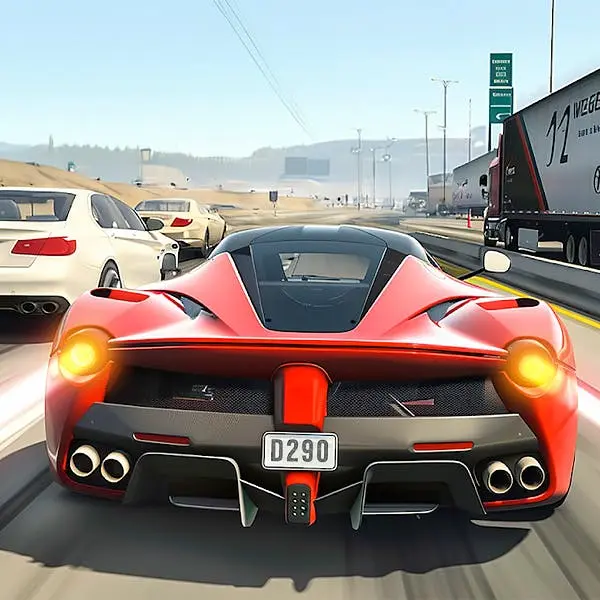
Traffic Tour redefines endless arcade racing by integrating a full career mode structure into the continuous highway racing format. Unlike traditional endless runners that loop indefinitely without progression,…
 Works on Desktop & Mobile
Tested By BunaGames
- Test date
- May 27, 2026
- Tested on
- Chrome 150
- Device
- Desktop
- Operating system
- macOS and Windows
- Game loaded successfully
- Yes
- Fullscreen works
- Yes
- Sound works
- Yes
- Save progress
- Local browser storage
- Mobile compatibility
- Partially tested
- Keyboard controls
- Working
- Controller support
- Not detected
- Average loading time
- 4.2 seconds
- Known issues
- Minor delay after entering fullscreen
Traffic Tour not loading?
- Refresh the page.
- Disable restrictive content blockers temporarily.
- Confirm JavaScript and WebGL are enabled.
- Clear the browser cache.
- Try another modern browser.
- Close unnecessary tabs.
- Switch off VPN if the game server is blocked.
- Use the Report a Problem button if the issue continues.
Continue Playing
Daily Challenge

Play 5 minutes today in Traffic Tour.
Leaderboard
- 1Community rating4.7 ★
- 2Player likes915
- 3Total votes992
- 4Your local progress0%
Your progress is saved locally in this browser. No account required.
 Your progress is saved locally in this browser. No account required.
Game Progress & Challenges
Why Play This Game?
 Instant PlayPlay instantly in your browser.
 Mobile FriendlyOptimized for all devices.
 Free to PlayNo hidden fees.
About "Traffic Tour"
Traffic Tour redefines endless arcade racing by integrating a full career mode structure into the continuous highway racing format. Unlike traditional endless runners that loop indefinitely without progression, this game layers career advancement, unlockable vehicle rosters, and multiple game modes over its core lane-splitting mechanics. Players navigate dense traffic flows at high velocity, earning currency through near-miss maneuvers and sustained speed while building a garage of performance vehicles. The first-person view perspective intensifies spatial awareness challenges, requiring precise judgment of closing distances and gap timing that flat third-person angles cannot replicate. This combination of progression depth and visceral driving perspective positions the game beyond simple score-chasing into structured competitive racing.
Gameplay
The core loop centers on maintaining maximum velocity through congested multi-lane highways while executing close-proximity overtakes. Each near-miss with oncoming or adjacent traffic multiplies your score chain, rewarding aggressive positioning without collision. Lane-splitting—threading between vehicles in parallel lanes—generates the highest point multipliers but demands exact lateral control and speed modulation.
Career mode structures progression through tiered events with specific objectives: distance targets, score thresholds, and time trials. Completing events unlocks currency for vehicle purchases and upgrades that affect acceleration curves, top speed ceilings, and handling responsiveness. Street racing events introduce head-to-head competition against AI opponents, shifting focus from pure survival to tactical positioning and drafting mechanics.
Traffic density and speed variance increase across career tiers, introducing buses, trucks, and erratic lane-changers that disrupt rhythm and force reactive decision-making. The physics model emphasizes momentum conservation—heavy braking scrubs speed that takes seconds to rebuild, making commitment to overtake lines critical.
Platform
Traffic Tour functions as one of the accessible online games playable directly through modern web browsers without installation requirements. The browser version maintains the full feature set including career progression, vehicle unlocks, and multiple game modes, eliminating the friction of app store downloads or device storage constraints.
Cross-session progress saves automatically via browser storage, allowing players to resume career advancement across multiple sessions. The WebGL rendering pipeline delivers smooth frame rates on desktop and laptop hardware, with responsive input handling that preserves the precision required for high-speed lane changes. Mobile browser support extends access to touchscreen devices, though the control scheme adapts differently than native mobile apps.
How to Play "Traffic Tour"
Begin by selecting a game mode: Career for structured progression, Endless for pure distance runs, Time Trial for speed-focused challenges, or Free Ride for practice without objectives. In Career mode, choose an available event from the tier map and review the completion criteria before starting.
Once racing begins, accelerate into traffic and position your vehicle to pass as closely as possible to other cars—proximity determines point multipliers. Chain multiple near-misses without collision to build score combos that decay if you drive in open road too long. Use oncoming traffic lanes for the highest risk-reward overtakes, but time your return to the correct side precisely to avoid head-on impacts.
Earn currency through completed events and high scores, then access the garage to purchase faster vehicles or upgrade existing ones. Each car exhibits different handling characteristics: some prioritize acceleration for technical traffic weaving, others offer higher top speeds for sustained highway runs. Match vehicle selection to event requirements for optimal performance.
Controls
Keyboard controls use the Arrow Keys for directional input: Up Arrow accelerates, Down Arrow brakes or reverses, and Left/Right Arrows steer between lanes. Alternatively, WASD keys mirror this layout with W for gas, S for brake, and A/D for lateral movement.
The Spacebar typically activates nitro boost when available, providing temporary acceleration bursts to close gaps or escape tight clusters. Some control schemes map Shift for camera perspective toggles between first-person cockpit view and third-person chase angles, though first-person remains the intended competitive view.
On touchscreen devices, virtual buttons appear on-screen: tap zones on the left and right sides steer, while dedicated acceleration and brake buttons occupy the lower corners. Swipe gestures may trigger lane changes in simplified mobile control modes.
Can "Traffic Tour" Unblocked?
The browser-based version of Traffic Tour typically remains accessible on networks where downloadable executables or app store content faces restrictions. Since the game runs entirely within the browser sandbox using standard web technologies, it bypasses many institutional filters that target executable files or specific app domains.
Players on school or workplace networks can often play free without encountering the blocks applied to Steam, mobile app stores, or standalone game clients. The lightweight asset loading and minimal external resource calls reduce the likelihood of triggering content filters, though individual network policies vary. No account creation or personal data submission is required to access core gameplay, further simplifying access on restricted systems.
Tips for "Traffic Tour"
- Sustain speed in oncoming lanes: The opposite traffic lane offers the fastest point accumulation through high-speed head-on near-misses, but requires memorizing traffic spawn patterns and committing to overtake lines early—hesitation mid-maneuver causes collisions.
- Prioritize combo preservation over single high-risk passes: A sustained 10x multiplier from consistent safe near-misses outscores sporadic 15x attempts that break your chain. Build rhythm before escalating aggression.
- Upgrade acceleration before top speed: Traffic weaving depends more on rapid velocity changes than maximum speed. Higher acceleration lets you exploit brief gaps and recover from braking faster than top-speed upgrades.
- Use peripheral vision in first-person view: The cockpit perspective limits your field of view—train yourself to process vehicle positions at screen edges rather than waiting for central focus. Anticipate lane occupancy two car-lengths ahead.
- Match vehicle weight class to traffic density: Lighter cars with tighter handling excel in dense, slow-moving traffic where constant lane switches dominate. Heavier, faster vehicles perform better in sparse highway sections with long straightaways.
- Brake before lane changes, not during: Lateral movement while braking destabilizes handling and extends stopping distance. Scrub speed in your current lane, then execute the lane change at stable velocity.
Features "Traffic Tour"
- Full career mode progression: Structured tier system with unlockable events, objective-based challenges, and currency rewards that fund vehicle acquisitions and performance upgrades.
- First-person cockpit perspective: Immersive driver viewpoint that increases spatial challenge and replicates real depth perception demands absent in third-person cameras.
- Lane-splitting mechanics: Precision threading between parallel vehicles for maximum score multipliers, requiring exact lateral positioning and speed judgment.
- Diverse vehicle roster: Multiple car classes with distinct acceleration, top speed, and handling profiles that alter optimal racing strategies and event suitability.
- Multiple game modes: Career, Endless, Time Trial, and Free Ride modes address different play intents from structured progression to pure skill testing.
- Realistic traffic behavior: AI vehicles execute lane changes, speed variations, and density clustering that mimic actual highway flow patterns rather than static obstacle grids.
- Momentum-based physics: Speed conservation model where braking and collisions carry tangible velocity penalties, rewarding commitment and punishing indecision.
- Persistent browser progression: Automatic save system retains career advancement, unlocked vehicles, and currency across sessions without account requirements.
Best "Traffic Tour" Similar Games & Top Picks
- City Car Driving: Play City Car Driving online and focus on smooth city driving, vehicle control, careful practice, and better handling in your browser.
- Escape Drive: Play Escape Drive online and outrun the police in a fast-paced city car chase filled with sharp turns, obstacles, and crashes.
- The Farmer: Play The Farmer online and manage a growing farm by planting crops, caring for chickens, and building a successful farm.
- Street Life: Play Street Life online, a clicker merge game about tapping, merging, and jamming with a musical monkey on the road to stardom.
- Grand Prix Hero: Race across continents in Grand Prix Hero. Dodge traffic, collect coins, use boosts, and upgrade your car for the next race.
FAQ - Traffic Tour
Can I play Traffic Tour directly in my browser without downloading?
Yes, the browser version runs entirely within your web browser using WebGL technology, requiring no downloads, installations, or app store access. Simply load the page and start racing immediately with full career mode and vehicle unlocks available.
What makes Traffic Tour different from other endless racing games?
Traffic Tour integrates a complete career mode with tiered events and vehicle progression into the endless racing format, rather than offering only score-based survival. The mandatory first-person view perspective and lane-splitting mechanics add spatial complexity absent in simpler arcade racers.
How do the controls work for Traffic Tour?
Use Arrow Keys or WASD for steering and acceleration, with Up/W for gas, Down/S for brake, and Left-Right/A-D for lane changes. Spacebar typically activates nitro boost. Touchscreen devices display virtual buttons for steering, acceleration, and braking.
Does my progress save between browser sessions?
Yes, the game automatically saves career progression, unlocked vehicles, currency, and completed events using browser local storage. Returning to the same browser on the same device restores your full game state without requiring account login.
What is lane-splitting and why does it matter?
Lane-splitting means driving between two vehicles occupying parallel lanes simultaneously, threading the narrow gap between them. This maneuver generates the highest score multipliers but demands precise lateral control and speed matching to avoid clipping either vehicle.
Which vehicles should I unlock first in career mode?
Prioritize vehicles with high acceleration ratings over pure top speed for early career tiers where dense traffic requires frequent speed adjustments and tight maneuvering. Faster top-speed cars become advantageous in later tiers with sparser, faster-moving traffic.
Can I switch between first-person and third-person views?
Some versions allow camera perspective toggles, but the game is designed around first-person cockpit view for maximum immersion and challenge. Third-person views, when available, reduce difficulty by expanding visible traffic range beyond realistic driver sightlines.
Is Traffic Tour unblocked on school or work networks?
Browser-based versions typically bypass restrictions targeting downloadable games or app stores since they run as standard web content. Individual network policies vary, but the game's web-native architecture avoids most common institutional filters.
More Games Like This
 Bike Hero
Driving ★ 4.6
Bike Hero
Driving ★ 4.6
 Crazy Stunt Cars Multiplayer
Driving ★ 4.6
Crazy Stunt Cars Multiplayer
Driving ★ 4.6
 Stunt Car Challenge 3
Driving ★ 4.7
Stunt Car Challenge 3
Driving ★ 4.7
 Drive Mad 3
Driving ★ 4.6
Drive Mad 3
Driving ★ 4.6
 Papas Sushiria
Driving ★ 4.6
Papas Sushiria
Driving ★ 4.6
 Papas Wingeria
Driving ★ 4.6
Papas Wingeria
Driving ★ 4.6
 Papas Scooperia
Driving ★ 4.7
Papas Scooperia
Driving ★ 4.7
 Car Rush
Driving ★ 4.6
Car Rush
Driving ★ 4.6
 Papas Pizzeria
Driving ★ 4.6
Papas Pizzeria
Driving ★ 4.6
 Papas Freezeria
Driving ★ 4.6
Papas Freezeria
Driving ★ 4.6
 Madalin Stunt Cars 3
Driving ★ 4.5
Madalin Stunt Cars 3
Driving ★ 4.5
 Papas Taco Mia
Driving ★ 4.6
Papas Taco Mia
Driving ★ 4.6
 Papas Cupcakeria
Driving ★ 4.6
Papas Cupcakeria
Driving ★ 4.6
 Moto X3m Spooky Land
Driving ★ 4.7
Moto X3m Spooky Land
Driving ★ 4.7
 Moto X3m Winter
Driving ★ 4.7
Moto X3m Winter
Driving ★ 4.7
 Retro Highway
Driving ★ 4.4
Retro Highway
Driving ★ 4.4
 Speed Master
Driving ★ 4.7
Speed Master
Driving ★ 4.7
 Loop Crash
Driving ★ 4.6
Loop Crash
Driving ★ 4.6
 Report a Problem
Play Anytime, Anywhere
Add BunaGames to your home screen for quick access to your favorite games!
Comments About Traffic Tour