



Truck Loader
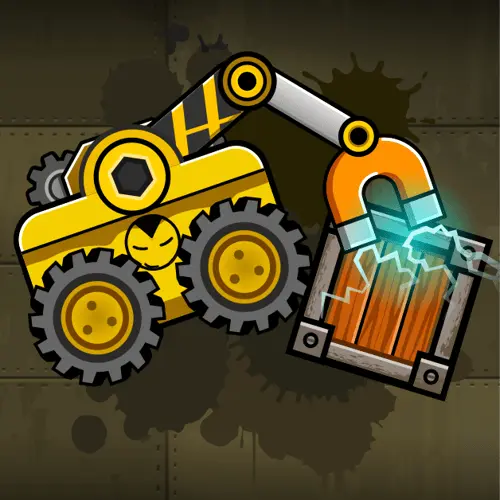
Truck Loader is a physics-based cargo puzzle game built around one clear job: drive a compact loader, grab scattered crates with a magnetic arm, and place each box…
 Works on Desktop & Mobile
Tested By BunaGames
- Test date
- May 30, 2026
- Tested on
- Chrome 150
- Device
- Desktop
- Operating system
- macOS and Windows
- Game loaded successfully
- Yes
- Fullscreen works
- Yes
- Sound works
- Yes
- Save progress
- Local browser storage
- Mobile compatibility
- Partially tested
- Keyboard controls
- Working
- Controller support
- Not detected
- Average loading time
- 4.2 seconds
- Known issues
- Minor delay after entering fullscreen
Truck Loader not loading?
- Refresh the page.
- Disable restrictive content blockers temporarily.
- Confirm JavaScript and WebGL are enabled.
- Clear the browser cache.
- Try another modern browser.
- Close unnecessary tabs.
- Switch off VPN if the game server is blocked.
- Use the Report a Problem button if the issue continues.
Continue Playing
Daily Challenge

Play 6 minutes today in Truck Loader.
Leaderboard
- 1Community rating4.7 ★
- 2Player likes990
- 3Total votes1.1K
- 4Your local progress0%
Your progress is saved locally in this browser. No account required.
 Your progress is saved locally in this browser. No account required.
Game Progress & Challenges
Why Play This Game?
 Instant PlayPlay instantly in your browser.
 Mobile FriendlyOptimized for all devices.
 Free to PlayNo hidden fees.
About "Truck Loader"
Truck Loader is a physics-based cargo puzzle game built around one clear job: drive a compact loader, grab scattered crates with a magnetic arm, and place each box inside the truck. It looks like a simple driving game at first, but the real challenge comes from spatial thinking, careful positioning, and learning how the magnet changes the movement of every crate.
Instead of racing to the finish line, you work through level layouts that ask you to maneuver in tight spaces, lift boxes from awkward angles, and load cargo into the marked area of the truck bed. The forklift, crane-like magnet, crates, truck, ramps, platforms, and obstacles all become part of the puzzle. Each stage rewards control more than speed.
That mix makes the game a strong fit for players who enjoy vehicle games with a puzzle brain. You still steer, jump, reverse, and line up your machine, but every move has a purpose. The fun comes from turning a messy loading area into a clean, completed delivery.
Gameplay
The core loop is direct and satisfying: enter a level, locate the cargo boxes, drive the loader into position, activate the magnet, and carry each crate to the truck. The level is complete when the required cargo is placed correctly in the loading zone. Because the magnetic arm can pull, drag, swing, and rotate boxes, the same task can feel different depending on where you attach the magnet and how much momentum you create.
Truck Loader is often described as a puzzle game because success depends on understanding the level, not just reaching the truck. A crate may be behind a barrier, above the loader, blocked by another object, or positioned in a way that makes a straight lift impossible. You need to decide whether to push it, pull it, jump with it, flip it, or approach it from another side.
The driving side matters as well. The loader is small, but it has weight and limited space to move. If you rush, a box can swing out of control, fall into the wrong place, or block your path. If you take a slower line, you can use the magnet like a precision tool and place cargo neatly.
The best part of the design is how it turns basic warehouse work into a chain of small decisions. Every crate becomes a mini problem: where to grab it, how high to lift it, when to release it, and how to settle it in the truck without knocking the rest of the cargo around.
Platform
Truck Loader can be played as a browser game on BunaGames, which makes it easy to start without a long setup. The game fits the quick-session style of browser games: open the page, learn the controls, solve a few cargo puzzles, and continue when you have time. Its level-based structure works well for short breaks because each stage has a compact objective.
The gameplay is best suited to keyboard and mouse input. The keyboard handles the vehicle movement while the mouse controls the magnetic arm, so desktop and laptop players get the clearest control over steering and grabbing. Because the puzzle depends on accurate aiming and crate placement, a larger screen can make it easier to see the truck bed, obstacles, and cargo positions.
As with many browser arcade games, performance may depend on the device, browser, and connection. For the smoothest experience, use an updated browser and keep the game tab active while playing.
How to Play "Truck Loader"
Start each level by looking at the whole loading area before moving. Find the truck, identify every crate, and notice whether any objects, ledges, buttons, or narrow passages stand between the loader and the cargo. A quick scan prevents wasted movement and helps you solve the level in the correct order.
- Drive to the first crate. Use the loader to approach the box from a stable angle. If the space is tight, slow down and line up before using the magnet.
- Aim the magnetic arm. Move the cursor toward the crate and activate the magnet when the arm is close enough. The box should attach so you can pull or lift it.
- Control the swing. A hanging crate can build momentum. Move smoothly, stop gently, and avoid sudden turns when the box is above the loader.
- Carry the crate to the truck. Use ramps, jumps, or careful reversing when the path is uneven. If the crate gets stuck, release and reattach from a better angle.
- Place cargo in the truck bed. Put each crate inside the marked loading area. Some boxes may need to be stacked, rotated, or nudged into position.
- Repeat until the truck is loaded. Finish the remaining cargo and keep the truck space organized so the final crate is not blocked.
Do not treat every level like a speed challenge. The smartest route is usually the cleanest one: collect the boxes in an order that keeps the path open and prevents crates from falling into awkward spots.
Controls
Truck Loader uses a combined keyboard-and-mouse control style. The keyboard moves the vehicle, while the mouse controls the magnetic arm used to grab cargo. This split is important because the game is not only about driving; it also asks you to aim, lift, and place crates with accuracy.
| Action | Input |
|---|---|
| Move left or right | A / D |
| Jump | W |
| Aim magnetic arm | Mouse |
| Grab or release crate | Left click |
Some versions of the game may also support arrow-key movement, but the common setup uses A and D for horizontal movement, W for jumping, and the mouse for magnet control. Keep one hand on the movement keys and the other on the mouse so you can adjust the loader and magnetic arm at the same time.
Can "Truck Loader" Unblocked?
Truck Loader is a good choice when you want an unblocked-style browser game because it focuses on quick, lightweight puzzle play rather than complex menus or long missions. You can play directly from the game page and move from one cargo challenge to the next without needing a separate installation.
If the game does not load in a school, office, or public network, the issue may be related to local restrictions rather than the game itself. Network filters can block gaming pages, embedded players, or certain browser features. Try using a modern browser, refreshing the page, or playing from a connection where games are allowed.
The game also works well for short sessions because progress is based on individual levels. You can solve one stage, pause, and return later without needing to commit to a long driving campaign. That makes it easy to enjoy as a compact arcade puzzle experience.
Tips for "Truck Loader"
Plan the loading order. Before moving the first crate, think about which box should go into the truck first. If you place a large or awkward crate in the wrong spot, it can block the space needed for the remaining cargo. A clean order saves time and reduces restarts.
Use the magnet as a control tool, not just a hook. The magnetic arm can pull crates closer, hold them steady, drag them along the ground, or lift them over small obstacles. If a crate is swinging too much, lower it, let it settle, and then continue.
Attach from better angles. Where you click matters. Grabbing the top, side, or corner of a box can change how it rotates while you move. If the crate keeps flipping the wrong way, release it and connect from another side.
Keep the loader stable. Jumping while carrying cargo can help you clear obstacles, but it can also make the box swing. Use jumps when needed, then pause for a moment before entering the truck area.
Do not force stuck cargo. If a crate is wedged against a wall or trapped under the loader arm, backing up and re-approaching is usually better than pushing harder. Physics puzzles reward repositioning.
Finish with precision. The final placement often matters most. When the crate is inside the truck, make small movements and release it gently so it lands in the marked space instead of bouncing out or tipping another box.
Features "Truck Loader"
- Magnetic forklift gameplay: The central mechanic is the loader with a magnetic arm, giving the game a distinctive mix of driving, aiming, pulling, and cargo handling.
- Physics-based crate movement: Boxes react to motion, contact, gravity, and momentum, so careful handling is more reliable than rushing.
- Level-based puzzle structure: Each stage gives you a focused loading problem with crates placed around the environment and a truck waiting for delivery.
- Vehicle control with puzzle logic: Truck Loader belongs naturally near driving games, but it also uses timing, route planning, and spatial reasoning.
- Simple objective, varied solutions: Loading the truck is always the goal, yet the best method changes based on box position, obstacles, and available space.
- Keyboard and mouse coordination: Steering the loader while aiming the magnetic arm creates an active control rhythm that feels different from ordinary truck or forklift games.
- Short-session friendly design: Because levels are compact, the game works well when you want a quick challenge rather than a long simulation.
- Readable arcade style: The important objects are easy to understand: loader, crates, truck, platforms, and loading zones. That clarity helps new players learn quickly.
The main strength of Truck Loader is its efficient design. It does not need a complicated story or heavy upgrade system. The appeal comes from the tactile feeling of solving a cargo problem with a machine that is just flexible enough to be clever and just awkward enough to be funny.
Best "Truck Loader" Similar Games & Top Picks
- City Car Driving: Play City Car Driving online and focus on smooth city driving, vehicle control, careful practice, and better handling in your browser.
- Escape Drive: Play Escape Drive online and outrun the police in a fast-paced city car chase filled with sharp turns, obstacles, and crashes.
- The Farmer: Play The Farmer online and manage a growing farm by planting crops, caring for chickens, and building a successful farm.
- Street Life: Play Street Life online, a clicker merge game about tapping, merging, and jamming with a musical monkey on the road to stardom.
- Grand Prix Hero: Race across continents in Grand Prix Hero. Dodge traffic, collect coins, use boosts, and upgrade your car for the next race.
FAQ - Truck Loader
What is Truck Loader?
Truck Loader is a browser-based physics puzzle game where you control a small forklift-like loader with a magnetic arm. Your objective is to collect cargo boxes from each level and place them inside the truck. It combines driving controls with crate handling, spatial puzzles, and careful timing.
Is Truck Loader a driving game or a puzzle game?
It is both, but the puzzle side is the main challenge. You drive the loader around the level, jump over obstacles, and position the vehicle, but winning depends on solving how to move and load the crates correctly. That is why players often describe it as a physics puzzle game with driving mechanics.
How do you grab boxes in Truck Loader?
Move the magnetic arm toward a crate with the mouse, then use the left mouse button to attach or release the magnet. Once the box is attached, drive carefully and guide it toward the truck. Smooth movement helps prevent the crate from swinging out of control.
What are the basic controls?
The common control setup uses A and D to move left and right, W to jump, the mouse to aim the magnetic arm, and left click to grab or release boxes. Some versions may also support arrow-key movement, but keyboard and mouse play is the clearest way to control both the loader and the magnet.
Do I need to download Truck Loader?
No download is needed to play it on BunaGames. It runs as an online browser game, so you can open the game page and start playing from a compatible browser. Keeping your browser updated usually gives the best loading and control experience.
Why do crates fall out of the truck?
Crates can fall out if they are released too high, dropped at a bad angle, placed outside the marked area, or knocked by another box. Move slowly near the truck bed, lower the crate before releasing it, and try to keep the cargo organized from the first box to the last.
What is the best strategy for harder levels?
Look at the full level before moving, choose the safest loading order, and avoid creating blocked paths. If a crate is hard to lift, try attaching the magnet from a different side. When a box swings, stop and let it settle before continuing. Precision is usually faster than rushing.
Can beginners play Truck Loader?
Yes. The goal is easy to understand, and the controls are simple enough for new players to learn quickly. The challenge increases as the layouts become more demanding, so beginners can start with basic cargo loading and gradually learn better magnet control, movement timing, and crate placement.
More Games Like This
 Bike Hero
Driving ★ 4.6
Bike Hero
Driving ★ 4.6
 Crazy Stunt Cars Multiplayer
Driving ★ 4.6
Crazy Stunt Cars Multiplayer
Driving ★ 4.6
 Stunt Car Challenge 3
Driving ★ 4.7
Stunt Car Challenge 3
Driving ★ 4.7
 Drive Mad 3
Driving ★ 4.6
Drive Mad 3
Driving ★ 4.6
 Papas Sushiria
Driving ★ 4.6
Papas Sushiria
Driving ★ 4.6
 Papas Wingeria
Driving ★ 4.6
Papas Wingeria
Driving ★ 4.6
 Papas Scooperia
Driving ★ 4.7
Papas Scooperia
Driving ★ 4.7
 Car Rush
Driving ★ 4.6
Car Rush
Driving ★ 4.6
 Papas Pizzeria
Driving ★ 4.6
Papas Pizzeria
Driving ★ 4.6
 Papas Freezeria
Driving ★ 4.6
Papas Freezeria
Driving ★ 4.6
 Madalin Stunt Cars 3
Driving ★ 4.5
Madalin Stunt Cars 3
Driving ★ 4.5
 Papas Taco Mia
Driving ★ 4.6
Papas Taco Mia
Driving ★ 4.6
 Papas Cupcakeria
Driving ★ 4.6
Papas Cupcakeria
Driving ★ 4.6
 Moto X3m Spooky Land
Driving ★ 4.7
Moto X3m Spooky Land
Driving ★ 4.7
 Moto X3m Winter
Driving ★ 4.7
Moto X3m Winter
Driving ★ 4.7
 Retro Highway
Driving ★ 4.4
Retro Highway
Driving ★ 4.4
 Speed Master
Driving ★ 4.7
Speed Master
Driving ★ 4.7
 Loop Crash
Driving ★ 4.6
Loop Crash
Driving ★ 4.6
 Report a Problem
Play Anytime, Anywhere
Add BunaGames to your home screen for quick access to your favorite games!
Comments About Truck Loader