



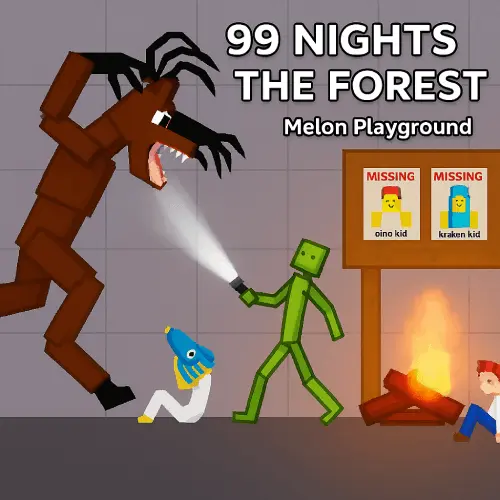
99 in the Forest Playground
99 in the Forest Playground is a pixel-style sandbox game built around player-made forest scenes. Instead of following one fixed campaign, you place characters, objects, buildings, structures, and…
 Works on Desktop & Mobile
Tested By BunaGames
- Test date
- June 19, 2026
- Tested on
- Chrome 150
- Device
- Desktop
- Operating system
- macOS and Windows
- Game loaded successfully
- Yes
- Fullscreen works
- Yes
- Sound works
- Yes
- Save progress
- Local browser storage
- Mobile compatibility
- Partially tested
- Keyboard controls
- Working
- Controller support
- Not detected
- Average loading time
- 4.2 seconds
- Known issues
- Minor delay after entering fullscreen
99 in the Forest Playground not loading?
- Refresh the page.
- Disable restrictive content blockers temporarily.
- Confirm JavaScript and WebGL are enabled.
- Clear the browser cache.
- Try another modern browser.
- Close unnecessary tabs.
- Switch off VPN if the game server is blocked.
- Use the Report a Problem button if the issue continues.
Continue Playing
Daily Challenge

Play 6 minutes today in 99 in the Forest Playground.
Leaderboard
- 1Community rating4.6 ★
- 2Player likes694
- 3Total votes766
- 4Your local progress0%
Your progress is saved locally in this browser. No account required.
 Your progress is saved locally in this browser. No account required.
Game Progress & Challenges
Why Play This Game?
 Instant PlayPlay instantly in your browser.
 Mobile FriendlyOptimized for all devices.
 Free to PlayNo hidden fees.
About "99 in the Forest Playground"
99 in the Forest Playground is a pixel-style sandbox game built around player-made forest scenes. Instead of following one fixed campaign, you place characters, objects, buildings, structures, and action tools into a playground-like environment, then decide what happens next. The appeal is experimentation: a quiet scene can become a rescue setup, a chaotic battle, a funny ragdoll accident, or an imaginative story with its own rules.
The game uses a forest-themed cast and setting associated with deer, owls, kids, and other interactive characters. You can create situations by arranging pieces of the world, dressing up characters, adding weapons, and testing the result. Buildings are not just background decoration; they help give a scene a purpose, whether you are making a camp, a hideout, an obstacle area, or a dramatic encounter.
Although its name evokes survival horror and a dangerous forest, the central activity is creative sandbox play. There is room for action, destruction, shooting, and blasts, but there is also room for slower setup and storytelling. It is a good choice for players who enjoy open-ended browser games where the goal is not to beat a prescribed level, but to build an interesting scenario and see how the characters and physics-style interactions play out.
Gameplay
Gameplay in 99 in the Forest Playground begins with an open sandbox mindset. Rather than being assigned a single route through the forest, you create the situation yourself. Start by adding characters and arranging the setting, then introduce buildings, structures, equipment, or weapons to shape the scene. The result can be peaceful, comic, destructive, or tense depending on the combination you choose.
The game’s interaction loop is simple but flexible: select an item, place it in the play area, adjust the arrangement, and observe what happens when characters meet objects or action tools. Drag-and-drop placement makes the game approachable, while the available combinations give players reasons to keep experimenting. A deer and an owl can be part of a forest tableau; kids can become characters in a story; weapons and blasts can turn the same setup into an action sequence.
Ragdoll-style chaos is an important part of the fun. Positioning matters because the placement of a character, prop, structure, or weapon changes the outcome. A scene made for a dramatic fall, collision, or explosion may need several attempts before it looks the way you intended. That trial-and-adjust rhythm gives the sandbox its replay value.
There is no need to treat every creation as a serious challenge. One play session can focus on building a believable forest camp, while the next can test unusual character combinations or create a deliberately over-the-top chain of events. The game rewards curiosity more than speed. Players who set a clear mini-goal before placing items usually get more satisfying results than players who fill the screen without a plan.
Platform
99 in the Forest Playground is presented as an online browser sandbox game. It is designed for players who want to open a game page and begin creating scenes without treating the experience like a large, long-form survival title. The browser format suits short creative sessions as well as longer periods of experimenting with different placements and setups.
The game is especially suited to desktop or laptop play because its core interaction is selecting and dragging items into a scene. A larger screen can make it easier to arrange characters, buildings, and objects with precision, particularly when you are building a busy action sequence. The visual style is pixel-based, so the focus is on readable sprites, recognizable props, and clear scene construction rather than realistic graphics.
Because access can depend on the device, browser, connection, and local network rules, availability may vary by location. If the game opens normally on your device, you can use it as a creative online playground for forest stories, physics-driven mishaps, and player-designed action scenarios.
How to Play "99 in the Forest Playground"
Begin by thinking of a small scenario you want to create. A simple idea is enough: build a forest camp, make a deer encounter an owl, create a group scene with kids, or set up an action moment around a structure. Starting with a purpose prevents the sandbox from becoming visually cluttered before the scene has a clear focus.
- Select a character, object, building, structure, or action item from the available choices.
- Drag it into the play area and place it where it supports your idea.
- Add more pieces gradually instead of placing everything at once.
- Arrange characters so their position, direction, and distance from objects create a readable scene.
- Use dress-up options when you want characters to have a more distinct role in your story.
- Add weapons, shooting, or blast elements only after the basic setup is ready.
- Watch the outcome, then reposition or replace items to improve the result.
For a first session, keep the build small. Place one or two characters, one structure, and a limited number of props. Once you understand how the arrangement feels, expand it into a larger forest scene. This approach makes it easier to tell which item changed the result.
Try treating each setup like a miniature stage. Buildings establish a location, characters provide the cast, clothing can suggest a role, and weapons or explosions provide conflict. A good sandbox scene does not need many objects; it needs a recognizable idea. You might make a lookout area with an owl, a forest meeting around a building, or a chaotic stunt sequence designed around a dramatic fall. After each experiment, adjust only one or two elements. That is the fastest way to learn how placement affects the action.
Controls
The essential control style is drag and drop. Select an available character, object, building, structure, weapon, or clothing-related option, then move it into the sandbox scene. Careful placement is more useful than rushing, especially when you want to create a specific collision, fall, action setup, or story moment.
- Select items: Choose the character, prop, structure, or action element you want to use.
- Drag and drop: Move the selected item into the forest playground.
- Arrange scenes: Position pieces with space between them so the setup remains easy to read.
- Experiment: Change placements and combinations to test different outcomes.
- Build gradually: Add a few items at a time before introducing weapons or blasts.
Exact interface buttons can vary with the version and device. If an item does not produce the scene you expected, move it, simplify the layout, and test again. Sandbox play is about revising the setup as much as creating the first one.
Can "99 in the Forest Playground" Unblocked?
Players often search for an unblocked version when they want a browser game that can be opened easily during a break. 99 in the Forest Playground is an online sandbox experience, but access always depends on the browser, device, connection, and rules of the network you are using. A school, workplace, library, or managed network may restrict gaming sites, and those restrictions should be respected.
The best approach is to play from a permitted connection and use a current browser with a stable internet connection. Since the game relies on placing and arranging interactive items, a device with a comfortably sized screen and responsive pointer input can make scene building easier.
If a page does not load, the cause may be a local network rule, browser setting, connection issue, or temporary availability issue rather than a problem with the game itself. Do not rely on workarounds for blocked networks. When access is allowed, the browser format makes it convenient to jump into a quick forest scenario, test a few ragdoll-style interactions, and return later to build a more detailed creation.
Tips for "99 in the Forest Playground"
The strongest creations in 99 in the Forest Playground usually begin with a simple plan. Before adding objects, decide whether the scene is a peaceful forest story, a survival-inspired encounter, a funny accident, or an action experiment. This gives every character and structure a job instead of making the play area feel random.
- Build the setting first: Place buildings and structures before filling the scene with characters. This establishes where the action is happening.
- Use a small cast: Start with one or two characters, such as a deer or owl, then add more only when they improve the idea.
- Leave visual space: Spread objects out enough that you can see interactions and understand the result of each change.
- Create a focal point: Put the most important character, prop, or action event where it is easy to notice.
- Add action last: Weapons, shooting, and blasts are more effective after you have built a readable scene around them.
- Test one change at a time: If a setup becomes chaotic, remove extra elements and identify which placement caused the effect.
- Use clothing with purpose: Dress-up options can help separate characters into roles for a story or challenge.
A useful advanced habit is to make “before” and “after” scenes. First create a stable forest setting with characters and a structure. Then make a second version with an action tool or destructive event. Comparing the two helps you understand how a single addition changes the mood and outcome.
Do not assume bigger is always better. A small scene with a clear beginning, conflict, and result can be more entertaining than a crowded screen. For example, a character near a building, a nearby obstacle, and one carefully chosen action element can provide a complete mini-story. Save your largest setups for when you have already tested the main interactions individually.
Features "99 in the Forest Playground"
99 in the Forest Playground combines forest-themed characters with open sandbox tools. Its feature set supports freeform scene construction rather than a narrow level-by-level structure, allowing you to create your own situations and repeat them in new ways.
- Forest sandbox setting: Build stories and action scenes in a forest-focused playground environment.
- Pixel-style presentation: The game uses a pixel-based visual approach suited to clear characters, props, and structures.
- Character creation: Place interactive characters including deer, owls, and kids as part of custom scenarios.
- Buildings and structures: Add constructed elements to form camps, meeting areas, obstacles, backdrops, or improvised arenas.
- Drag-and-drop interaction: Create scenes by selecting items and placing them directly into the sandbox.
- Dress-up options: Change character presentation to help establish roles in your own stories.
- Action tools: Use weapons, shooting, and blasts when you want a more chaotic or combat-focused scene.
- Ragdoll-style moments: Experiment with falls, collisions, and unpredictable outcomes created by placement and action.
- Open-ended replay value: Reuse the available pieces in different combinations instead of repeating one fixed mission.
The most valuable feature is the freedom to shift between play styles. You can approach it as a creative building toy, a character dress-up scene maker, an action playground, or a source of physics-driven comedy. The forest theme gives the sandbox a recognizable identity, while the ability to combine people, animals, buildings, and weapons keeps individual scenes from feeling identical.
This flexibility also makes the game easy to revisit. A player who made a quiet camp scene earlier can return later and rebuild the same space as an obstacle course, a dramatic confrontation, or a chain-reaction experiment. The tools remain familiar, but the purpose of the scene changes with your imagination.
Best "99 in the Forest Playground" Similar Games & Top Picks
- Hello Neighbor: Play Hello Neighbor, a stealth horror game about entering a suspicious house, avoiding a smart Neighbor, and uncovering a basement secret.
- Eyes: The Horror Game: Play Eyes: The Horror Game online and face ghosts, traps, jump scares, and tense survival horror locations.
- Plants vs Zombies 2 “PVZ 2”: Play Plants vs Zombies 2 PVZ 2 online. Build plant defenses, stop zombie waves, learn controls, and use smart lane-defense tactics.
- Jolly 2: Play Jolly 2 online, a tense point-and-click survival horror game with nightshift challenges, exploration, and frightening surprises.
- Ultimate Custom Night UCN: Play Ultimate Custom Night UCN online and build a custom FNAF survival challenge with 50 selectable characters and adjustable difficulty.
FAQ - 99 in the Forest Playground
What is 99 in the Forest Playground?
99 in the Forest Playground is a pixel-style online sandbox game where players create forest scenes with characters, objects, buildings, structures, clothing-related options, and action tools. It is centered on experimentation rather than a single fixed storyline or campaign.
Is 99 in the Forest Playground a survival game?
The game has a forest theme and a title that suggests survival horror, but the supported gameplay focus is sandbox creation. You can make challenging or dangerous-looking scenarios, yet the main activity is arranging characters and objects to create your own situations.
How do I play the game?
Select an available item and drag it into the sandbox area. Build a scene with characters and structures, then add props or action elements. Watch the result, adjust placements, and try another combination. Starting with a small idea makes the creative process easier.
What characters can I use?
The game includes forest-related characters such as deer and owls, along with kids. These characters can be placed into player-made scenes and used as part of a story, a peaceful setting, or a more chaotic action setup.
Can I build buildings and structures?
Yes. Buildings and structures are part of the sandbox options described for the game. They can be used to create a location, give characters a setting, form an obstacle, or make an action scene feel more organized and purposeful.
Are there weapons and explosions in 99 in the Forest Playground?
Yes. The game includes action-oriented options involving weapons, shooting, and blasts. These tools can be used to create energetic scenes, but they work best after you have arranged the characters and environment you want to affect.
Does the game have ragdoll gameplay?
The game is associated with sandbox ragdoll action and crazy falls. Positioning characters and objects can lead to physical, comedic, or chaotic outcomes. Because results depend on the arrangement you make, experimenting with placement is part of the experience.
Can I play 99 in the Forest Playground unblocked?
The game is available as an online browser experience when the game page is accessible on your device and connection. However, networks at schools, workplaces, and other managed locations may limit game access. Play only where browser gaming is permitted and follow local network rules.
More Games Like This
 Slenderman
Horror ★ 4.7
Slenderman
Horror ★ 4.7
 Bendy And The Ink Machine
Horror ★ 4.6
Bendy And The Ink Machine
Horror ★ 4.6
 Papas Sushiria
Horror ★ 4.6
Papas Sushiria
Horror ★ 4.6
 Papas Wingeria
Horror ★ 4.6
Papas Wingeria
Horror ★ 4.6
 Papas Scooperia
Horror ★ 4.7
Papas Scooperia
Horror ★ 4.7
 Papas Pizzeria
Horror ★ 4.6
Papas Pizzeria
Horror ★ 4.6
 Papas Freezeria
Horror ★ 4.6
Papas Freezeria
Horror ★ 4.6
 Fnaf 3
Horror ★ 4.7
Fnaf 3
Horror ★ 4.7
 Fnaf 4
Horror ★ 4.7
Fnaf 4
Horror ★ 4.7
 Papas Taco Mia
Horror ★ 4.6
Papas Taco Mia
Horror ★ 4.6
 Papas Cupcakeria
Horror ★ 4.6
Papas Cupcakeria
Horror ★ 4.6
 Slide in the Woods
Horror ★ 4.3
Slide in the Woods
Horror ★ 4.3
 Scary Shawarma Kiosk: The Anomaly
Horror ★ 4.7
Scary Shawarma Kiosk: The Anomaly
Horror ★ 4.7
 FNAF Free Roam
Horror ★ 4.6
FNAF Free Roam
Horror ★ 4.6
 Who’s at the Door?
Horror ★ 4.6
Who’s at the Door?
Horror ★ 4.6
 FNF Silly Billy
Horror ★ 4.6
FNF Silly Billy
Horror ★ 4.6
 The Man from the Window
Horror ★ 4.6
The Man from the Window
Horror ★ 4.6
 Baldi
Horror ★ 4.7
Baldi
Horror ★ 4.7
 Report a Problem
Comments About 99 in the Forest Playground