



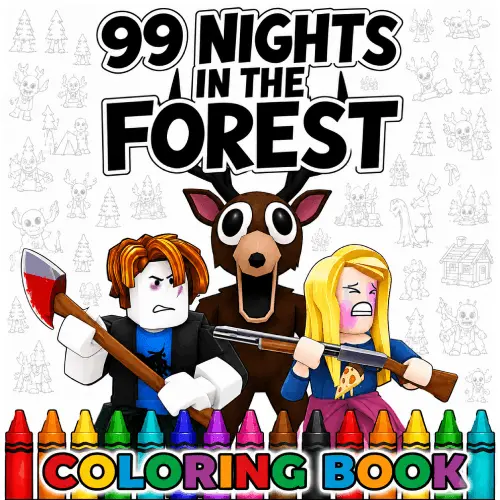
99 Nights in the Forest Coloring Pages
99 Nights in the Forest Coloring Pages turns the eerie atmosphere of a monster-filled woodland adventure into a calmer creative activity. Instead of asking players to survive a…
 Works on Desktop & Mobile
Tested By BunaGames
- Test date
- June 20, 2026
- Tested on
- Chrome 150
- Device
- Desktop
- Operating system
- macOS and Windows
- Game loaded successfully
- Yes
- Fullscreen works
- Yes
- Sound works
- Yes
- Save progress
- Local browser storage
- Mobile compatibility
- Partially tested
- Keyboard controls
- Working
- Controller support
- Not detected
- Average loading time
- 4.2 seconds
- Known issues
- Minor delay after entering fullscreen
99 Nights in the Forest Coloring Pages not loading?
- Refresh the page.
- Disable restrictive content blockers temporarily.
- Confirm JavaScript and WebGL are enabled.
- Clear the browser cache.
- Try another modern browser.
- Close unnecessary tabs.
- Switch off VPN if the game server is blocked.
- Use the Report a Problem button if the issue continues.
Continue Playing
Daily Challenge

Play 5 minutes today in 99 Nights in the Forest Coloring Pages.
Leaderboard
- 1Community rating4.7 ★
- 2Player likes1.2K
- 3Total votes1.3K
- 4Your local progress0%
Your progress is saved locally in this browser. No account required.
 Your progress is saved locally in this browser. No account required.
Game Progress & Challenges
Why Play This Game?
 Instant PlayPlay instantly in your browser.
 Mobile FriendlyOptimized for all devices.
 Free to PlayNo hidden fees.
About "99 Nights in the Forest Coloring Pages"
99 Nights in the Forest Coloring Pages turns the eerie atmosphere of a monster-filled woodland adventure into a calmer creative activity. Instead of asking players to survive a dangerous night, this coloring experience focuses on bringing dark forest scenes, recognizable characters, and suspenseful moments to life with color.
The artwork is inspired by familiar elements associated with the setting: The Deer, the Owl, campfires, missing kids, mysterious cultists, aliens, and shadowy monsters hidden among the trees. That mix gives the page a clear horror-game identity while keeping the activity approachable for players who want to create rather than compete.
It is a useful choice for fans who enjoy Roblox-inspired forest horror imagery but also want a break from tense survival themes. You can treat each picture as a dramatic nighttime scene, use traditional spooky colors, or redesign the world with bright and unexpected shades. The goal is not to find one correct palette; it is to make each forest illustration your own.
Because the source material is built around suspense, darkness, and unknown dangers, even a simple coloring page can suggest a story. A glowing fire may feel safe, a dark treeline may feel threatening, and a character’s colors can change the mood from playful to unsettling.
Gameplay
The central activity is coloring artwork based on the world and visual themes of 99 Nights in the Forest. Players work with illustrated scenes rather than taking part in a survival challenge. This distinction matters: the forest danger, monsters, and mysterious characters provide the creative subject, while the gameplay is about choosing colors and shaping the final look of each image.
Scenes may emphasize different parts of the setting. A campfire picture invites warm orange, yellow, and red lighting against a cool nighttime background. A page featuring The Deer or the Owl can become a character study, with attention placed on fur, feathers, eyes, shadows, and the surrounding trees. Images involving missing kids, cultists, or strange visitors can be colored to feel ominous, dramatic, humorous, or completely different from the expected horror mood.
The strongest way to approach a page is to think in layers:
- Foreground: Color the main character or object first so it remains the visual focus.
- Light source: Decide whether the scene is lit by a campfire, moonlight, or an unnatural glow.
- Background: Use deeper forest shades behind the main subject to create distance.
- Details: Add contrast to eyes, symbols, flames, branches, and other small areas last.
This is a low-pressure horror-game activity. There is no need to rush through a scene or copy a specific reference. The fun comes from recognizing the forest-inspired entities and deciding how threatening, mysterious, or colorful the finished page should look.
Platform
This page is designed for people looking for a browser-based coloring activity rather than a downloadable coloring-book collection. The competitor results repeatedly connect the theme with printable pages and online coloring, while this BunaGames page is aimed at visitors who want to access the experience through a game page.
A browser format is especially convenient for short creative sessions. You can open the page when you want a quick spooky activity, spend time on one character or scene, and return when you are ready to continue exploring the forest-inspired artwork. It also suits fans who want to engage with the visual side of the setting without needing to prepare paper coloring supplies.
The content is best understood as digital fan-style coloring entertainment centered on recognizable horror imagery. It is not presented as an official survival guide, a story archive, or a replacement for the original game world. Its value comes from the illustrations: dark woods, nighttime tension, campfire imagery, unusual creatures, and the characters that make the forest setting memorable.
For more quick-to-access entertainment, BunaGames also offers a broad selection of browser games.
How to Play "99 Nights in the Forest Coloring Pages"
Start by looking over the available illustration before making your first color choice. In a horror-themed coloring scene, the most important decision is usually the mood. Ask whether you want the picture to feel like a cold moonlit forest, a dangerous campfire encounter, a strange alien visit, or a bright alternate version of the world.
- Identify the focal point. Find the character, creature, campfire, or event that should stand out most clearly.
- Choose a limited base palette. Forest greens, browns, grays, blues, and black can establish a traditional nighttime setting. Add brighter colors only where you want attention.
- Set the lighting. Firelight works well with orange and gold tones, while moonlight can use pale blue, silver, and cool gray.
- Color large areas first. Background sky, trees, ground, and major clothing or creature areas establish the scene quickly.
- Finish with small details. Eyes, flames, markings, feathers, shadows, and mysterious symbols can make the illustration feel more complete.
There is no required story outcome. A campfire can become a safe gathering place or an isolated warning light. The Deer can look natural, supernatural, colorful, or nearly invisible against the trees. The Owl can be a quiet observer or a vivid focal point. Use the known forest-horror elements as prompts, not restrictions.
If a page includes several characters, separate them with contrast. For example, keep the background dark and give the central figure a lighter outline or brighter clothing. If the picture feels too busy, choose one accent color, such as red for danger or purple for an unnatural presence, and repeat it in only a few meaningful places.
Controls
Coloring games are most enjoyable when you work deliberately rather than trying to finish every area at once. Begin with the largest visible shapes, then move toward smaller details that define the scene’s personality.
On a browser-based coloring page, follow the on-screen interaction prompts provided by the game interface. The exact available tools can vary, so use the visible color choices and any clearly labeled options on the page instead of assuming that every coloring game has the same functions.
- Use the displayed selection method to choose a color.
- Apply color to the area you want to change.
- Check edges around characters, flames, branches, and facial details before moving on.
- Use any visible reset, change-color, or save option only as labeled by the game.
A useful creative control is palette discipline. Pick a few main colors before beginning, then reserve your brightest shade for the campfire, eyes, alien details, or another story-important object. That choice gives a dark forest illustration a clearer visual hierarchy.
Can "99 Nights in the Forest Coloring Pages" Unblocked?
99 Nights in the Forest Coloring Pages is suited to players seeking a straightforward online creative activity with a spooky theme. The page focuses on coloring forest-horror artwork, making it a lighter alternative to fast-paced action or survival gameplay.
Access can depend on the browser, device settings, network rules, and the availability of the game page in your location. If a page does not load as expected, check that your browser is current, refresh the page, and make sure normal site content is allowed. Do not rely on third-party bypass tools or unfamiliar downloads to access a browser game.
The useful part of an online coloring format is its flexibility. You can spend a few minutes experimenting with one campfire or creature scene, or take longer to build a consistent color style across the full image. The activity does not require you to memorize a survival route, defeat a monster, or reach a final night. The creative result is the reward.
For a quick session, choose a picture with one obvious main figure. For a longer session, select a detailed forest scene with multiple characters, trees, shadows, and lighting areas to develop.
Tips for "99 Nights in the Forest Coloring Pages"
Good horror coloring is less about using only black and more about controlling contrast. A page can remain dark, mysterious, and clearly readable when you balance deep backgrounds with a few intentional highlights.
- Build the forest from cool tones. Dark green, blue, gray, and muted brown help trees and nighttime spaces recede behind the main scene.
- Make firelight warm. Use yellow at the center of a campfire, orange around it, and darker red or brown toward the outer edges. This creates a believable focal glow without needing complex effects.
- Give The Deer a recognizable silhouette. Keep the character separate from the forest with a lighter edge, an unusual fur color, or brighter eyes if the art allows it.
- Use the Owl as an observer. Pale feathers or a strong eye color can make an owl noticeable even when the rest of the picture is dark.
- Reserve red carefully. A little red can signal danger, cult imagery, a warning, or a dramatic detail. Too much can flatten the scene.
- Try an unnatural accent. Purple, neon green, or electric blue can fit alien or supernatural details while keeping the rest of the forest grounded.
- Color the story, not just the objects. Decide what happened before the illustrated moment. Are the missing kids near safety? Is the campfire fading? Is something watching from the treeline?
If you are unsure where to begin, color the light source first. A warm campfire immediately tells you which nearby areas should be lighter and which distant trees should stay darker. This simple decision creates depth and makes even a basic scene feel more cinematic.
Finally, do not be afraid to make a playful version. The subject matter is spooky, but a colorful Owl, rainbow forest, or bright alien sky can turn the same illustration into a personal alternate-world design.
Features "99 Nights in the Forest Coloring Pages"
This coloring experience covers the visual language that fans expect from 99 Nights in the Forest-inspired art: a dark woodland setting, uneasy nighttime scenes, strange creatures, character-focused images, and campfire-centered moments. Rather than concentrating on one repeated image type, the wider theme supports different creative directions.
- Forest horror atmosphere: Trees, darkness, shadows, and isolated clearings provide a suspenseful setting for every color choice.
- Recognizable entities: The Deer, Owl, missing kids, cultists, aliens, and other monsters give players several visual subjects to explore.
- Campfire scenes: Warm firelight creates an immediate contrast against cold nighttime surroundings.
- Flexible difficulty: Simple pictures can suit quick coloring sessions, while detailed scenes offer more areas for shading and color planning.
- Creative reinterpretation: Players can follow a traditional eerie palette or create a completely original version of the forest.
- Horror without pressure: The subject is suspenseful, but the activity itself is calm and self-paced.
The main information advantage of a coloring page is that it lets players engage with the setting’s imagery without confusing it with survival gameplay. The danger is part of the scene’s inspiration, not a task that has to be completed. A monster can be colored slowly, a campfire can be redesigned, and an ominous forest can become as dark or as cheerful as you decide.
That makes the page useful for fans of spooky game art, Roblox-style coloring interests, and anyone who enjoys turning familiar characters and locations into a finished personal picture.
Best "99 Nights in the Forest Coloring Pages" Similar Games & Top Picks
- Hello Neighbor: Play Hello Neighbor, a stealth horror game about entering a suspicious house, avoiding a smart Neighbor, and uncovering a basement secret.
- Eyes: The Horror Game: Play Eyes: The Horror Game online and face ghosts, traps, jump scares, and tense survival horror locations.
- Plants vs Zombies 2 “PVZ 2”: Play Plants vs Zombies 2 PVZ 2 online. Build plant defenses, stop zombie waves, learn controls, and use smart lane-defense tactics.
- Jolly 2: Play Jolly 2 online, a tense point-and-click survival horror game with nightshift challenges, exploration, and frightening surprises.
- Ultimate Custom Night UCN: Play Ultimate Custom Night UCN online and build a custom FNAF survival challenge with 50 selectable characters and adjustable difficulty.
FAQ - 99 Nights in the Forest Coloring Pages
What is 99 Nights in the Forest Coloring Pages?
It is a horror-themed coloring experience based on the visual world associated with 99 Nights in the Forest. The artwork centers on spooky woodland scenes and recognizable elements such as The Deer, the Owl, campfires, missing kids, cultists, aliens, and monsters.
Is this a survival game?
No. The theme draws from a forest-horror setting, but the activity here is coloring. You are working with illustrated scenes and deciding how they should look rather than trying to survive enemies or complete a nighttime challenge.
What characters and scenes can the coloring theme include?
The available research repeatedly associates the coloring pages with The Deer, the Owl, missing kids, campfire scenes, cultists, aliens, and other frightening forest creatures. Specific artwork can emphasize one character, a group scene, or the dark environment around them.
Can I make the pictures less scary?
Yes. Coloring gives you control over the mood. Use bright skies, colorful trees, cheerful clothing, or playful creature colors to create a lighter version of the forest. If you prefer a more traditional horror appearance, use dark greens, grays, blues, black, and small warm highlights from a campfire.
What colors work best for a campfire scene?
Start with yellow near the center of the flames, add orange around it, and use red or darker brown toward the outside. Pair the fire with cooler blue, gray, or green shades in the trees and night sky. The warm-versus-cool contrast helps the campfire look brighter and makes nearby characters easier to notice.
How can I make The Deer stand out from the background?
Keep the surrounding trees and ground darker or less saturated than the character. Then use a slightly lighter outline, distinct fur tones, or a small bright accent around the eyes or antlers if those details appear in the illustration. This separates the figure from a dense forest without losing the eerie atmosphere.
Is the page suitable for Roblox fans?
The research connects these coloring pages with Roblox coloring interests and fans of the 99 Nights in the Forest theme. It is best for players who recognize the setting or simply enjoy stylized spooky forest art. The coloring activity itself does not require knowledge of a specific game strategy.
Do I need to use a realistic color palette?
No. Realistic shades can create a cinematic nighttime forest, but there is no required palette. You can use neon colors for alien details, bright feathers for the Owl, unusual colors for The Deer, or a fantasy sky above the trees. The best result is the one that makes the scene feel memorable to you.
More Games Like This
 Slenderman
Horror ★ 4.7
Slenderman
Horror ★ 4.7
 Bendy And The Ink Machine
Horror ★ 4.6
Bendy And The Ink Machine
Horror ★ 4.6
 Papas Sushiria
Horror ★ 4.6
Papas Sushiria
Horror ★ 4.6
 Papas Wingeria
Horror ★ 4.6
Papas Wingeria
Horror ★ 4.6
 Papas Scooperia
Horror ★ 4.7
Papas Scooperia
Horror ★ 4.7
 Papas Pizzeria
Horror ★ 4.6
Papas Pizzeria
Horror ★ 4.6
 Papas Freezeria
Horror ★ 4.6
Papas Freezeria
Horror ★ 4.6
 Fnaf 3
Horror ★ 4.7
Fnaf 3
Horror ★ 4.7
 Fnaf 4
Horror ★ 4.7
Fnaf 4
Horror ★ 4.7
 Papas Taco Mia
Horror ★ 4.6
Papas Taco Mia
Horror ★ 4.6
 Papas Cupcakeria
Horror ★ 4.6
Papas Cupcakeria
Horror ★ 4.6
 Slide in the Woods
Horror ★ 4.3
Slide in the Woods
Horror ★ 4.3
 Scary Shawarma Kiosk: The Anomaly
Horror ★ 4.7
Scary Shawarma Kiosk: The Anomaly
Horror ★ 4.7
 FNAF Free Roam
Horror ★ 4.6
FNAF Free Roam
Horror ★ 4.6
 Who’s at the Door?
Horror ★ 4.6
Who’s at the Door?
Horror ★ 4.6
 FNF Silly Billy
Horror ★ 4.6
FNF Silly Billy
Horror ★ 4.6
 The Man from the Window
Horror ★ 4.6
The Man from the Window
Horror ★ 4.6
 Baldi
Horror ★ 4.7
Baldi
Horror ★ 4.7
 Report a Problem
Comments About 99 Nights in the Forest Coloring Pages