



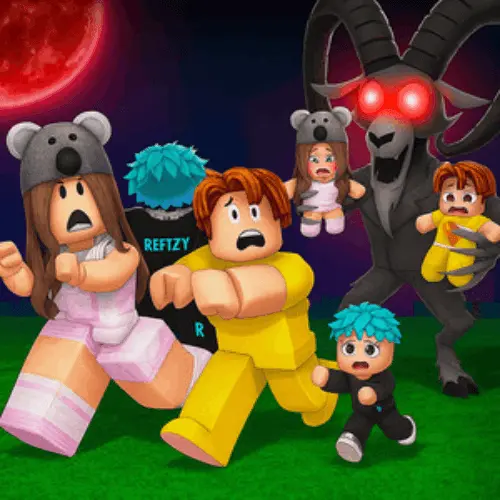
99 Nights in the Forest – Find All the Kids!
99 Nights in the Forest - Find All the Kids! is a horror-focused forest search experience built around one urgent objective: locate and rescue the four Missing Children.…
 Works on Desktop & Mobile
Tested By BunaGames
- Test date
- June 20, 2026
- Tested on
- Chrome 150
- Device
- Desktop
- Operating system
- macOS and Windows
- Game loaded successfully
- Yes
- Fullscreen works
- Yes
- Sound works
- Yes
- Save progress
- Local browser storage
- Mobile compatibility
- Partially tested
- Keyboard controls
- Working
- Controller support
- Not detected
- Average loading time
- 4.2 seconds
- Known issues
- Minor delay after entering fullscreen
99 Nights in the Forest – Find All the Kids! not loading?
- Refresh the page.
- Disable restrictive content blockers temporarily.
- Confirm JavaScript and WebGL are enabled.
- Clear the browser cache.
- Try another modern browser.
- Close unnecessary tabs.
- Switch off VPN if the game server is blocked.
- Use the Report a Problem button if the issue continues.
Continue Playing

Daily Challenge

Play 4 minutes today in 99 Nights in the Forest – Find All the Kids!.
Leaderboard
- 1Community rating4.4 ★
- 2Player likes524
- 3Total votes617
- 4Your local progress0%
Your progress is saved locally in this browser. No account required.
 Your progress is saved locally in this browser. No account required.
Game Progress & Challenges
Why Play This Game?
 Instant PlayPlay instantly in your browser.
 Mobile FriendlyOptimized for all devices.
 Free to PlayNo hidden fees.
About "99 Nights in the Forest – Find All the Kids!"
99 Nights in the Forest - Find All the Kids! is a horror-focused forest search experience built around one urgent objective: locate and rescue the four Missing Children. The children were kidnapped by The Deer, making each successful rescue part of the central goal rather than a side activity.
Instead of treating the forest as simple scenery, the game’s premise gives exploration a clear purpose. You are looking for information, choosing which child to pursue, and working through an unsettling environment where the threat behind the disappearances matters to the story. The title is especially suited to players who want a focused objective in a dark survival-horror setting rather than an open-ended challenge with no direction.
A key piece of the search process is the missing-kids billboard. Interacting with it lets you choose the child you are trying to find, turning the broad goal of rescuing everyone into a more deliberate sequence of targets. The four children include the Dino Kid, Kraken Kid, and Squid Kid; the reliable overall objective is to bring all four children back.
Play it as a browser horror challenge when you want a direct mission, tense forest atmosphere, and a practical reason to pay attention to every clue and interaction.
Gameplay
The gameplay loop in 99 Nights in the Forest - Find All the Kids! centers on target selection, forest exploration, and rescue progress. Your larger mission is fixed: all four Missing Children must be found. Your immediate mission can be more specific, because the billboard allows you to select the child you are currently seeking.
That selection step matters. It gives the search structure and prevents the objective from feeling like a vague instruction to wander through the woods. Before moving on, identify the child you want to pursue at the billboard, then treat the rest of the session as a focused attempt to advance that rescue. Once a child has been rescued, return your attention to the remaining children until the full objective is complete.
The horror context comes from the children’s connection to The Deer. The Deer is identified as their kidnapper, so the forest search is not merely a collection task. It is an investigation and rescue mission framed by a hostile, ominous premise. Players looking for the most useful route into the game should prioritize objective awareness over aimless exploration.
- Find the missing-kids billboard.
- Interact with it to open the child-selection step.
- Choose a missing child with the mouse.
- Explore with that rescue target in mind.
- Repeat the process until all four children are rescued.
The strongest way to approach the game is methodically. Keep track of which children are already safe, which target is selected, and whether you have returned to the billboard when you need to change priorities. This turns a potentially confusing search into a series of manageable objectives.
Platform
99 Nights in the Forest - Find All the Kids! is presented on BunaGames as a browser game, so you can start it from the game page without treating it like a separate download-based product. It fits players who want to open a horror game quickly, understand the mission, and begin working toward the missing-children objective in one place.
The game’s reported interaction method is also compatible with a desktop-style browser setup: use the E key to interact with the billboard, then use the mouse to choose a child. A keyboard and mouse provide the clearest way to handle that specific objective-selection interaction.
Because the core task depends on reading the board and making a selection, play with enough screen visibility to notice the billboard prompt and the child choices. If you are browsing for a quick objective-driven session, this game works best when you can pause, inspect the board, and pursue one rescue target at a time.
How to Play "99 Nights in the Forest – Find All the Kids!"
Begin by treating the rescue of the Missing Children as your only major priority. There are four children to save, and The Deer is identified as the force responsible for kidnapping them. The practical first step is to find the billboard that displays the missing children.
When you reach the billboard, interact with it using E. This opens the selection stage. Use the mouse to click the child you want to look for. Choosing a target is important because it defines the immediate rescue objective instead of leaving you to search without a plan.
- Enter the forest and look for the missing-kids billboard.
- Stand close enough to use the interaction prompt.
- Press E on the billboard.
- Use the mouse to select the child you are seeking.
- Continue your forest search with that selected child as the active goal.
- After making rescue progress, return to the board when you need to choose another child.
- Continue until all four Missing Children have been rescued.
The game is easier to understand when you divide the full objective into four individual rescue attempts. Rather than trying to remember every child at once, select one, stay focused on that target, then move on. The known child labels include Dino Kid, Kraken Kid, and Squid Kid, while the complete objective remains the rescue of all four children.
Do not overlook the interaction sequence. Simply finding the billboard is not the full process: you must use E and then click the chosen child with the mouse. That two-part action is the clearest confirmed gameplay instruction and the most valuable thing to remember when beginning a run.
Controls
The confirmed controls for the missing-children objective are simple and specific. Use the keyboard to interact with the billboard, then use the mouse to select the child you want to search for.
| Input | Action |
|---|---|
| E key | Interact with billboard |
| Mouse click | Select a child |
Stand at the missing-kids billboard before pressing E. After the interaction opens the available child choices, move the cursor to the desired child and click. This sequence is useful whenever you need to set or change your current rescue target.
If the board does not respond, check that your character is positioned close enough to the billboard before using the interaction key. Once the selection appears, use a deliberate mouse click so you do not choose the wrong target by mistake.
Can "99 Nights in the Forest – Find All the Kids!" Unblocked?
You can play 99 Nights in the Forest - Find All the Kids! through its BunaGames page as a browser-based horror game. This makes it a practical option for players searching for a game they can open online and begin without relying on a separate storefront page.
The most useful way to start is to load the game, look for the missing-kids billboard, and set a child as your current objective. Since the game’s key mission is to rescue four children, a short session can still feel purposeful: select one child, focus your search, and build progress toward the complete rescue goal.
For a smoother browser session, keep the game page active while using the keyboard and mouse. The documented objective interaction uses E followed by a mouse selection, so avoiding unnecessary tab changes can help you stay ready when you reach the billboard.
Tips for "99 Nights in the Forest – Find All the Kids!"
Start every serious search with a defined objective. The missing-kids billboard is more than background detail: it is the confirmed tool for choosing which child to seek. Press E at the board and use the mouse to select one child before committing to exploration.
Think in single-target passes. The overall mission is to rescue four Missing Children, but trying to mentally chase all of them at once can make progress feel unclear. Pick one child, make that rescue your active focus, then return to the billboard to select another. This approach creates a simple loop: choose, search, rescue, repeat.
- Use the board first: Do not assume every forest trip has the same target. Confirm your selected child before moving on.
- Remember the two-part interaction: E opens the billboard interaction; mouse clicks choose the child.
- Track completed rescues: The finish condition is all four children, so keep a clear mental count of who still needs help.
- Stay objective-led: The forest setting can encourage wandering, but the strongest progress comes from searching with a selected child in mind.
- Read names carefully: Known labels include Dino Kid, Kraken Kid, and Squid Kid. Selecting deliberately helps you avoid pursuing the wrong goal.
The main information advantage in this game is knowing that the billboard is actionable. Players who only explore may miss the system that turns the broad rescue premise into an organized search. Use the billboard as your planning point whenever you begin, resume, or change a rescue attempt.
Finally, remember the story context: The Deer kidnapped the children. That detail explains why rescuing them is the central objective and why the game belongs naturally in a horror setting. Treat each successful rescue as meaningful progress toward resolving the core threat, not as a disconnected collectible.
Features "99 Nights in the Forest – Find All the Kids!"
99 Nights in the Forest - Find All the Kids! combines a clearly defined rescue mission with a dark forest-horror premise. Its most important feature is objective clarity: there are four Missing Children, and rescuing them is one of the game’s main goals.
- Four-child rescue objective: Work toward finding and saving every Missing Child.
- The Deer story threat: The children are identified as having been kidnapped by The Deer.
- Interactive missing-kids billboard: Use the board to begin the child-selection process.
- Target-based searching: Choose a child with the mouse after interacting with the billboard.
- Recognizable child labels: The reported targets include Dino Kid, Kraken Kid, and Squid Kid.
- Horror-game framing: The forest search is shaped by an unsettling kidnapping premise rather than a neutral scavenger hunt.
- Browser access: Open the game from BunaGames for a direct online play session.
The game’s useful design distinction is that it gives players both a long-term and short-term goal. The long-term goal is rescuing all four children. The short-term goal is the individual child selected through the billboard. This creates a practical sense of progression even when the player is concentrating on a single rescue at a time.
The billboard mechanic is also the feature most worth learning early. It provides a concrete interaction point and links the story objective to player action. Rather than guessing what to do next, players can use E at the board, click a child, and continue the forest search with a specific target in mind.
Best "99 Nights in the Forest – Find All the Kids!" Similar Games & Top Picks
- Hello Neighbor: Play Hello Neighbor, a stealth horror game about entering a suspicious house, avoiding a smart Neighbor, and uncovering a basement secret.
- Eyes: The Horror Game: Play Eyes: The Horror Game online and face ghosts, traps, jump scares, and tense survival horror locations.
- Plants vs Zombies 2 “PVZ 2”: Play Plants vs Zombies 2 PVZ 2 online. Build plant defenses, stop zombie waves, learn controls, and use smart lane-defense tactics.
- Jolly 2: Play Jolly 2 online, a tense point-and-click survival horror game with nightshift challenges, exploration, and frightening surprises.
- Ultimate Custom Night UCN: Play Ultimate Custom Night UCN online and build a custom FNAF survival challenge with 50 selectable characters and adjustable difficulty.
FAQ - 99 Nights in the Forest – Find All the Kids!
What is 99 Nights in the Forest - Find All the Kids!?
It is a horror-focused forest game centered on rescuing Missing Children. The game’s main objective includes finding all four children who were kidnapped by The Deer.
How many missing children are there?
There are four Missing Children to rescue. The full goal is to find and save all four, not just one selected target.
Who kidnapped the missing children?
The Deer is identified as the kidnapper of the four Missing Children. This is the central story threat behind the rescue mission and the game’s horror atmosphere.
How do I choose which child to find?
Find the billboard that shows the missing kids. Interact with the billboard by pressing E, then use the mouse to click the child you want to look for. This sets a clear immediate target for your search.
What controls are confirmed for the billboard?
Press the E key to interact with the missing-kids billboard. After the board interaction opens, click the chosen child with the mouse. These are the key confirmed inputs for selecting a rescue target.
Which children are mentioned in the game guides?
Reported child names include the Dino Kid, Kraken Kid, and Squid Kid. The broader objective remains rescuing all four Missing Children.
What should I do first when I start playing?
Look for the missing-kids billboard before treating the forest as an open-ended search area. Use E at the board, choose a child with the mouse, and then focus on that child’s rescue. This gives your session a clear direction from the beginning.
Can I play this game in a browser?
Yes. 99 Nights in the Forest - Find All the Kids! is available through its BunaGames game page as a browser-based experience. For the clearest interaction with the billboard, use a keyboard for E and a mouse for the child selection.
More Games Like This
 Slenderman
Horror ★ 4.7
Slenderman
Horror ★ 4.7
 Bendy And The Ink Machine
Horror ★ 4.6
Bendy And The Ink Machine
Horror ★ 4.6
 Papas Sushiria
Horror ★ 4.6
Papas Sushiria
Horror ★ 4.6
 Papas Wingeria
Horror ★ 4.6
Papas Wingeria
Horror ★ 4.6
 Papas Scooperia
Horror ★ 4.7
Papas Scooperia
Horror ★ 4.7
 Papas Pizzeria
Horror ★ 4.6
Papas Pizzeria
Horror ★ 4.6
 Papas Freezeria
Horror ★ 4.6
Papas Freezeria
Horror ★ 4.6
 Fnaf 3
Horror ★ 4.7
Fnaf 3
Horror ★ 4.7
 Fnaf 4
Horror ★ 4.7
Fnaf 4
Horror ★ 4.7
 Papas Taco Mia
Horror ★ 4.6
Papas Taco Mia
Horror ★ 4.6
 Papas Cupcakeria
Horror ★ 4.6
Papas Cupcakeria
Horror ★ 4.6
 Slide in the Woods
Horror ★ 4.3
Slide in the Woods
Horror ★ 4.3
 Scary Shawarma Kiosk: The Anomaly
Horror ★ 4.7
Scary Shawarma Kiosk: The Anomaly
Horror ★ 4.7
 FNAF Free Roam
Horror ★ 4.6
FNAF Free Roam
Horror ★ 4.6
 Who’s at the Door?
Horror ★ 4.6
Who’s at the Door?
Horror ★ 4.6
 FNF Silly Billy
Horror ★ 4.6
FNF Silly Billy
Horror ★ 4.6
 The Man from the Window
Horror ★ 4.6
The Man from the Window
Horror ★ 4.6
 Baldi
Horror ★ 4.7
Baldi
Horror ★ 4.7
 Report a Problem
Comments About 99 Nights in the Forest – Find All the Kids!