



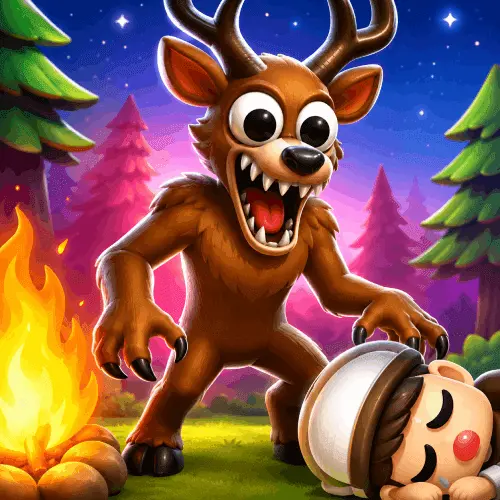
99 Nights In The Woods: Horror Story Original
99 Nights In The Woods: Horror Story Original is a browser survival horror game built around one urgent objective: keep a fire alive while enduring 99 haunted nights…
 Works on Desktop & Mobile
Tested By BunaGames
- Test date
- June 20, 2026
- Tested on
- Chrome 150
- Device
- Desktop
- Operating system
- macOS and Windows
- Game loaded successfully
- Yes
- Fullscreen works
- Yes
- Sound works
- Yes
- Save progress
- Local browser storage
- Mobile compatibility
- Partially tested
- Keyboard controls
- Working
- Controller support
- Not detected
- Average loading time
- 4.2 seconds
- Known issues
- Minor delay after entering fullscreen
99 Nights In The Woods: Horror Story Original not loading?
- Refresh the page.
- Disable restrictive content blockers temporarily.
- Confirm JavaScript and WebGL are enabled.
- Clear the browser cache.
- Try another modern browser.
- Close unnecessary tabs.
- Switch off VPN if the game server is blocked.
- Use the Report a Problem button if the issue continues.
Continue Playing

Daily Challenge

Play 7 minutes today in 99 Nights In The Woods: Horror Story Original.
Leaderboard
- 1Community rating4.6 ★
- 2Player likes752
- 3Total votes846
- 4Your local progress0%
Your progress is saved locally in this browser. No account required.
 Your progress is saved locally in this browser. No account required.
Game Progress & Challenges
Why Play This Game?
 Instant PlayPlay instantly in your browser.
 Mobile FriendlyOptimized for all devices.
 Free to PlayNo hidden fees.
About "99 Nights In The Woods: Horror Story Original"
99 Nights In The Woods: Horror Story Original is a browser survival horror game built around one urgent objective: keep a fire alive while enduring 99 haunted nights in a remote forest cabin. Its premise puts the fire at the center of the experience. It is more than scenery; it is the focal point of the player’s survival pressure as the nights continue.
The game is described as FNAF-inspired, placing it in a horror style that favors sustained tension, alert decision-making, and a confined setting over an open-world adventure format. Rather than promising a simple action challenge, the premise creates a long-form survival scenario: each night matters because it is part of a larger attempt to reach the end of the 99-night run.
The title is especially suited to players looking for a focused horror session in a web browser. The cabin, the surrounding woods, the haunted-night theme, and the fire-survival goal create a clear atmosphere without requiring players to learn a large fictional world first. Begin with the immediate problem, stay attentive to what the game presents, and treat each successful night as progress toward the full survival objective.
For players browsing more quick-to-start experiences, BunaGames also offers browser games across many genres.
Gameplay
The gameplay of 99 Nights In The Woods: Horror Story Original revolves around surviving a sequence of 99 haunted nights while protecting the cabin’s fire. That single goal gives the game a strong survival-horror identity: the player is not simply trying to finish a short level, but attempting to maintain safety and composure through an extended night-by-night challenge.
The remote forest cabin is the game’s key setting. A cabin suggests limited shelter, while the woods beyond it create uncertainty and isolation. Combined with the haunted-night premise, this setting makes attention valuable. Players should focus on the game’s immediate visual and audio information rather than rushing through interactions. In horror games, uncertainty is often part of the challenge, and this title’s central fire objective gives that uncertainty a practical purpose.
The FNAF-inspired description is useful context, but it should not be read as a claim that every mechanic from another horror series is present here. What is clearly established is the tension-driven format: a fixed survival objective, a threatening night setting, and the need to remain aware as the run advances. The game’s identity is its own cabin-and-woods scenario, centered on lasting through 99 nights.
Approach the experience as an endurance challenge. A successful session is not only about reacting to one frightening moment; it is about making careful choices repeatedly and avoiding mistakes that end a long attempt early. The best mindset is patient, observant, and prepared to learn from every failed run.
Platform
99 Nights In The Woods: Horror Story Original is presented as a browser game, so it is designed to be launched online rather than treated as a separate downloadable release. This makes it a practical choice for players who want to start a horror game from a game page without first looking for an installation process.
The available research identifies the game as a free browser horror experience. Open the game page, allow it to load, and use the on-screen instructions supplied by the playable version. Exact device support, performance requirements, and input layouts are not specified in the available game information, so the game’s own start screen and prompt text should be treated as the most reliable guide for the version currently available.
For the smoothest session, use a current browser, keep the game tab active, and avoid having many demanding tabs open at the same time. Horror games often depend on concentration, so playing in a stable browser window can make it easier to notice prompts and react to changes around the cabin.
How to Play "99 Nights In The Woods: Horror Story Original"
- Start the browser game and review its opening prompts. The available source material confirms the premise and objective, while the live game provides the specific interaction instructions for the current build.
- Identify the fire immediately. Keeping it alive is the core survival task stated for the game. Treat its condition and any related prompt as a priority whenever the game directs your attention there.
- Learn the cabin routine. The game is set in a remote forest cabin, so take a moment to understand what information is visible on screen, what can be interacted with, and how the game signals danger or changing conditions.
- Handle one night at a time. The long-term target is 99 haunted nights, but the useful short-term objective is to survive the current night without losing control of the fire-centered situation.
- Respond deliberately rather than randomly. Horror survival games reward attention. When something changes, check the available cues and choose the action that best supports the immediate survival objective.
- Use failed attempts as information. If a run ends, replay with a clearer plan. Notice which moment divided a stable night from a failed one, then prioritize that point on the next attempt.
The game’s premise does not publish a complete mechanical walkthrough, so avoid relying on assumed features such as a particular enemy pattern, inventory system, or map layout. The reliable goal is clear: sustain the fire and survive the nights. Let the playable version teach the exact steps needed to do that.
Controls
The available game descriptions do not provide an official keyboard or mouse control list. Because browser-game controls can differ between versions and updates, the most accurate approach is to follow the instructions shown when the game loads.
Before committing to a long run, test the available interactions during the opening moments. Check how the game registers selections, how you return to the main survival view after an interaction, and whether prompts request clicking, tapping, or keyboard input. If the game displays an instruction panel, read it before the first night becomes demanding.
- On-screen prompts: Use them as the primary control reference.
- Pointer or touch input: Follow the interaction method requested by the live game.
- Keyboard prompts: Use only keys explicitly shown in the game.
This approach prevents a common browser-game mistake: assuming controls from another FNAF-inspired title instead of using the instructions for 99 Nights In The Woods: Horror Story Original itself.
Can "99 Nights In The Woods: Horror Story Original" Unblocked?
99 Nights In The Woods: Horror Story Original is intended to be played in a web browser from its game page. If it does not start immediately, first check ordinary browser issues: wait for loading to finish, refresh the page once, confirm that the browser is updated, and make sure a content blocker is not preventing the game from loading.
Access can also depend on the network and device being used. School, workplace, library, and managed public networks may apply their own restrictions to online game sites. Those rules are set by the network administrator, not by the game itself. Use the game only where online gaming is permitted and do not attempt to bypass local security, filtering, or access policies.
At home or on a permitted connection, a stable internet connection and an active browser tab are the most useful basics. If the game loads but seems unresponsive, reload the page and read the opening instructions again before assuming that an in-game action has failed.
Tips for "99 Nights In The Woods: Horror Story Original"
Make the fire your constant reference point. The clearest documented mechanic is keeping the fire alive. Whenever the game presents several possible concerns, judge them against that objective first. A frightening event may demand attention, but the fire remains the survival anchor named by the game’s premise.
Do not treat the 99-night goal as one giant task. Think in smaller checkpoints. The current night is the practical challenge; completing it is meaningful progress. This mindset reduces rushed decisions and helps turn a long horror run into manageable stages.
Read every prompt before acting. The research does not establish a universal control scheme or a full list of systems, which makes the live game’s instructions especially important. A brief pause to understand an on-screen cue is usually more useful than repeatedly clicking through it.
Build familiarity early. The first moments of a run are the right time to notice the cabin view, interactive areas, warning signals, and the way the game communicates changes. Learning these basics before the atmosphere becomes more stressful makes later decisions more controlled.
Protect concentration. The remote-cabin setting and haunted-night objective are designed around tension. Use headphones only if they are comfortable, keep browser notifications from interrupting you, and avoid switching tabs during an active survival sequence. The goal is not simply to be startled; it is to recognize useful game information under pressure.
Avoid importing assumptions. “FNAF-inspired” describes a horror influence, not a complete mechanic list. Do not assume there are specific cameras, doors, characters, resources, or endings unless the playable game shows them. Observing what this game actually asks of you is a better strategy than following advice made for a different title.
Restart with a purpose. If a session ends, identify one concrete lesson: a prompt you missed, a fire-related priority you delayed, or a moment where you acted without checking the screen. Apply that one lesson in the next attempt instead of changing everything at once.
Features "99 Nights In The Woods: Horror Story Original"
A clear 99-night survival objective. The game gives players a defined long-term challenge: survive 99 haunted nights. This provides a stronger sense of progression than a single isolated scare, because every completed night contributes to the larger run.
Fire-centered survival pressure. Keeping the fire alive is the central stated task. That mechanic gives the horror setting a concrete priority and turns the cabin’s fire into an active part of the player’s decision-making rather than a background visual detail.
Remote forest cabin setting. The cabin and woods establish the game’s core atmosphere. Shelter is close at hand, but the forest setting maintains an isolated, uneasy tone appropriate for survival horror.
Haunted-night theme. The nights are explicitly described as haunted, giving the game a supernatural horror frame. The premise is focused and easy to understand: survive the darkness while maintaining the one thing that helps hold the situation together.
FNAF-inspired tension. The game is described as FNAF-inspired, signaling an emphasis on alertness and suspense. This is useful for players who enjoy horror experiences where awareness and timing matter as much as courage.
Browser-based access. The game is offered as an online browser experience, making it easy to begin from a game page. The browser format suits players who want a direct horror session without treating the game as a lengthy download-based commitment.
Focused premise instead of unnecessary complexity. The available information does not overstate a large collection of systems. Its strongest feature is clarity: a fire, a forest cabin, haunted nights, and a demanding survival count. That directness helps players understand the stakes before the game even begins.
Best "99 Nights In The Woods: Horror Story Original" Similar Games & Top Picks
- Hello Neighbor: Play Hello Neighbor, a stealth horror game about entering a suspicious house, avoiding a smart Neighbor, and uncovering a basement secret.
- Eyes: The Horror Game: Play Eyes: The Horror Game online and face ghosts, traps, jump scares, and tense survival horror locations.
- Plants vs Zombies 2 “PVZ 2”: Play Plants vs Zombies 2 PVZ 2 online. Build plant defenses, stop zombie waves, learn controls, and use smart lane-defense tactics.
- Jolly 2: Play Jolly 2 online, a tense point-and-click survival horror game with nightshift challenges, exploration, and frightening surprises.
- Ultimate Custom Night UCN: Play Ultimate Custom Night UCN online and build a custom FNAF survival challenge with 50 selectable characters and adjustable difficulty.
FAQ - 99 Nights In The Woods: Horror Story Original
What is 99 Nights In The Woods: Horror Story Original?
99 Nights In The Woods: Horror Story Original is a browser survival horror game set around a remote forest cabin. The central objective is to keep a fire alive while surviving 99 haunted nights. It is also described as FNAF-inspired, indicating a tension-focused horror format.
What is the main goal of the game?
Your long-term goal is to survive all 99 nights. The game’s stated survival task is keeping the fire alive, so players should treat the fire as the central priority during the run. Surviving each individual night moves you closer to the full objective.
Is 99 Nights In The Woods: Horror Story Original a browser game?
Yes. It is presented as an online browser horror game. You can launch it from the game page instead of needing to rely on a separate download process. Follow the instructions shown in the playable version when it loads.
Is the game free to play?
The game is presented as a free browser horror experience. Availability can still depend on whether online games are allowed on the network and device you are using. On a permitted connection, open the page and start the game through your browser.
What are the controls?
An official complete control list is not provided in the available game information. Use the live game’s opening prompts as the authoritative guide. Do not assume that its controls match every other FNAF-inspired browser game, because input layouts can vary.
Is this the same as 99 Nights in the Forest on Roblox?
This page is specifically for 99 Nights In The Woods: Horror Story Original, the browser survival horror game focused on a cabin fire and 99 haunted nights. Similar names can lead to confusion, so use the title and the playable game page to identify the version you want to play.
Does the game have a true-story premise?
The available information for this browser game establishes its haunted forest-cabin survival premise, but it does not provide a confirmed true-story claim for 99 Nights In The Woods: Horror Story Original. The reliable description is the in-game objective: keep the fire alive and survive the nights.
How can I improve at surviving the nights?
Focus on the current night, read every prompt, learn the cabin’s on-screen information early, and keep the fire-related objective at the top of your priorities. If a run ends, use the failure to identify one missed cue or delayed decision, then apply that lesson on the next attempt.
More Games Like This
 Slenderman
Horror ★ 4.7
Slenderman
Horror ★ 4.7
 Bendy And The Ink Machine
Horror ★ 4.6
Bendy And The Ink Machine
Horror ★ 4.6
 Papas Sushiria
Horror ★ 4.6
Papas Sushiria
Horror ★ 4.6
 Papas Wingeria
Horror ★ 4.6
Papas Wingeria
Horror ★ 4.6
 Papas Scooperia
Horror ★ 4.7
Papas Scooperia
Horror ★ 4.7
 Papas Pizzeria
Horror ★ 4.6
Papas Pizzeria
Horror ★ 4.6
 Papas Freezeria
Horror ★ 4.6
Papas Freezeria
Horror ★ 4.6
 Fnaf 3
Horror ★ 4.7
Fnaf 3
Horror ★ 4.7
 Fnaf 4
Horror ★ 4.7
Fnaf 4
Horror ★ 4.7
 Papas Taco Mia
Horror ★ 4.6
Papas Taco Mia
Horror ★ 4.6
 Papas Cupcakeria
Horror ★ 4.6
Papas Cupcakeria
Horror ★ 4.6
 Slide in the Woods
Horror ★ 4.3
Slide in the Woods
Horror ★ 4.3
 Scary Shawarma Kiosk: The Anomaly
Horror ★ 4.7
Scary Shawarma Kiosk: The Anomaly
Horror ★ 4.7
 FNAF Free Roam
Horror ★ 4.6
FNAF Free Roam
Horror ★ 4.6
 Who’s at the Door?
Horror ★ 4.6
Who’s at the Door?
Horror ★ 4.6
 FNF Silly Billy
Horror ★ 4.6
FNF Silly Billy
Horror ★ 4.6
 The Man from the Window
Horror ★ 4.6
The Man from the Window
Horror ★ 4.6
 Baldi
Horror ★ 4.7
Baldi
Horror ★ 4.7
 Report a Problem
Comments About 99 Nights In The Woods: Horror Story Original