



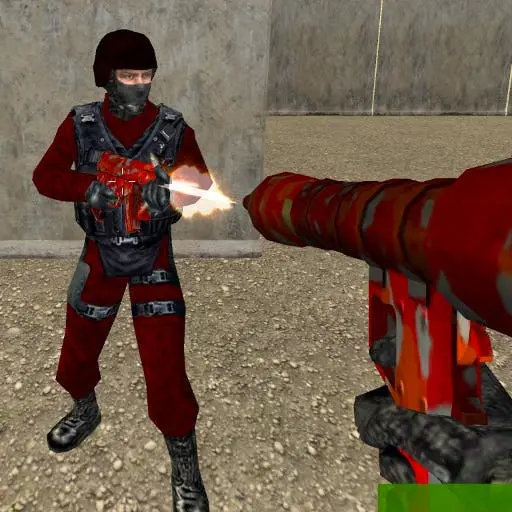
Crazy Shooters 2
Crazy Shooters 2 is a fast-paced multiplayer first-person shooter built as an HTML5 game, allowing instant access through your web browser without downloads or installations. This 3D shooter…
 Works on Desktop & Mobile
Tested By BunaGames
- Test date
- May 27, 2026
- Tested on
- Chrome 150
- Device
- Desktop
- Operating system
- macOS and Windows
- Game loaded successfully
- Yes
- Fullscreen works
- Yes
- Sound works
- Yes
- Save progress
- Local browser storage
- Mobile compatibility
- Partially tested
- Keyboard controls
- Working
- Controller support
- Not detected
- Average loading time
- 4.2 seconds
- Known issues
- Minor delay after entering fullscreen
Crazy Shooters 2 not loading?
- Refresh the page.
- Disable restrictive content blockers temporarily.
- Confirm JavaScript and WebGL are enabled.
- Clear the browser cache.
- Try another modern browser.
- Close unnecessary tabs.
- Switch off VPN if the game server is blocked.
- Use the Report a Problem button if the issue continues.
Continue Playing
Daily Challenge

Play 7 minutes today in Crazy Shooters 2.
Leaderboard
- 1Community rating4.6 ★
- 2Player likes840
- 3Total votes940
- 4Your local progress0%
Your progress is saved locally in this browser. No account required.
 Your progress is saved locally in this browser. No account required.
Game Progress & Challenges
Why Play This Game?
 Instant PlayPlay instantly in your browser.
 Mobile FriendlyOptimized for all devices.
 Free to PlayNo hidden fees.
About "Crazy Shooters 2"
Crazy Shooters 2 is a fast-paced multiplayer first-person shooter built as an HTML5 game, allowing instant access through your web browser without downloads or installations. This 3D shooter emphasizes room-based multiplayer combat where players create or join custom lobbies to compete across multiple arena environments. The game combines accessible browser technology with competitive FPS mechanics, delivering precision gunplay and loadout customization in a format optimized for quick sessions and social play.
Designed for players seeking immediate action, the game supports both casual matches and skill-focused competition. Its browser-native architecture ensures cross-platform compatibility while maintaining the responsive controls and visual fidelity expected from modern online games in the shooter genre.
Gameplay
Crazy Shooters 2 centers on room-based multiplayer matches where players engage in arena combat using a variety of weapons and tactical approaches. The core loop involves joining or hosting game rooms, selecting loadouts, and competing for eliminations across varied map layouts. Each arena presents distinct sightlines, cover positions, and engagement ranges that reward both aggressive rushes and defensive positioning.
Combat emphasizes constant motion and precision fire, requiring players to maintain situational awareness while tracking opponents across three-dimensional spaces. The game supports multiple concurrent rooms, allowing players to choose matches based on preferred rulesets, player counts, or skill levels. Weapon handling follows traditional FPS mechanics with recoil patterns, reload timing, and damage falloff influencing firefight outcomes.
The multiplayer structure encourages both solo queue play and coordinated team strategies, with match pacing designed for rapid respawns and continuous action rather than elimination-based rounds.
Platform
Crazy Shooters 2 runs entirely as an HTML5 browser game, eliminating installation requirements and enabling play across Windows, Mac, and Linux systems through modern web browsers. This web-based architecture provides immediate access through any device with sufficient processing capability and a stable internet connection, making it one of the more accessible browser games in the competitive shooter space.
The HTML5 framework ensures compatibility with Chrome, Firefox, Edge, and other standards-compliant browsers while maintaining performance adequate for real-time multiplayer synchronization. Players can launch matches directly from the browser window without account creation barriers, though some platforms may offer optional registration for stat tracking or room management features.
No mobile client exists, as the game targets desktop and laptop hardware capable of handling 3D rendering and precise mouse-and-keyboard input essential for competitive FPS gameplay.
How to Play "Crazy Shooters 2"
Begin by selecting whether to create a new game room or join an existing lobby from the multiplayer menu. When hosting, configure room settings including map selection, player limits, and match duration before opening the lobby to other players. When joining, browse available rooms and select one matching your preferred playstyle or skill level.
Once in a match, spawn into the arena with your selected loadout and begin engaging opponents. Focus on maintaining movement to avoid becoming an easy target while tracking enemy positions through sound cues and visual indicators. Secure eliminations by landing accurate shots, and respawn quickly after defeats to maintain pressure on opponents.
Adapt your weapon choice and positioning based on map layout—use long sightlines for ranged weapons and tight corridors for close-quarters combat. Coordinate with teammates when possible to control key map areas and establish spawn dominance. Matches conclude when time expires or score thresholds are reached, with leaderboards displaying individual performance metrics.
Controls
- WASD: Character movement (forward, left, backward, right)
- Mouse: Aim and camera control
- Left Click: Fire weapon
- Right Click: Aim down sights (if available)
- R: Reload current weapon
- Space: Jump
- Shift: Sprint or tactical movement modifier
- Number Keys (1-5): Switch between available weapons
- Tab: View scoreboard and player stats
- ESC: Access pause menu or room settings
Control responsiveness depends on browser performance and input latency, so ensure hardware acceleration is enabled in browser settings for optimal mouse tracking and frame timing.
Can "Crazy Shooters 2" Unblocked?
Crazy Shooters 2 functions as a browser-based HTML5 game, which typically allows access on networks where downloadable executables are restricted. Many educational institutions and workplaces block gaming sites by domain, but the game's web-native architecture means it can often be accessed through unblocked game portals or mirror sites that bypass standard content filters.
Because the game requires no installation or plugin dependencies beyond a modern browser, it avoids many common security restrictions that block Flash or executable content. However, network administrators may still restrict access based on bandwidth usage or multiplayer traffic patterns, as real-time FPS gameplay generates continuous data exchange that can be detected and filtered.
For unrestricted access, play free from home networks or personal devices where content filtering is not enforced. Always respect institutional network policies and acceptable use guidelines.
Tips for "Crazy Shooters 2"
- Master movement patterns: Combine strafing with jump timing to create unpredictable hitboxes that complicate opponent tracking while maintaining your own aim stability.
- Learn spawn locations: Memorize arena spawn points to anticipate enemy positions immediately after respawns, securing early eliminations before opponents regain orientation.
- Optimize loadout for map type: Select weapons matching the dominant engagement range of each arena—prioritize shotguns or SMGs on compact maps, rifles or snipers on open layouts.
- Control high ground: Elevated positions provide superior sightlines and force opponents into predictable approach angles, especially on multi-level arenas.
- Manage reload timing: Reload during movement between cover positions rather than mid-engagement, and track ammunition counts to avoid empty magazines during critical firefights.
- Use audio cues: Footstep sounds and gunfire reveal enemy locations before visual contact, allowing preemptive positioning and ambush setups.
- Adjust mouse sensitivity: Fine-tune sensitivity settings to balance quick 180-degree turns with precise long-range tracking based on your natural aim style.
- Prioritize survival over eliminations: Maintaining a positive kill-death ratio requires avoiding unnecessary risks—disengage from unfavorable fights to preserve momentum.
Features "Crazy Shooters 2"
- Room-based multiplayer architecture: Create custom lobbies with configurable settings or join existing matches based on preferred parameters and player counts.
- Multiple arena environments: Battle across varied map layouts featuring distinct geometry, sightlines, and tactical opportunities that demand adaptive strategies.
- Loadout customization system: Select from diverse weapon types with unique handling characteristics, damage profiles, and effective ranges to match playstyle preferences.
- HTML5 browser technology: Play instantly without downloads, installations, or plugin requirements through any modern web browser on desktop systems.
- Real-time 3D combat: Experience responsive first-person shooter mechanics with physics-based movement, projectile ballistics, and environmental interaction.
- Continuous respawn system: Maintain match momentum through rapid respawns that minimize downtime and sustain high-intensity action throughout sessions.
- Cross-platform browser compatibility: Access the game from Windows, Mac, or Linux systems using standards-compliant browsers without platform-specific clients.
- Competitive leaderboards: Track individual performance metrics including eliminations, deaths, accuracy, and match outcomes across sessions.
Best "Crazy Shooters 2" Similar Games & Top Picks
- Call of Duty: Play Call of Duty in your browser. Learn the FPS gameplay basics, controls, tactics, features, and access details before you start.
- CS 1: Play CS 1 online for free, a team-based tactical FPS focused on skill-based shooting, combat arenas, and strategic teamwork.
- Zombie Strike: Play Zombie Strike, a first-person zombie survival game with relentless waves, weapon hunting, upgrades, and solo survival action.
- Hazmob FPS: Hazmob FPS is a browser-based multiplayer shooter with 55+ weapons, 7 game modes, and 8 maps. Play Team Deathmatch, Capture the Flag, and Gun…
- GunSpin: Master gun recoil physics in GunSpin! Launch your weapon and use momentum to fly as far as possible. Play this innovative shooting game free…
FAQ - Crazy Shooters 2
Is Crazy Shooters 2 free to play?
Yes, Crazy Shooters 2 is completely free to play directly in your web browser without any purchase requirements, subscriptions, or hidden costs. The game operates as a browser-based title accessible through various gaming portals.
Can I play Crazy Shooters 2 without downloading anything?
Absolutely. The game is built using HTML5 technology, which means it runs entirely within your browser without requiring downloads, installations, or additional plugins. Simply navigate to a hosting site and launch the game directly.
Does Crazy Shooters 2 support single-player mode?
The game is designed primarily as a multiplayer experience focused on room-based competitive matches. While you can create private rooms, the core gameplay revolves around battling other human players rather than AI opponents or campaign content.
What browsers work best for Crazy Shooters 2?
Modern versions of Chrome, Firefox, Edge, and Safari all support the game's HTML5 framework. For optimal performance, ensure your browser has hardware acceleration enabled and is updated to the latest version to maintain smooth frame rates during combat.
Can I play Crazy Shooters 2 on mobile devices?
The game is optimized for desktop and laptop play with mouse-and-keyboard controls essential for competitive FPS mechanics. Mobile browsers lack the input precision and screen real estate necessary for effective gameplay, so the experience targets traditional computer platforms.
How do I improve my aim in Crazy Shooters 2?
Focus on finding the right mouse sensitivity that balances quick turns with precise tracking. Practice leading moving targets, controlling recoil patterns through burst firing, and positioning your crosshair at head height as you navigate corners to reduce reaction time during encounters.
Are there different game modes in Crazy Shooters 2?
The game centers on arena-based deathmatch combat, with variations possible through custom room settings configured by hosts. Specific mode availability depends on the room creator's preferences, including team-based formats or free-for-all elimination matches.
Why is my game lagging during multiplayer matches?
Lag typically results from insufficient internet bandwidth, high network latency to the game server, or browser performance issues. Close unnecessary tabs, disable browser extensions that consume resources, check your connection stability, and ensure no background applications are consuming bandwidth during play.
More Games Like This
 Raft Wars
FPS ★ 4.7
Raft Wars
FPS ★ 4.7
 Papas Sushiria
FPS ★ 4.6
Papas Sushiria
FPS ★ 4.6
 Papas Wingeria
FPS ★ 4.6
Papas Wingeria
FPS ★ 4.6
 Papas Scooperia
FPS ★ 4.7
Papas Scooperia
FPS ★ 4.7
 Papas Pizzeria
FPS ★ 4.6
Papas Pizzeria
FPS ★ 4.6
 Papas Freezeria
FPS ★ 4.6
Papas Freezeria
FPS ★ 4.6
 Masked Special Forces
FPS ★ 4.7
Masked Special Forces
FPS ★ 4.7
 Papas Taco Mia
FPS ★ 4.6
Papas Taco Mia
FPS ★ 4.6
 Papas Cupcakeria
FPS ★ 4.6
Papas Cupcakeria
FPS ★ 4.6
 Deer Hunter
FPS ★ 4.7
Deer Hunter
FPS ★ 4.7
 Shooter Sky
FPS ★ 4.7
Shooter Sky
FPS ★ 4.7
 Ultrakill
FPS ★ 4.6
Ultrakill
FPS ★ 4.6
 Hello Neighbor
FPS ★ 4.7
Hello Neighbor
FPS ★ 4.7
 sprunki phase 8
FPS ★ 4.7
sprunki phase 8
FPS ★ 4.7
 Fly the Plane
FPS ★ 4.8
Fly the Plane
FPS ★ 4.8
 Melon Playground
FPS ★ 4.7
Melon Playground
FPS ★ 4.7
 Sprunkr
FPS ★ 4.4
Sprunkr
FPS ★ 4.4
 Dune Surfer Game
FPS ★ 4.6
Dune Surfer Game
FPS ★ 4.6
 Report a Problem
Comments About Crazy Shooters 2