



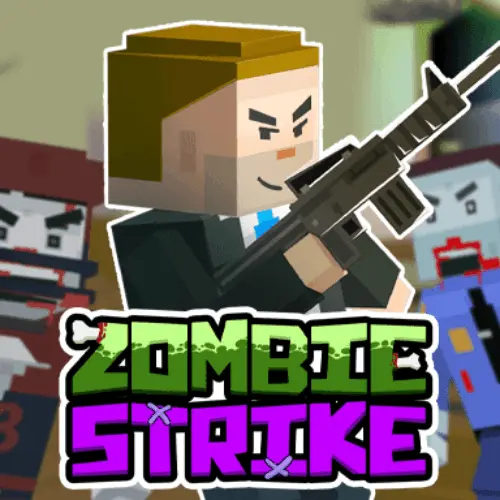
Zombie Strike
Zombie Strike is a single-player first-person zombie survival game built around one urgent objective: stay alive for as long as possible while the undead keep coming. It combines…
 Works on Desktop & Mobile
Tested By BunaGames
- Test date
- June 12, 2026
- Tested on
- Chrome 150
- Device
- Desktop
- Operating system
- macOS and Windows
- Game loaded successfully
- Yes
- Fullscreen works
- Yes
- Sound works
- Yes
- Save progress
- Local browser storage
- Mobile compatibility
- Partially tested
- Keyboard controls
- Working
- Controller support
- Not detected
- Average loading time
- 4.2 seconds
- Known issues
- Minor delay after entering fullscreen
Zombie Strike not loading?
- Refresh the page.
- Disable restrictive content blockers temporarily.
- Confirm JavaScript and WebGL are enabled.
- Clear the browser cache.
- Try another modern browser.
- Close unnecessary tabs.
- Switch off VPN if the game server is blocked.
- Use the Report a Problem button if the issue continues.
Continue Playing
Daily Challenge

Play 7 minutes today in Zombie Strike.
Leaderboard
- 1Community rating4.7 ★
- 2Player likes1.2K
- 3Total votes1.3K
- 4Your local progress0%
Your progress is saved locally in this browser. No account required.
 Your progress is saved locally in this browser. No account required.
Game Progress & Challenges
Why Play This Game?
 Instant PlayPlay instantly in your browser.
 Mobile FriendlyOptimized for all devices.
 Free to PlayNo hidden fees.
About "Zombie Strike"
Zombie Strike is a single-player first-person zombie survival game built around one urgent objective: stay alive for as long as possible while the undead keep coming. It combines the direct perspective and pressure of an FPS with a survival loop in which every wave can demand better movement, smarter target selection, and stronger equipment.
The central threat is not a one-time encounter. Relentless zombie waves create a rising survival challenge, so players must continually judge whether to hold a useful position, retreat from danger, or search for a new weapon before the next group closes in. The first-person view keeps each confrontation immediate: approaching enemies occupy your space, and a missed shot or poor route can quickly turn into a surrounded position.
Weapon discovery and upgrades add progression to the action. Instead of treating every moment as identical target practice, the game asks players to improve their chances over time by locating more useful gear and making the most of what they find. That makes Zombie Strike a strong fit for players looking for focused undead action among other browser games, especially when they want a solo challenge with repeatable survival goals.
Gameplay
Zombie Strike centers on survival under sustained pressure. You play alone in a first-person perspective and face waves of zombies that are designed to test how long you can remain alive. The practical goal is simple to understand but difficult to maintain: eliminate threats, avoid being overwhelmed, and keep improving your ability to survive the next attack.
Combat rewards awareness as much as speed. A zombie that is still far away is usually a manageable problem; several enemies reaching close range at once are much more dangerous. Effective runs therefore depend on noticing the direction of incoming threats, keeping room to move, and reducing the number of enemies that can attack from nearby positions. The first-person format makes positioning especially important because your view only covers part of the space at one time.
Weapons are a major part of the survival loop. Finding a new weapon can change how confidently you handle a wave, while upgrades give players a reason to keep pushing beyond their current performance. Rather than assuming that one tool will solve every situation, use new equipment as an opportunity to reassess your approach. A stronger option may help you clear danger faster, but movement and timing still matter when enemies continue to arrive.
- Survival focus: Last as long as possible against ongoing zombie attacks.
- First-person action: Face threats from a close, direct FPS viewpoint.
- Solo challenge: Your decisions, aim, movement, and weapon choices determine the run.
- Progression loop: Search for weapons and upgrades to improve later waves.
The best mindset is to treat each wave as both a fight and a resource decision. Clearing enemies matters, but surviving long enough to benefit from better equipment is what gives each attempt its momentum.
Platform
Zombie Strike is presented here as a browser game, so the intended experience is to launch it from the game page and play through a web browser. That format is useful for players who want to start a zombie survival session without treating it like a long installation-based game.
The game is designed around direct first-person action, so a screen that lets you clearly see approaching zombies and available routes will make its survival decisions easier to read. A keyboard-and-mouse setup is generally the most natural way to approach browser FPS play, although the exact supported inputs and on-screen prompts should always be checked after the game loads.
Browser play also suits the structure of Zombie Strike. Each attempt is driven by the immediate question of how long you can survive, making it easy to return for another run when you want to test a new weapon choice, improve your movement, or beat a previous survival result. Open the game on this page, allow it to load fully, and use its in-game interface as the authority for available settings and inputs.
How to Play "Zombie Strike"
Start Zombie Strike with a survival-first plan. Your aim is not merely to defeat a few zombies; it is to remain alive as the pressure of repeated waves builds. Begin by learning the play space and identifying where you have room to move if enemies gather in front of you. A clear retreat path is valuable because crowded close-range fights can become difficult very quickly.
As zombies approach, focus on reducing immediate danger. Keep your attention on enemies that are closing the distance or limiting your route, rather than becoming distracted by threats that are not yet able to overwhelm you. Maintain awareness of your surroundings as much as the first-person view allows. After engaging in one direction, check whether other zombies may be advancing from another angle.
Look for opportunities to find new weapons and use upgrades as they become available. These systems are part of the game’s long-term survival structure: stronger or more suitable equipment can help you deal with later waves more effectively. Do not assume that an upgrade removes the need for caution. Better gear is most useful when paired with controlled movement and deliberate target priority.
- Launch the game and wait for the first-person play area to load.
- Use the in-game prompts to confirm the available movement, aiming, and action inputs.
- Survey your immediate area before committing to a direction.
- Engage approaching zombies while preserving space to retreat or reposition.
- Search for new weapons and take advantage of upgrades during the run.
- Continue adapting as waves become harder to manage.
A successful run is usually built from many small decisions. Keep moving with purpose, avoid letting enemies compress your available space, and use every weapon improvement to extend your survival time.
Controls
Zombie Strike uses first-person shooter-style interaction, but players should rely on the game’s own opening prompts for the exact key bindings and supported actions. Control layouts can vary between browser versions, devices, and game builds, so it is better to confirm the displayed instructions than to depend on an assumed setup.
Before entering a serious survival attempt, spend a moment identifying the inputs for these essential tasks:
- Movement: Navigate through the play area and create distance from zombies.
- Looking and aiming: Turn toward threats and line up attacks in the first-person view.
- Attacking: Use the currently equipped weapon against approaching enemies.
- Weapon interaction: Check how the game handles newly found weapons or weapon changes.
- Upgrade interaction: Follow any on-screen instruction connected to improving equipment.
If an input is unclear, pause before a wave becomes crowded and review the visible game interface. Knowing how to move, aim, attack, and react to weapon opportunities is more useful than rushing into the first group without understanding the available actions.
Can "Zombie Strike" Unblocked?
Zombie Strike is available on BunaGames as a browser-play experience. Open the game page, let the content load, and begin playing directly in your browser when access is available on your network and device.
If the game does not start immediately, first check the practical basics: confirm that the page has finished loading, make sure browser permissions or content restrictions are not interrupting gameplay, and try refreshing the page. A stable connection can also help the game load correctly before you begin a survival run.
School, workplace, library, and public-network rules are controlled by the network owner. Do not attempt to bypass filters, security systems, or local policies. If a network blocks gaming content, the appropriate option is to play later on a permitted connection or use a device and network where browser games are allowed.
Once Zombie Strike is running, the main benefit of its browser format is quick access to its solo zombie-wave challenge. You can focus on staying alive, finding weapons, and improving your next attempt without needing to navigate away from the game page.
Tips for "Zombie Strike"
Survival in Zombie Strike improves when you think beyond the nearest target. Zombies are dangerous individually, but the larger problem is losing control of the space around you. Keep a route available whenever possible. If you stop in a location where enemies can close in from several directions, even a useful weapon may not be enough to restore control.
Prioritize immediate threats. An enemy that is about to reach you should usually receive more attention than one that remains farther away. This does not mean ignoring distant zombies completely; it means using your attention where it has the greatest survival value. Reduce the enemies that can force you into close-range pressure, then reassess the rest of the wave.
Use movement deliberately rather than constantly running without a plan. Reposition when a group is beginning to crowd your current location, when your line of sight is becoming poor, or when you need a safer angle on incoming enemies. Turning to check your surroundings after an engagement can prevent a surprise approach from becoming a trap.
- Protect your space: Leave yourself a direction to move before enemies get too close.
- Watch the edges: After firing ahead, briefly check for threats entering from other angles.
- Do not overcommit: Chasing one target can be risky if it pulls you into a crowded area.
- Value weapon finds: New weapons may improve your ability to handle tougher survival moments.
- Use upgrades with intent: Treat them as tools for extending a run, not as a substitute for positioning.
- Learn from each defeat: Notice whether the run ended because of aim, awareness, movement, or an unsafe route.
Most importantly, do not judge progress only by the number of zombies defeated. A calmer, more controlled approach that keeps you alive longer is often the better result. As waves continue, survival time becomes the clearest measure of how well your aim, weapon decisions, and movement work together.
Features "Zombie Strike"
Zombie Strike brings together the core elements players expect from a compact zombie survival FPS: a first-person viewpoint, hostile undead waves, solo play, weapon discovery, upgrades, and the constant goal of surviving longer than before. Its structure keeps attention on immediate action while giving each run a progression element through equipment improvements.
- First-person zombie combat: Face the undead from a close, direct FPS perspective.
- Relentless waves: Deal with ongoing groups of zombies rather than a single isolated encounter.
- Single-player survival: Take on the challenge alone and rely on your own decisions.
- Stay-alive objective: The central measure of success is how long you can survive.
- Weapon hunting: Find new weapons during play to improve your survival options.
- Upgrade progression: Use upgrades to strengthen your ability to face continued pressure.
- Repeatable runs: Return to improve awareness, movement, weapon choices, and survival time.
- Browser access: Play from the game page through a web browser.
The strongest feature is how these systems reinforce one another. Waves create urgency, the first-person camera makes nearby danger feel immediate, and weapon upgrades give players a reason to keep fighting through difficult moments. The result is not just a shooting game; it is a survival challenge where effective play means balancing offense with safe positioning.
Zombie Strike is particularly suited to players who enjoy zombie games with a clear objective. There is no need to interpret a complicated premise before beginning: observe the threats, use your weapons, search for improvements, and try to survive longer. That clarity makes it easy to start, while the escalating wave pressure gives players a reason to refine their approach over repeated attempts.
Best "Zombie Strike" Similar Games & Top Picks
- Call of Duty: Play Call of Duty in your browser. Learn the FPS gameplay basics, controls, tactics, features, and access details before you start.
- CS 1: Play CS 1 online for free, a team-based tactical FPS focused on skill-based shooting, combat arenas, and strategic teamwork.
- Crazy Shooters 2: Crazy Shooters 2 is a fast-paced multiplayer FPS you can play instantly in your browser. Create rooms, customize loadouts, and battle across varied arenas.
- Hazmob FPS: Hazmob FPS is a browser-based multiplayer shooter with 55+ weapons, 7 game modes, and 8 maps. Play Team Deathmatch, Capture the Flag, and Gun…
- GunSpin: Master gun recoil physics in GunSpin! Launch your weapon and use momentum to fly as far as possible. Play this innovative shooting game free…
FAQ - Zombie Strike
What is Zombie Strike?
Zombie Strike is a single-player first-person zombie survival game. You face relentless waves of zombies and try to stay alive for as long as possible. The game combines FPS-style combat with weapon discovery and upgrades that can improve your chances during a run.
What is the main goal in Zombie Strike?
The main goal is survival. Defeating zombies is necessary, but the larger objective is to remain alive as long as you can while waves continue to create pressure. Better movement, awareness, weapon choices, and upgrades can all help extend your survival time.
Is Zombie Strike a first-person shooter?
Yes. Zombie Strike is described as a first-person shooter survival game. The first-person viewpoint places you directly in the action, so aiming at approaching zombies, observing nearby threats, and maintaining room to move are important parts of play.
Can I play Zombie Strike alone?
Yes. Zombie Strike is presented as a single-player zombie survival experience. Your run depends on your own ability to deal with waves, find weapons, use upgrades, and avoid becoming overwhelmed by close-range enemies.
Are there weapons and upgrades in Zombie Strike?
Yes. Finding new weapons and using upgrades are part of the game’s survival loop. These improvements can give you stronger options as the zombie threat continues. They work best when paired with careful positioning and attention to approaching enemies.
How do I survive longer in Zombie Strike?
Keep space between yourself and the nearest zombies, avoid letting enemies surround you, and prioritize threats that are closing in. Check your surroundings after engagements, preserve a route for repositioning, and make use of new weapons or upgrades when they become available. Survival is usually determined by control of space as much as by shooting accuracy.
What are the controls for Zombie Strike?
Check the instructions and prompts shown inside the game after it loads. Zombie Strike uses first-person shooter-style actions such as movement, aiming, and attacking, but the exact controls should be confirmed through the current in-game interface rather than assumed from another version or platform.
Can I play Zombie Strike in a browser?
Yes. This BunaGames page provides Zombie Strike as a browser-play game. Open the page, wait for the game to load, and follow its on-screen instructions. Access may still depend on your browser, device, connection, and any rules set by the network you are using.
More Games Like This
 Raft Wars
FPS ★ 4.7
Raft Wars
FPS ★ 4.7
 Papas Sushiria
FPS ★ 4.6
Papas Sushiria
FPS ★ 4.6
 Papas Wingeria
FPS ★ 4.6
Papas Wingeria
FPS ★ 4.6
 Papas Scooperia
FPS ★ 4.7
Papas Scooperia
FPS ★ 4.7
 Papas Pizzeria
FPS ★ 4.6
Papas Pizzeria
FPS ★ 4.6
 Papas Freezeria
FPS ★ 4.6
Papas Freezeria
FPS ★ 4.6
 Masked Special Forces
FPS ★ 4.7
Masked Special Forces
FPS ★ 4.7
 Papas Taco Mia
FPS ★ 4.6
Papas Taco Mia
FPS ★ 4.6
 Papas Cupcakeria
FPS ★ 4.6
Papas Cupcakeria
FPS ★ 4.6
 Deer Hunter
FPS ★ 4.7
Deer Hunter
FPS ★ 4.7
 Shooter Sky
FPS ★ 4.7
Shooter Sky
FPS ★ 4.7
 Ultrakill
FPS ★ 4.6
Ultrakill
FPS ★ 4.6
 Hello Neighbor
FPS ★ 4.7
Hello Neighbor
FPS ★ 4.7
 sprunki phase 8
FPS ★ 4.7
sprunki phase 8
FPS ★ 4.7
 Fly the Plane
FPS ★ 4.8
Fly the Plane
FPS ★ 4.8
 Melon Playground
FPS ★ 4.7
Melon Playground
FPS ★ 4.7
 Sprunkr
FPS ★ 4.4
Sprunkr
FPS ★ 4.4
 Dune Surfer Game
FPS ★ 4.6
Dune Surfer Game
FPS ★ 4.6
 Report a Problem
Play Anytime, Anywhere
Add BunaGames to your home screen for quick access to your favorite games!
Comments About Zombie Strike