



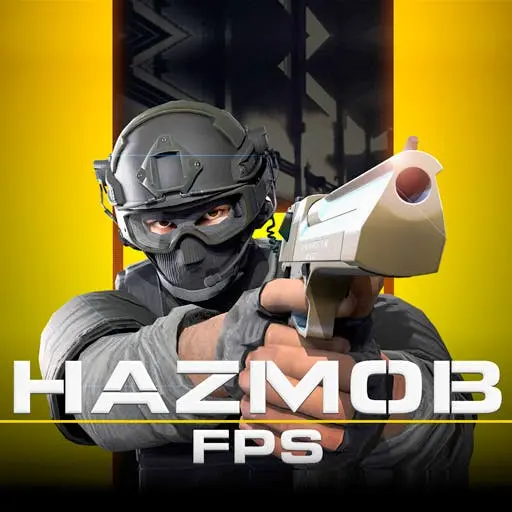
Hazmob FPS
Hazmob FPS is a browser-based multiplayer first-person shooter that delivers competitive combat without requiring downloads or installations. Built for instant access, this online game features 55+ weapons, 8…
 Works on Desktop & Mobile
Tested By BunaGames
- Test date
- May 26, 2026
- Tested on
- Chrome 150
- Device
- Desktop
- Operating system
- macOS and Windows
- Game loaded successfully
- Yes
- Fullscreen works
- Yes
- Sound works
- Yes
- Save progress
- Local browser storage
- Mobile compatibility
- Partially tested
- Keyboard controls
- Working
- Controller support
- Not detected
- Average loading time
- 4.2 seconds
- Known issues
- Minor delay after entering fullscreen
Hazmob FPS not loading?
- Refresh the page.
- Disable restrictive content blockers temporarily.
- Confirm JavaScript and WebGL are enabled.
- Clear the browser cache.
- Try another modern browser.
- Close unnecessary tabs.
- Switch off VPN if the game server is blocked.
- Use the Report a Problem button if the issue continues.
Continue Playing
Daily Challenge

Play 7 minutes today in Hazmob FPS.
Leaderboard
- 1Community rating4.7 ★
- 2Player likes1.0K
- 3Total votes1.1K
- 4Your local progress0%
Your progress is saved locally in this browser. No account required.
 Your progress is saved locally in this browser. No account required.
Game Progress & Challenges
Why Play This Game?
 Instant PlayPlay instantly in your browser.
 Mobile FriendlyOptimized for all devices.
 Free to PlayNo hidden fees.
About "Hazmob FPS"
Hazmob FPS is a browser-based multiplayer first-person shooter that delivers competitive combat without requiring downloads or installations. Built for instant access, this online game features 55+ weapons, 8 distinct maps, and 7 game modes designed for fast-paced tactical engagements. Players join real-time matches against opponents worldwide, choosing from classic modes like Team Deathmatch and Capture the Flag, or testing weapon proficiency in Gun Race. The game emphasizes accessibility and variety, allowing players to jump directly into combat through any modern web browser while maintaining the depth expected from dedicated FPS titles.
Gameplay
Hazmob FPS centers on real-time multiplayer combat where positioning, weapon selection, and reaction speed determine match outcomes. Each game mode introduces distinct tactical objectives: Team Deathmatch rewards consistent eliminations and team coordination, Capture the Flag demands strategic flag routes and defensive positioning, while Gun Race challenges players to progress through a preset weapon sequence by securing kills with each firearm.
The weapon arsenal spans over 55 firearms across categories including assault rifles, sniper rifles, shotguns, submachine guns, and pistols. Each weapon class exhibits unique recoil patterns, damage profiles, and effective range zones, requiring players to adapt loadouts based on map geometry and mode requirements. The 8 maps vary in scale and layout, from tight urban environments favoring close-quarters combat to open arenas where long-range engagements dominate.
Match pacing remains continuous with respawn mechanics that minimize downtime. Players accumulate performance-based progression through eliminations, objective completions, and match victories, creating a skill-driven competitive loop that rewards both individual accuracy and team synergy.
Platform
Hazmob FPS operates entirely within web browsers, eliminating installation barriers and storage requirements. The game runs on WebGL technology, ensuring compatibility across desktop and laptop systems using Chrome, Firefox, Safari, and Edge browsers. This browser-native architecture allows players to access full multiplayer functionality immediately after loading the game page.
Cross-platform accessibility extends to mobile devices through dedicated iOS applications, though the browser version remains the primary access point for desktop users seeking play free experiences. The web-based deployment also facilitates seamless updates and server-side improvements without requiring client-side patches, maintaining consistent gameplay experiences across all active sessions.
How to Play "Hazmob FPS"
Begin by selecting a preferred game mode from the main menu. Each mode displays current player counts and map rotations before joining. Once in a match, spawn into the map with a default loadout and navigate to weapon pickups or designated spawn points based on mode rules.
In Team Deathmatch, focus on securing eliminations while minimizing deaths to contribute to the team score threshold. Capture the Flag requires coordinating flag captures by retrieving the enemy flag and returning it to your base while defending your own flag from opposing carriers. Gun Race demands sequential kills with each assigned weapon to progress through the weapon tier list faster than opponents.
Monitor the scoreboard to track performance metrics, adjust tactics based on leading players' strategies, and utilize map knowledge to control high-traffic zones. Respawns occur after brief delays, allowing immediate re-engagement without extended downtime.
Controls
- WASD - Move forward, left, backward, and right
- Mouse - Aim and look around the environment
- Left Click - Fire equipped weapon
- Right Click - Aim down sights for precision targeting
- R - Reload current weapon
- Space - Jump over obstacles and reach elevated positions
- Shift - Sprint to increase movement speed
- Ctrl - Crouch for reduced profile and improved accuracy
- 1-5 Number Keys - Switch between available weapons in loadout
- G - Throw grenades or tactical equipment
- Tab - Display match scoreboard and player statistics
Can "Hazmob FPS" Unblocked?
Hazmob FPS functions as an unblocked browser game accessible from networks that permit standard web traffic. Since the game operates through HTML5 and WebGL without requiring executable downloads, it bypasses restrictions typically applied to downloadable software. Players on school or workplace networks can often access the game directly through browser games portals, provided the network allows general web browsing.
The browser-based architecture means no firewall exceptions or administrative permissions are necessary for gameplay. Sessions connect to game servers through standard HTTPS protocols, maintaining compatibility with most network configurations while delivering full multiplayer functionality without installation footprints.
Tips for "Hazmob FPS"
- Master weapon recoil patterns: Spend time in each mode learning how different firearms handle sustained fire. Burst firing improves accuracy at medium range compared to full-auto spray.
- Control map power positions: Identify elevated spots and choke points that offer sightline advantages. Holding these zones forces opponents into disadvantageous engagements.
- Adapt loadouts to map scale: Equip sniper rifles and long-range weapons on open maps, while shotguns and SMGs dominate tight corridors and urban layouts.
- Track enemy spawn patterns: After eliminations, anticipate where opponents will respawn to maintain pressure and control match tempo.
- Use sound cues for positioning: Footsteps and gunfire reveal enemy locations. Listen for audio indicators to predict flanking routes and ambush opportunities.
- Prioritize objective play in mode-specific matches: In Capture the Flag, coordinate with teammates for flag runs rather than focusing solely on eliminations. Objective completions often outweigh kill counts.
- Manage ammunition reserves: Reload during safe moments rather than mid-engagement. Running dry during firefights creates fatal vulnerabilities.
- Experiment across all 55+ weapons: Each firearm offers unique handling characteristics. Finding weapons that match your playstyle improves consistency and performance metrics.
Features "Hazmob FPS"
- 55+ weapon arsenal: Extensive firearm variety spanning assault rifles, sniper rifles, shotguns, SMGs, pistols, and specialized weapons with distinct performance profiles
- 7 competitive game modes: Includes Team Deathmatch, Capture the Flag, Gun Race, and additional modes offering diverse tactical objectives
- 8 multiplayer maps: Varied environments ranging from close-quarters urban settings to open arenas, each designed for specific combat dynamics
- Browser-native deployment: Zero-download access through WebGL technology, enabling instant play on desktop browsers without installations
- Real-time multiplayer matchmaking: Join active matches with players worldwide through server-based lobbies and automatic team balancing
- Performance-based progression: Skill-driven advancement system rewarding eliminations, objective completions, and match victories
- Cross-platform compatibility: Accessible via web browsers on desktop systems and through dedicated mobile applications for extended platform reach
- Continuous respawn mechanics: Minimal downtime between deaths maintains match intensity and engagement throughout sessions
- Customizable controls: Rebindable key mappings and sensitivity adjustments for personalized input configurations
Best "Hazmob FPS" Similar Games & Top Picks
- Call of Duty: Play Call of Duty in your browser. Learn the FPS gameplay basics, controls, tactics, features, and access details before you start.
- CS 1: Play CS 1 online for free, a team-based tactical FPS focused on skill-based shooting, combat arenas, and strategic teamwork.
- Zombie Strike: Play Zombie Strike, a first-person zombie survival game with relentless waves, weapon hunting, upgrades, and solo survival action.
- Crazy Shooters 2: Crazy Shooters 2 is a fast-paced multiplayer FPS you can play instantly in your browser. Create rooms, customize loadouts, and battle across varied arenas.
- GunSpin: Master gun recoil physics in GunSpin! Launch your weapon and use momentum to fly as far as possible. Play this innovative shooting game free…
FAQ - Hazmob FPS
Is Hazmob FPS free to play?
Yes, Hazmob FPS is completely free to play through web browsers without requiring purchases, subscriptions, or downloads. All core game modes, weapons, and maps are accessible immediately upon loading the game.
Can I play Hazmob FPS without downloading anything?
Hazmob FPS runs entirely in web browsers using WebGL technology, eliminating the need for downloads or installations. Simply load the game page in a compatible browser to start playing instantly.
How many weapons are available in Hazmob FPS?
The game features over 55 weapons spanning multiple categories including assault rifles, sniper rifles, shotguns, submachine guns, and pistols. Each weapon offers distinct recoil patterns, damage values, and effective range characteristics.
What game modes does Hazmob FPS offer?
Hazmob FPS includes 7 game modes with confirmed options like Team Deathmatch, Capture the Flag, and Gun Race. Each mode presents unique objectives and tactical requirements for competitive play.
Can I play Hazmob FPS on mobile devices?
While the primary platform is web browsers on desktop systems, Hazmob FPS is also available through dedicated mobile applications on iOS, extending accessibility to smartphone and tablet users.
Does Hazmob FPS require a powerful computer?
As a browser-based game optimized for web deployment, Hazmob FPS runs on most modern computers with updated browsers. The WebGL framework ensures reasonable performance across standard hardware configurations without demanding high-end gaming systems.
How many players can join a match in Hazmob FPS?
Match sizes vary by game mode and map capacity. The multiplayer infrastructure supports real-time matches with multiple players per session, though exact player counts depend on server configurations and mode requirements.
Are there different maps in Hazmob FPS?
The game features 8 distinct maps with varying layouts, scale, and environmental designs. Maps range from tight urban environments suited for close-quarters combat to open arenas favoring long-range engagements.
More Games Like This
 Raft Wars
FPS ★ 4.7
Raft Wars
FPS ★ 4.7
 Papas Sushiria
FPS ★ 4.6
Papas Sushiria
FPS ★ 4.6
 Papas Wingeria
FPS ★ 4.6
Papas Wingeria
FPS ★ 4.6
 Papas Scooperia
FPS ★ 4.7
Papas Scooperia
FPS ★ 4.7
 Papas Pizzeria
FPS ★ 4.6
Papas Pizzeria
FPS ★ 4.6
 Papas Freezeria
FPS ★ 4.6
Papas Freezeria
FPS ★ 4.6
 Masked Special Forces
FPS ★ 4.7
Masked Special Forces
FPS ★ 4.7
 Papas Taco Mia
FPS ★ 4.6
Papas Taco Mia
FPS ★ 4.6
 Papas Cupcakeria
FPS ★ 4.6
Papas Cupcakeria
FPS ★ 4.6
 Deer Hunter
FPS ★ 4.7
Deer Hunter
FPS ★ 4.7
 Shooter Sky
FPS ★ 4.7
Shooter Sky
FPS ★ 4.7
 Ultrakill
FPS ★ 4.6
Ultrakill
FPS ★ 4.6
 Hello Neighbor
FPS ★ 4.7
Hello Neighbor
FPS ★ 4.7
 sprunki phase 8
FPS ★ 4.7
sprunki phase 8
FPS ★ 4.7
 Fly the Plane
FPS ★ 4.8
Fly the Plane
FPS ★ 4.8
 Melon Playground
FPS ★ 4.7
Melon Playground
FPS ★ 4.7
 Sprunkr
FPS ★ 4.4
Sprunkr
FPS ★ 4.4
 Dune Surfer Game
FPS ★ 4.6
Dune Surfer Game
FPS ★ 4.6
 Report a Problem
Comments About Hazmob FPS