



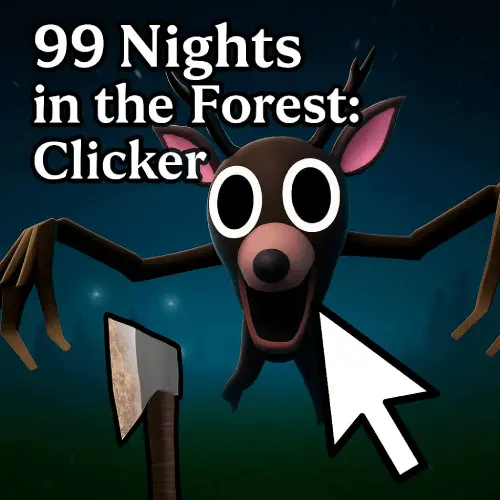
99 Nights in the Forest Clicker
Merge 99 Nights in the Forest: Clicker is a darkly themed merge clicker game set in a mysterious woodland where moonlight, deep shadows, magical creatures, and steady progression…
 Works on Desktop & Mobile
Tested By BunaGames
- Test date
- June 17, 2026
- Tested on
- Chrome 150
- Device
- Desktop
- Operating system
- macOS and Windows
- Game loaded successfully
- Yes
- Fullscreen works
- Yes
- Sound works
- Yes
- Save progress
- Local browser storage
- Mobile compatibility
- Partially tested
- Keyboard controls
- Working
- Controller support
- Not detected
- Average loading time
- 4.2 seconds
- Known issues
- Minor delay after entering fullscreen
99 Nights in the Forest Clicker not loading?
- Refresh the page.
- Disable restrictive content blockers temporarily.
- Confirm JavaScript and WebGL are enabled.
- Clear the browser cache.
- Try another modern browser.
- Close unnecessary tabs.
- Switch off VPN if the game server is blocked.
- Use the Report a Problem button if the issue continues.
Continue Playing
Daily Challenge

Play 6 minutes today in 99 Nights in the Forest Clicker.
Leaderboard
- 1Community rating4.7 ★
- 2Player likes793
- 3Total votes859
- 4Your local progress0%
Your progress is saved locally in this browser. No account required.
 Your progress is saved locally in this browser. No account required.
Game Progress & Challenges
Why Play This Game?
 Instant PlayPlay instantly in your browser.
 Mobile FriendlyOptimized for all devices.
 Free to PlayNo hidden fees.
About "99 Nights in the Forest Clicker"
Merge 99 Nights in the Forest: Clicker is a darkly themed merge clicker game set in a mysterious woodland where moonlight, deep shadows, magical creatures, and steady progression shape the experience. It combines the immediate rhythm of clicking with the more deliberate choices of merging and upgrading, giving players a simple action loop with room to improve their results over time.
The forest setting gives the game a horror-game atmosphere without changing its core focus: make progress, organize what you have, and look for stronger outcomes through smart merges. Each click contributes to the growing forest adventure, while merging helps turn smaller elements into more valuable progress. That makes the game approachable for players who enjoy idle-style momentum but still want decisions to matter.
Rather than relying on a complicated rule set, the game centers its attention on a familiar and satisfying cycle. Click to advance, merge when an opportunity appears, and use upgrades to support longer runs through the mysterious night forest. It is a fitting choice for players looking for a lightweight browser game with magical-creature imagery, a shadowy setting, and a clear sense of development.
Gameplay
The gameplay in Merge 99 Nights in the Forest: Clicker is built around three closely connected actions: clicking, merging, and upgrading. Clicking provides the active pace of play. It keeps you involved in the forest’s progression and creates a steady sense that every input is moving your session forward.
Merging adds the strategic layer. Instead of treating every available piece as something to use immediately, take a moment to consider whether combining it can create a more useful result. This is the part of the loop that rewards attention. A player who simply clicks can still enjoy the momentum, but a player who notices merge opportunities can make their progress feel more organized and purposeful.
Upgrades reinforce that long-term direction. The research consistently identifies steady progression and strategic upgrades as central ideas, so the strongest approach is to treat upgrades as support for your overall merge plan rather than as isolated rewards. When a new upgrade becomes available, consider how it helps your current pace and future merging choices.
The night-forest presentation provides a distinct context for this loop. Magical creatures and deep woodland shadows give familiar clicker mechanics a more mysterious tone. The game is therefore less about mastering a long list of commands and more about maintaining a productive rhythm: click for momentum, merge for improved value, and upgrade for sustained progress.
- Active progression: Clicking keeps the session moving.
- Merge decisions: Combining elements introduces strategy.
- Upgrade planning: Improvements support longer-term advancement.
- Forest atmosphere: Magical creatures and moonlit shadows frame the action.
Platform
Merge 99 Nights in the Forest: Clicker is presented on BunaGames as an online browser game. You can open the game page and play from a compatible web browser without treating it like a separate downloadable release. This makes it convenient for a quick session when you want a clicker game with a dark fantasy forest mood.
Browser play is especially suitable for a merge clicker because the main experience is based on repeated interaction, observing available merge opportunities, and checking your progression. A stable internet connection and an up-to-date browser can help the game load and respond smoothly.
The game’s interface is designed around straightforward interaction rather than a complex controller layout. On a desktop or laptop, use the pointer to select and click game elements. On a touchscreen browser, tapping is the natural equivalent of clicking. If the game does not respond as expected, refresh the page and allow it a moment to load fully before starting again.
How to Play "99 Nights in the Forest Clicker"
Start by opening the game and paying attention to the items, creatures, or progression elements available on the screen. The core objective is not presented as a one-time finish line; instead, it is to build momentum in the forest through repeated clicks, useful merges, and upgrades that strengthen your overall development.
- Click to begin progressing. Repeated clicks are the active foundation of the game. Use them to keep the forest adventure advancing and to reveal the value of the clicker loop.
- Watch for merge opportunities. Merging is the key decision-making mechanic. When compatible elements are available, combining them can create a stronger or more advanced result than leaving them separate.
- Prioritize meaningful improvements. The game emphasizes strategic upgrades, so think about how each available improvement supports the pace you want to maintain.
- Keep the loop balanced. Do not view clicking and merging as competing tasks. Clicking drives momentum, while merging helps convert that momentum into better progression.
- Return to the forest rhythm. After a merge or upgrade, continue clicking and reassess the next opportunity. This repeated review is what gives the game its steady, incremental structure.
A useful way to approach the game is to separate immediate action from longer-term planning. Click when you need to advance now, but pause briefly when a merge or upgrade choice appears. That small moment of attention can make the experience feel less like random tapping and more like an organized progression game.
The mysterious forest theme is part of the appeal, but the practical goal remains clear: develop stronger results over time. Learn the rhythm of the interface, recognize when merging is worthwhile, and let upgrades support consistent advancement through the night setting.
Controls
The controls are intentionally simple and match the game’s clicker format. Most interaction is handled through the pointer or touchscreen, allowing you to focus on timing, merging, and progression instead of memorizing a large command list.
| Input | Action |
|---|---|
| Mouse click | Interact and progress |
| Pointer selection | Choose merge options |
| Screen tap | Touchscreen equivalent |
On desktop, move the cursor over an available game element and click when you want to interact. Use the same pointer-based approach when selecting elements connected to merging or upgrades. On touch-enabled devices, tap the relevant on-screen element.
Because the game centers on repeated clicking and merge choices, accuracy is more useful than speed alone. Give yourself enough time to recognize what is on screen before committing to a merge. A calm, consistent input rhythm can be more effective than rushed tapping.
Can "99 Nights in the Forest Clicker" Unblocked?
Merge 99 Nights in the Forest: Clicker can be played from its BunaGames page in a web browser, making it a practical option when you want direct online access to a merge clicker. There is no need to search for a separate installer just to begin a session; open the game page, wait for it to load, and use the on-screen interface.
Availability can still depend on the browser, network rules, and device you are using. If a school, workplace, library, or managed network restricts gaming websites, respect the local internet policy rather than trying to bypass it. The best place to play is a permitted personal connection or any environment where browser games are allowed.
For a smoother session, close unnecessary browser tabs, use a reliable connection, and let the game finish loading before clicking. If you want more quick-play options after your forest run, BunaGames also has online games for different browser-gaming moods and genres.
Tips for "99 Nights in the Forest Clicker"
The best strategy in Merge 99 Nights in the Forest: Clicker is not simply to click as quickly as possible. The game combines active clicking with merging and strategic upgrades, so efficient progress comes from understanding how those three parts support one another.
- Build a steady clicking rhythm. Consistent interaction keeps your progression moving. Start by learning the pace of the game instead of rushing every action.
- Look before you merge. A merge is a progression choice, not just another click. Check the available elements and make sure you are acting on a clear opportunity.
- Use upgrades with a purpose. When an upgrade appears, consider how it fits the direction of your current session. Improvements are most valuable when they reinforce sustained progress.
- Do not ignore the strategic layer. The clicker side gives immediate feedback, but merging is what adds planning. Alternate between active clicking and brief review periods.
- Keep your attention on the current screen. The forest theme may be atmospheric, but useful information is in the playable elements and available choices. Notice what can be interacted with before clicking repeatedly.
- Favor repeatable progress. A reliable loop of clicking, merging, and upgrading is more useful than making hurried choices that you have not considered.
A helpful mental model is to treat clicking as resource generation, merging as improvement, and upgrades as long-term support. Even if the game feels simple at first, this framework gives each action a role. You are not just tapping through a night forest; you are deciding when to turn regular activity into more valuable advancement.
Finally, play at a pace that lets you enjoy the magical-creature setting. The game’s dark woodland atmosphere works best when you can notice both the visual theme and the small progression decisions that make each session satisfying.
Features "99 Nights in the Forest Clicker"
Merge 99 Nights in the Forest: Clicker brings together recognizable clicker and merge-game ideas in a distinctive moonlit forest setting. Its main strength is clarity: players can begin interacting quickly, then find more purpose in the merge and upgrade portions of the loop.
- Clicker-based progression: Repeated interaction drives the active side of play and gives each session a quick, responsive pace.
- Merge-focused decisions: Merging introduces a strategic element beyond simple tapping. It asks players to notice opportunities and pursue stronger results.
- Strategic upgrades: Upgrades provide a longer-term progression angle, helping the game feel like more than a short sequence of clicks.
- Mysterious forest setting: Deep shadows, moonlight, and a night woodland create a darker atmosphere than a typical bright arcade clicker.
- Magical creatures: The forest is inhabited by unique magical creatures, giving the progression theme a fantasy flavor.
- Accessible browser format: The game is suited to direct online play with simple pointer or tap interaction.
- Easy-to-learn loop: The basic pattern is understandable quickly: click, identify a merge, improve your progress, and continue.
The combination of these elements is important. A pure clicker can become repetitive if there is nothing to think about, while a pure merge game can feel slow if interaction is limited. Here, clicking supplies continuous activity and merging supplies moments of consideration. Upgrades connect both systems by giving players a reason to keep building momentum.
The horror-category fit comes primarily from presentation rather than from a confirmed combat or survival system. The shadowy forest, nighttime mood, and mysterious creatures create the atmosphere, while the central gameplay remains focused on progression. That distinction helps players know what to expect before they begin.
Best "99 Nights in the Forest Clicker" Similar Games & Top Picks
- Hello Neighbor: Play Hello Neighbor, a stealth horror game about entering a suspicious house, avoiding a smart Neighbor, and uncovering a basement secret.
- Eyes: The Horror Game: Play Eyes: The Horror Game online and face ghosts, traps, jump scares, and tense survival horror locations.
- Plants vs Zombies 2 “PVZ 2”: Play Plants vs Zombies 2 PVZ 2 online. Build plant defenses, stop zombie waves, learn controls, and use smart lane-defense tactics.
- Jolly 2: Play Jolly 2 online, a tense point-and-click survival horror game with nightshift challenges, exploration, and frightening surprises.
- Ultimate Custom Night UCN: Play Ultimate Custom Night UCN online and build a custom FNAF survival challenge with 50 selectable characters and adjustable difficulty.
FAQ - 99 Nights in the Forest Clicker
What is Merge 99 Nights in the Forest: Clicker?
Merge 99 Nights in the Forest: Clicker is a merge clicker game set in a mysterious nighttime forest. It combines repeated clicking with merging and strategic upgrades, while magical creatures and deep forest shadows provide the game’s dark fantasy atmosphere.
What do you do in the game?
You click to make progress, look for opportunities to merge available elements, and use upgrades to support stronger long-term development. The main loop is designed around steady progression rather than a complicated set of commands.
Is Merge 99 Nights in the Forest: Clicker a horror game?
It has a horror-style mood because it takes place in a dark, mysterious forest filled with moonlight, shadows, and magical creatures. Its confirmed gameplay focus, however, is clicker progression, merging, and upgrades rather than a described combat or survival system.
How do merges help progression?
Merging is the game’s strategic component. It lets you turn available elements into a more advanced result, adding planning to the constant clicking. Paying attention to merge opportunities can make your progress feel more organized and rewarding.
Are upgrades important?
Yes. Strategic upgrades are a central part of the game’s progression. They are best treated as support for your overall clicking and merging plan, helping you sustain advancement through the forest setting over a longer session.
What controls does the game use?
The game uses simple browser-friendly interaction. On desktop, use the mouse and pointer to click or select on-screen elements. On a touchscreen browser, tap the relevant elements. The focus is on straightforward interaction rather than a large keyboard-control scheme.
Can I play it in a browser?
Yes. The game is available on BunaGames as an online browser game. Open the game page in a compatible web browser, allow it to load, and interact using clicks or taps. A stable connection and updated browser can improve the experience.
Is this game about fast clicking only?
No. Clicking is important for immediate momentum, but the game also emphasizes merging and strategic upgrades. A balanced approach works well: keep clicking to advance, then pause briefly to evaluate merge opportunities and improvements that can strengthen your progress.
More Games Like This
 Slenderman
Horror ★ 4.7
Slenderman
Horror ★ 4.7
 Bendy And The Ink Machine
Horror ★ 4.6
Bendy And The Ink Machine
Horror ★ 4.6
 Papas Sushiria
Horror ★ 4.6
Papas Sushiria
Horror ★ 4.6
 Papas Wingeria
Horror ★ 4.6
Papas Wingeria
Horror ★ 4.6
 Papas Scooperia
Horror ★ 4.7
Papas Scooperia
Horror ★ 4.7
 Papas Pizzeria
Horror ★ 4.6
Papas Pizzeria
Horror ★ 4.6
 Papas Freezeria
Horror ★ 4.6
Papas Freezeria
Horror ★ 4.6
 Fnaf 3
Horror ★ 4.7
Fnaf 3
Horror ★ 4.7
 Fnaf 4
Horror ★ 4.7
Fnaf 4
Horror ★ 4.7
 Papas Taco Mia
Horror ★ 4.6
Papas Taco Mia
Horror ★ 4.6
 Papas Cupcakeria
Horror ★ 4.6
Papas Cupcakeria
Horror ★ 4.6
 Slide in the Woods
Horror ★ 4.3
Slide in the Woods
Horror ★ 4.3
 Scary Shawarma Kiosk: The Anomaly
Horror ★ 4.7
Scary Shawarma Kiosk: The Anomaly
Horror ★ 4.7
 FNAF Free Roam
Horror ★ 4.6
FNAF Free Roam
Horror ★ 4.6
 Who’s at the Door?
Horror ★ 4.6
Who’s at the Door?
Horror ★ 4.6
 FNF Silly Billy
Horror ★ 4.6
FNF Silly Billy
Horror ★ 4.6
 The Man from the Window
Horror ★ 4.6
The Man from the Window
Horror ★ 4.6
 Baldi
Horror ★ 4.7
Baldi
Horror ★ 4.7
 Report a Problem
Comments About 99 Nights in the Forest Clicker