



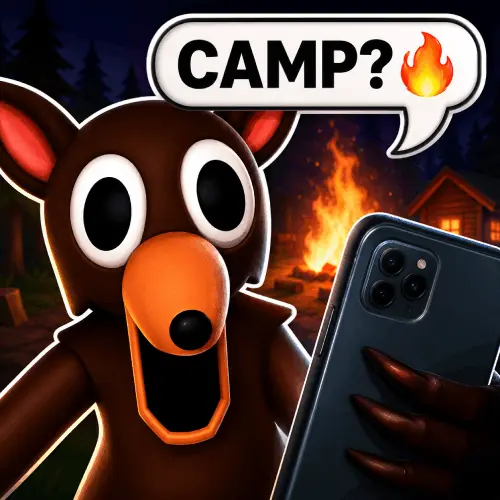
Scary Chats: Horror Messenger
Scary Chats: Horror Messenger is a text-based horror game that turns an ordinary phone-style conversation into its main source of tension. Rather than relying on fast movement, combat,…
 Works on Desktop & Mobile
Tested By BunaGames
- Test date
- June 19, 2026
- Tested on
- Chrome 150
- Device
- Desktop
- Operating system
- macOS and Windows
- Game loaded successfully
- Yes
- Fullscreen works
- Yes
- Sound works
- Yes
- Save progress
- Local browser storage
- Mobile compatibility
- Partially tested
- Keyboard controls
- Working
- Controller support
- Not detected
- Average loading time
- 4.2 seconds
- Known issues
- Minor delay after entering fullscreen
Scary Chats: Horror Messenger not loading?
- Refresh the page.
- Disable restrictive content blockers temporarily.
- Confirm JavaScript and WebGL are enabled.
- Clear the browser cache.
- Try another modern browser.
- Close unnecessary tabs.
- Switch off VPN if the game server is blocked.
- Use the Report a Problem button if the issue continues.
Continue Playing

Daily Challenge

Play 6 minutes today in Scary Chats: Horror Messenger.
Leaderboard
- 1Community rating4.8 ★
- 2Player likes1.0K
- 3Total votes1.1K
- 4Your local progress0%
Your progress is saved locally in this browser. No account required.
 Your progress is saved locally in this browser. No account required.
Game Progress & Challenges
Why Play This Game?
 Instant PlayPlay instantly in your browser.
 Mobile FriendlyOptimized for all devices.
 Free to PlayNo hidden fees.
About "Scary Chats: Horror Messenger"
Scary Chats: Horror Messenger is a text-based horror game that turns an ordinary phone-style conversation into its main source of tension. Rather than relying on fast movement, combat, or complex action controls, the game asks players to choose a level and read unsettling messages as a scary chat scenario develops on screen.
The horror comes from the familiar format. A messenger window is usually associated with quick, casual communication, but here it becomes the setting for eerie exchanges and ominous story beats. Each level presents a compact horror-chat experience, making the game a good fit for players who enjoy creepy fiction, suspenseful messages, and short sessions that can be played at their own reading pace.
Its central appeal is simple: focus on the conversation, notice the tone of each message, and let the story create the unease. The phone-screen presentation gives the game an intimate feel because the disturbing events arrive through a format that feels personal and immediate. Scary Chats: Horror Messenger is therefore less about reflexes and more about atmosphere, curiosity, and following a chilling exchange from beginning to end.
Gameplay
Gameplay in Scary Chats: Horror Messenger centers on selecting a level and reading a horror conversation. The game uses text as its primary storytelling tool, presenting messages through a phone-inspired interface instead of placing the player in a traditional action scene. This makes the pace deliberate: players can concentrate on what is being said, how the tone changes, and what each new message implies.
A level functions as a contained chat scenario. Start by choosing one, then follow the message thread as it unfolds. The tension is built through the contrast between the familiar messenger format and the disturbing subject matter. Instead of a monster suddenly appearing in a 3D environment, the suspense grows from the possibility that the next line may change how the previous messages are understood.
This structure gives the game a useful pick-up-and-play rhythm. You do not need to learn a long list of systems before engaging with the horror premise. Choose a chat, read carefully, and move through the available content at a comfortable speed. Players seeking a quick eerie story can treat each level as a short reading session, while players who enjoy horror fiction can take time to absorb the details and atmosphere.
- Choose from available levels.
- Read horror-themed chat messages on a phone-style screen.
- Follow the conversation as its suspense develops.
- Play at your own pace without action-heavy gameplay demands.
Platform
Scary Chats: Horror Messenger is presented on BunaGames as an online browser game. It is designed around readable text and a messenger-style display, so the core experience is centered on viewing the conversation clearly and progressing through the selected level.
Because the game is text-based, it suits players looking for a horror experience that does not depend on rapid keyboard combinations or precision movement. A larger screen can make longer message threads easier to read, while the simple chat format also matches the kind of interface players recognize from phone messaging.
For the best experience, open the game in a modern web browser, allow the page to load fully, and use a comfortable screen size for reading. If a message sequence feels easy to miss, slow down and review the visible conversation before continuing. The important information is in the text, mood, and flow of the chat rather than in visual action.
How to Play "Scary Chats: Horror Messenger"
To play Scary Chats: Horror Messenger, begin by choosing an available level. Each level is a horror-chat scenario presented through a messaging interface. Once the conversation opens, read the messages in order and let the exchange establish its setting, mood, and source of unease.
The most useful approach is to treat the game like interactive horror reading rather than a reaction test. Take a moment with each line instead of rushing through the thread. Pay attention to abrupt changes in wording, repeated details, or messages that make the conversation feel increasingly strange. The chat format is the game’s storytelling device, so careful reading is the main way to experience its suspense.
- Open the game and look for the level selection.
- Choose a level that you want to read.
- Follow the messages in the order they appear.
- Use the on-screen game interface to continue through the chat when prompted.
- Finish the scenario, then return to choose another level if available.
There is no need to approach it like a survival game with enemies to defeat or routes to memorize. The goal is to experience a scary conversation and see where the message thread leads. If you prefer horror that creates tension through implications and written dialogue, reading slowly will usually provide a stronger experience than trying to finish every chat as quickly as possible.
Controls
Scary Chats: Horror Messenger uses a simple on-screen interface built for reading and progressing through messages. The available research supports level selection and message reading as the key interactions, so the controls are intentionally light compared with an action game.
| Action | What to do |
|---|---|
| Select a scenario | Choose a level on screen |
| Read the story | Follow the chat messages |
| Continue | Use the visible prompt |
| Try another chat | Return to level selection |
Use the displayed interface prompts as your guide, since they show the interaction available at that point in the game. The main skill is not complicated input timing; it is staying focused on the conversation. Keep the game window visible, avoid rushing past the text, and use a reading pace that lets the eerie details land.
Can "Scary Chats: Horror Messenger" Unblocked?
Scary Chats: Horror Messenger is available to play through its BunaGames game page in a web browser. For players searching for an unblocked-style horror game experience, the important advantage is its straightforward online format: open the page, load the game, choose a level, and begin reading the creepy chat scenario.
Availability can still depend on the browser, connection, device settings, or any restrictions applied by a school, workplace, library, or network administrator. If a game does not load in a restricted environment, do not attempt to bypass network rules. Instead, try playing later on a permitted personal connection or device.
The game is especially suitable for short breaks because its format is based on selected levels and text conversations. You can focus on one chat scenario at a time without needing to commit to a long action session. For more quick-play options, browse BunaGames for browser games that run directly online.
Tips for "Scary Chats: Horror Messenger"
The best way to enjoy Scary Chats: Horror Messenger is to slow down. Its horror is delivered through a message thread, so skimming can reduce the effect of the story. Read each line in sequence and give the conversation enough attention for its tone to change naturally.
- Choose a calm reading pace. The game is not built around speed. Pausing briefly after a strange message can make the suspense more effective.
- Notice the conversation’s tone. Horror chats often become unsettling through a shift from ordinary wording to something increasingly ominous. Watch for that transition.
- Finish one level before jumping around. A contained chat scenario is easier to follow when read from its beginning through its conclusion.
- Use a comfortable screen setup. Clear, readable text matters more here than fast performance. Increase your browser view if the chat feels too small to read comfortably.
- Play in the mood you want. Headphones are not required, but a quieter setting can help you focus on the written atmosphere without distractions.
- Manage expectations. This is text-based horror, not a combat or chase game. Its strongest moments come from suspense, implication, and the uneasy feeling of receiving messages you may not want to see.
A useful information-gathering habit is to mentally connect each new message with the ones before it. In a phone-style story, a detail that seems ordinary early on may feel more disturbing after the conversation changes direction. That makes attentive reading the closest thing this game has to a core strategy.
Features "Scary Chats: Horror Messenger"
Scary Chats: Horror Messenger focuses its horror concept around a familiar digital format: a message conversation on a phone-like screen. That clear premise gives the game a distinct identity among browser horror games, especially for players who prefer written suspense over demanding action mechanics.
- Text-based horror format: The story is experienced through messages rather than through conventional combat, exploration, or platforming.
- Phone-screen atmosphere: The messenger presentation makes the horror feel immediate and personal, using a format associated with everyday communication.
- Selectable levels: Players can choose a level and enter a contained scary chat scenario.
- Conversation-driven suspense: The tension develops through the content and progression of the messages.
- Easy-to-understand interaction: The central activities are choosing a level, reading the chat, and continuing through the on-screen sequence.
- Short-session friendly structure: The level-based format suits players who want a compact horror story instead of a lengthy campaign.
The game’s strongest feature is also a useful genre difference: it demonstrates that horror does not need constant action to create pressure. A message thread can be unsettling because it feels close to real life. Players know how normal chats are supposed to look and sound, so an ominous conversation can create discomfort through contrast alone.
For readers who enjoy scary stories, chat fiction, and suspense that unfolds one message at a time, Scary Chats: Horror Messenger offers a direct, accessible horror setup. Its focus remains on the words on screen and the uneasy question of what the next message will reveal.
Best "Scary Chats: Horror Messenger" Similar Games & Top Picks
- Hello Neighbor: Play Hello Neighbor, a stealth horror game about entering a suspicious house, avoiding a smart Neighbor, and uncovering a basement secret.
- Eyes: The Horror Game: Play Eyes: The Horror Game online and face ghosts, traps, jump scares, and tense survival horror locations.
- Plants vs Zombies 2 “PVZ 2”: Play Plants vs Zombies 2 PVZ 2 online. Build plant defenses, stop zombie waves, learn controls, and use smart lane-defense tactics.
- Jolly 2: Play Jolly 2 online, a tense point-and-click survival horror game with nightshift challenges, exploration, and frightening surprises.
- Ultimate Custom Night UCN: Play Ultimate Custom Night UCN online and build a custom FNAF survival challenge with 50 selectable characters and adjustable difficulty.
FAQ - Scary Chats: Horror Messenger
What is Scary Chats: Horror Messenger?
Scary Chats: Horror Messenger is a text-based horror game presented through a phone-style messaging interface. Players choose a level and read a scary conversation as it unfolds. The game creates suspense through written messages and atmosphere rather than through action-heavy gameplay.
How do you play Scary Chats: Horror Messenger?
Start by selecting an available level. Open the chat scenario, read the messages in order, and use the visible on-screen prompts to continue through the conversation. The primary experience is following the horror story contained in the message thread.
Is Scary Chats: Horror Messenger an action game?
No. The supported gameplay description identifies it as a text-based horror game. Its core interaction is reading messages after choosing a level, so it is better suited to players who enjoy creepy stories and suspenseful dialogue than players looking for combat, driving, or fast reflex challenges.
What makes the game scary?
The game uses the familiar feeling of a phone conversation to build unease. Instead of placing the horror in a traditional action environment, it delivers the story through messages on screen. The changing tone and content of the chat are central to the tension.
Are there levels in Scary Chats: Horror Messenger?
Yes. Players can choose a level before reading its horror chat scenario. This level-based structure makes it easy to approach the game in separate sessions and experience one conversation at a time.
Can I play Scary Chats: Horror Messenger in a browser?
Yes. The game is available on its BunaGames page as an online browser game. Load the page in a web browser, then use the game interface to choose a level and read the messages.
Do I need advanced controls to play?
No advanced control scheme is required for the documented gameplay. You mainly select a level, read the message sequence, and follow the prompts shown in the interface. The game emphasizes attention to the story instead of difficult inputs.
Is Scary Chats: Horror Messenger good for short sessions?
Yes. Since the game is organized around selectable chat levels, it works well for players who want a brief horror-fiction experience. You can focus on one conversation, finish its sequence, and return later to explore another available level.
More Games Like This
 Slenderman
Horror ★ 4.7
Slenderman
Horror ★ 4.7
 Bendy And The Ink Machine
Horror ★ 4.6
Bendy And The Ink Machine
Horror ★ 4.6
 Papas Sushiria
Horror ★ 4.6
Papas Sushiria
Horror ★ 4.6
 Papas Wingeria
Horror ★ 4.6
Papas Wingeria
Horror ★ 4.6
 Papas Scooperia
Horror ★ 4.7
Papas Scooperia
Horror ★ 4.7
 Papas Pizzeria
Horror ★ 4.6
Papas Pizzeria
Horror ★ 4.6
 Papas Freezeria
Horror ★ 4.6
Papas Freezeria
Horror ★ 4.6
 Fnaf 3
Horror ★ 4.7
Fnaf 3
Horror ★ 4.7
 Fnaf 4
Horror ★ 4.7
Fnaf 4
Horror ★ 4.7
 Papas Taco Mia
Horror ★ 4.6
Papas Taco Mia
Horror ★ 4.6
 Papas Cupcakeria
Horror ★ 4.6
Papas Cupcakeria
Horror ★ 4.6
 Slide in the Woods
Horror ★ 4.3
Slide in the Woods
Horror ★ 4.3
 Scary Shawarma Kiosk: The Anomaly
Horror ★ 4.7
Scary Shawarma Kiosk: The Anomaly
Horror ★ 4.7
 FNAF Free Roam
Horror ★ 4.6
FNAF Free Roam
Horror ★ 4.6
 Who’s at the Door?
Horror ★ 4.6
Who’s at the Door?
Horror ★ 4.6
 FNF Silly Billy
Horror ★ 4.6
FNF Silly Billy
Horror ★ 4.6
 The Man from the Window
Horror ★ 4.6
The Man from the Window
Horror ★ 4.6
 Baldi
Horror ★ 4.7
Baldi
Horror ★ 4.7
 Report a Problem
Comments About Scary Chats: Horror Messenger