



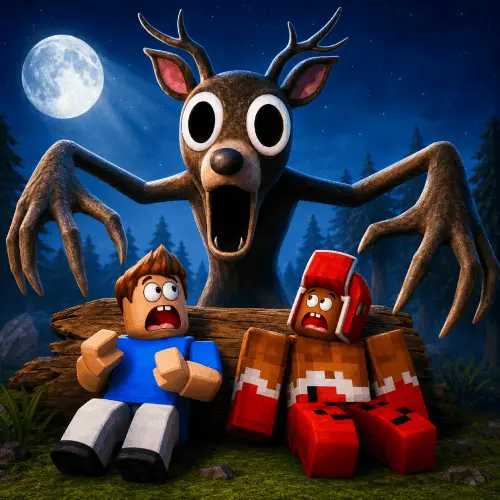
Survive 99 Nights in the Forest in Mine!
Survive 99 Nights in the Forest in Mine! is a horror-flavored survival challenge built around one clear objective: stay prepared long enough to endure an extended forest run.…
 Works on Desktop & Mobile
Tested By BunaGames
- Test date
- June 20, 2026
- Tested on
- Chrome 150
- Device
- Desktop
- Operating system
- macOS and Windows
- Game loaded successfully
- Yes
- Fullscreen works
- Yes
- Sound works
- Yes
- Save progress
- Local browser storage
- Mobile compatibility
- Partially tested
- Keyboard controls
- Working
- Controller support
- Not detected
- Average loading time
- 4.2 seconds
- Known issues
- Minor delay after entering fullscreen
Survive 99 Nights in the Forest in Mine! not loading?
- Refresh the page.
- Disable restrictive content blockers temporarily.
- Confirm JavaScript and WebGL are enabled.
- Clear the browser cache.
- Try another modern browser.
- Close unnecessary tabs.
- Switch off VPN if the game server is blocked.
- Use the Report a Problem button if the issue continues.
Continue Playing

Daily Challenge

Play 4 minutes today in Survive 99 Nights in the Forest in Mine!.
Leaderboard
- 1Community rating4.4 ★
- 2Player likes293
- 3Total votes348
- 4Your local progress0%
Your progress is saved locally in this browser. No account required.
 Your progress is saved locally in this browser. No account required.
Game Progress & Challenges
Why Play This Game?
 Instant PlayPlay instantly in your browser.
 Mobile FriendlyOptimized for all devices.
 Free to PlayNo hidden fees.
About "Survive 99 Nights in the Forest in Mine!"
Survive 99 Nights in the Forest in Mine! is a horror-flavored survival challenge built around one clear objective: stay prepared long enough to endure an extended forest run. The name puts the central pressure front and center. Survival is not about a single encounter; it is about managing decisions across many nights, when an early mistake can matter much later.
The strongest gameplay ideas associated with this survival format are exploration, resource priorities, campfire progress, loot from structures, and cooperative runs. Instead of treating every location as an immediate reward, players need to weigh the value of searching against the value of improving their current survival position. That tension gives the game its horror-game edge: the forest is a place to investigate, but it is also a place where poor timing can leave a run exposed.
This page is for players who want a browser-friendly way to jump into the challenge and understand its core loop before committing to a long attempt. Whether you prefer a focused solo run or want to coordinate with other players where team options are available, the important habit is the same: make each trip, upgrade, and search decision support surviving the next stage.
For more instant-play adventures, browse the wider collection of browser games.
Gameplay
The gameplay in Survive 99 Nights in the Forest in Mine! centers on sustained survival rather than a short, isolated round. A run asks you to move through a forest setting, assess useful locations, gather what you need, and keep your survival setup progressing as the nights continue. The long 99-night framing makes pacing meaningful. Spending too much time chasing every possible reward can be as costly as failing to prepare at all.
A key gameplay concept is the relationship between campfire progress and exploration. Community advice for the wider 99 Nights survival experience specifically recommends getting the campfire to level 4 before looting every structure. That is a useful priority rule because it prevents a common beginner pattern: roaming too widely for supplies before establishing a stronger foundation. Treat the campfire objective as a checkpoint that helps organize the run, not as an afterthought to complete only when convenient.
Exploration remains important because structures are associated with loot, but it works best when approached selectively. Search with a purpose, return to your main survival plan, then decide whether another trip is worth the risk and time. This creates a practical loop:
- Start the run and identify immediate survival priorities.
- Build progress around the campfire before overextending.
- Visit structures for loot when the timing supports the run.
- Reassess after each night instead of repeating the same route automatically.
Some material about the broader game also references a Hard Mode. That signals an added challenge option for players who already understand the normal survival rhythm and want less room for inefficient choices.
Platform
Survive 99 Nights in the Forest in Mine! is presented on BunaGames as a browser game, so the practical focus is quick online access rather than installing a separate game client. Open the game page in a current web browser, allow the game to load fully, and begin when the play screen is ready. A stable connection is especially useful for a long survival session because interruptions are frustrating when progress depends on careful planning.
Browser play is well suited to players who want to test the forest-survival loop without changing devices or searching through multiple stores. It also makes the game easy to revisit for another attempt after learning from an earlier run. If the game window offers display or quality options, choose settings that keep the action readable and responsive on your device.
Search results for similarly named 99 Nights content often discuss a Roblox version and Roblox-specific matchmaking. This BunaGames page is a browser destination, so use the options and instructions shown in the version you open rather than assuming that every platform has identical menus, modes, or controls.
How to Play "Survive 99 Nights in the Forest in Mine!"
Begin by treating your first minutes as setup time, not as a race to search every corner of the forest. The available survival advice points to a strong opening priority: develop the campfire before trying to loot all structures. In particular, reaching campfire level 4 before clearing every structure is a recommended benchmark. That gives your run a concrete early target and reduces the temptation to turn every discovery into an immediate detour.
Once you are underway, use a simple decision process whenever you consider leaving your current area. Ask what the next trip is meant to achieve. If you need progress toward the campfire goal, focus on that. If you are ready to search, choose a structure because it may provide loot, then avoid wandering without a reason. The aim is not merely to collect more; it is to collect at a time that still supports survival through the coming nights.
For cooperative formats associated with 99 Nights, players can begin a run through a lobby matchmaking box and select a desired team size from 1 to 5. If that option appears in the version you are playing, decide on the team plan before entering. A small group can coordinate tasks more easily, while a larger group may require clearer communication about who is exploring, gathering, or maintaining the central objective.
Use this practical order for a first attempt:
- Start or join a run and observe the available game prompts.
- Set the campfire as an early progression priority.
- Explore nearby structures deliberately for loot.
- Return to the core survival plan after each search.
- Review what delayed progress before the next night or next run.
Do not judge a run only by how far you traveled. A controlled, repeatable plan is more valuable than a busy route that leaves important preparation unfinished.
Controls
The available research does not establish a verified universal key map for Survive 99 Nights in the Forest in Mine!, so it is better not to rely on unconfirmed control lists. Browser versions and similarly named platform versions can use different input layouts, especially around movement, interaction, inventory actions, menus, and team matchmaking.
When the game loads, check the instructions, start screen, settings area, and any in-game prompts provided by that version. Learn the movement input first, then confirm how to interact with objects or structures before making a long exploration trip. If a menu allows input changes, use a layout that lets you move and interact comfortably without delaying your reactions.
For the best first run, test each displayed control near your starting area. Knowing how to open menus, interact, and leave a screen quickly is more useful than discovering those actions after you have already committed to a distant loot route.
Can "Survive 99 Nights in the Forest in Mine!" Unblocked?
Survive 99 Nights in the Forest in Mine! is available through its BunaGames browser page, making it a convenient option for players looking for an online horror survival game without a separate download workflow. Load the game directly from this page and use the browser version’s own on-screen directions for the most accurate setup information.
Access can still depend on the network and device you are using. School, workplace, library, or managed public networks may apply their own web restrictions, and those policies are controlled by the network administrator rather than by the game page. Use the game only where browser gaming is permitted and follow the rules for your connection.
If the game does not open smoothly, refresh the page after the initial load, confirm that your browser is up to date, and check that your connection is stable. Closing unnecessary browser tabs can also help your device devote more attention to a longer survival session. The goal is a reliable play environment so you can focus on campfire priorities, exploration choices, and lasting through the forest challenge.
Tips for "Survive 99 Nights in the Forest in Mine!"
Make campfire progress your first major milestone. The clearest beginner advice associated with 99 Nights is to raise the campfire to level 4 before attempting to loot every structure. This is more than a checklist item. It gives your run a sequence: strengthen the core objective first, then expand your search range with a reason.
Do not confuse exploration with progress. Structures can contain loot, so they are worth investigating, but trying to clear all of them immediately can disrupt your survival plan. Before moving toward a structure, decide what you need from the trip and whether the detour delays a more urgent goal. Purposeful exploration is usually safer than constant roaming.
Play as a team when useful. The wider game information describes team sizes from 1 to 5 and beginner advice recommends playing with friends. A group can help new players understand the loop, but only if everyone shares priorities. Agree on the immediate objective before spreading out. One player can focus on the central progression task while others make focused searches, then the group can regroup rather than drifting in separate directions.
Use early runs to learn a repeatable order. A first attempt does not need to reach the full 99-night goal to be useful. Notice which choices slowed down campfire progress, which searches felt unnecessary, and when the group lost track of its plan. On the next run, remove one inefficient habit instead of changing everything at once.
Save harder challenges for later. Hard Mode is referenced as an option in related 99 Nights material. Try it after you can consistently handle the basic pattern of setup, campfire development, and measured looting. Higher difficulty rewards familiarity with priorities; it is not the best place to learn them for the first time.
Features "Survive 99 Nights in the Forest in Mine!"
Survive 99 Nights in the Forest in Mine! draws its appeal from a survival structure that rewards planning across a long run. Its important gameplay themes are easy to recognize, yet they create meaningful choices when combined:
- Long-term survival goal: the 99-night premise makes endurance and consistency more important than a single lucky search.
- Forest exploration: moving through the setting and checking structures creates a reason to balance curiosity against preparation.
- Loot-focused locations: structures are associated with supplies, giving exploration a practical purpose within the survival loop.
- Campfire progression: the level 4 campfire recommendation provides a useful early benchmark for organizing a run.
- Solo and team-oriented play context: related matchmaking information supports runs ranging from one player to five players where that option is available.
- Harder challenge potential: Hard Mode is referenced in related material for players looking to test their survival knowledge further.
- Browser access: the BunaGames version is designed for online play from the game page.
The most valuable feature is not simply the forest setting or the number in the title. It is the way the game turns those elements into a priority-management challenge. A player can see a structure and want its loot, but the better question is whether visiting it now helps the campfire plan and the next stage of survival. That decision-making loop gives each run replay value.
For players who enjoy horror games with a practical objective, the format offers a useful mix of tension and structure. You are not asked only to react; you are asked to prepare, choose routes, coordinate when playing with others, and learn from the timing of earlier mistakes.
Best "Survive 99 Nights in the Forest in Mine!" Similar Games & Top Picks
- Hello Neighbor: Play Hello Neighbor, a stealth horror game about entering a suspicious house, avoiding a smart Neighbor, and uncovering a basement secret.
- Eyes: The Horror Game: Play Eyes: The Horror Game online and face ghosts, traps, jump scares, and tense survival horror locations.
- Plants vs Zombies 2 “PVZ 2”: Play Plants vs Zombies 2 PVZ 2 online. Build plant defenses, stop zombie waves, learn controls, and use smart lane-defense tactics.
- Jolly 2: Play Jolly 2 online, a tense point-and-click survival horror game with nightshift challenges, exploration, and frightening surprises.
- Ultimate Custom Night UCN: Play Ultimate Custom Night UCN online and build a custom FNAF survival challenge with 50 selectable characters and adjustable difficulty.
FAQ - Survive 99 Nights in the Forest in Mine!
What is Survive 99 Nights in the Forest in Mine!?
It is a browser horror survival game built around lasting through an extended forest challenge. The central ideas associated with the 99 Nights format include survival runs, forest exploration, loot found at structures, campfire progress, and careful planning from one stage to the next.
Can I play Survive 99 Nights in the Forest in Mine! in a browser?
Yes. This BunaGames listing is intended for browser play. Open the game page, let it load completely, and follow the instructions shown by the version running in your browser. A stable internet connection and an up-to-date browser can make a long session smoother.
Is Survive 99 Nights in the Forest in Mine! free to play?
The game is available to play from its BunaGames page. You can open the browser game and start exploring the survival challenge without a separate installation process. Always use the options presented directly on the page for the current play experience.
What should beginners do first?
Focus on the core survival setup before trying to search every available structure. Beginner advice for the 99 Nights survival format recommends getting the campfire to level 4 before looting all structures. Use that milestone to guide the opening of a run, then explore for loot with a clearer plan.
Why is the campfire important?
Campfire progression is a major early priority in the available survival advice. Reaching level 4 before attempting to clear every structure gives players a practical order of operations: build progress first, then expand exploration. It helps prevent an unfocused opening where too much time is spent chasing loot.
Can I play with friends?
Related 99 Nights matchmaking information describes selecting team sizes from 1 to 5 through a lobby matchmaking box. If team options are shown in the version you play, a coordinated group can be useful for learning the survival loop. Agree on priorities so exploration and campfire progress do not compete with each other.
What is Hard Mode?
Hard Mode is referenced in material about the broader 99 Nights experience as an additional challenge option. It is best approached after you understand the normal rhythm of starting a run, improving the campfire, choosing when to loot structures, and avoiding unnecessary detours.
Are the controls the same as the Roblox version?
Do not assume they are. Search results for similarly named 99 Nights content often refer to a Roblox version, while this page is a browser listing. Exact controls, menus, and matchmaking presentation can differ by version. Check the on-screen instructions and settings in the game you launch before beginning a serious survival attempt.
More Games Like This
 Slenderman
Horror ★ 4.7
Slenderman
Horror ★ 4.7
 Bendy And The Ink Machine
Horror ★ 4.6
Bendy And The Ink Machine
Horror ★ 4.6
 Papas Sushiria
Horror ★ 4.6
Papas Sushiria
Horror ★ 4.6
 Papas Wingeria
Horror ★ 4.6
Papas Wingeria
Horror ★ 4.6
 Papas Scooperia
Horror ★ 4.7
Papas Scooperia
Horror ★ 4.7
 Papas Pizzeria
Horror ★ 4.6
Papas Pizzeria
Horror ★ 4.6
 Papas Freezeria
Horror ★ 4.6
Papas Freezeria
Horror ★ 4.6
 Fnaf 3
Horror ★ 4.7
Fnaf 3
Horror ★ 4.7
 Fnaf 4
Horror ★ 4.7
Fnaf 4
Horror ★ 4.7
 Papas Taco Mia
Horror ★ 4.6
Papas Taco Mia
Horror ★ 4.6
 Papas Cupcakeria
Horror ★ 4.6
Papas Cupcakeria
Horror ★ 4.6
 Slide in the Woods
Horror ★ 4.3
Slide in the Woods
Horror ★ 4.3
 Scary Shawarma Kiosk: The Anomaly
Horror ★ 4.7
Scary Shawarma Kiosk: The Anomaly
Horror ★ 4.7
 FNAF Free Roam
Horror ★ 4.6
FNAF Free Roam
Horror ★ 4.6
 Who’s at the Door?
Horror ★ 4.6
Who’s at the Door?
Horror ★ 4.6
 FNF Silly Billy
Horror ★ 4.6
FNF Silly Billy
Horror ★ 4.6
 The Man from the Window
Horror ★ 4.6
The Man from the Window
Horror ★ 4.6
 Baldi
Horror ★ 4.7
Baldi
Horror ★ 4.7
 Report a Problem
Comments About Survive 99 Nights in the Forest in Mine!